
AuKing M8-F
Hướng dẫn sử dụng máy chiếu AuKing
Model: M8-F
Giới thiệu
This manual provides essential information for the safe and efficient operation of your AuKing Mini Projector. Please read it thoroughly before use and retain it for future reference.
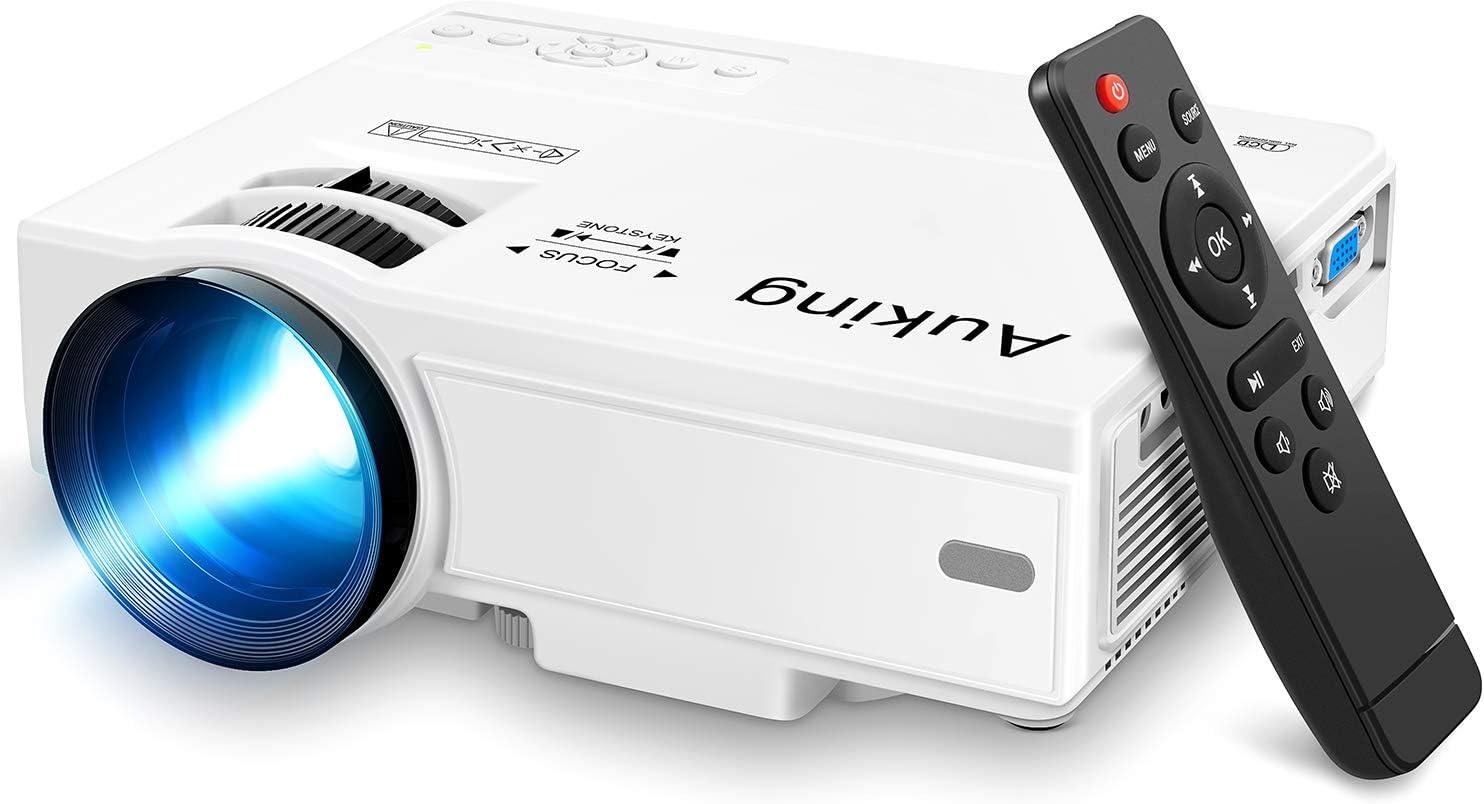
Image: The AuKing Mini Projector, a compact white device, is shown alongside its black remote control. The projector features a prominent lens and control buttons on its top surface.
Tính năng sản phẩm
- Full HD 1080P Support: Experience clear and sharp detailed images with the latest color reproduction technology for a vibrant viewhiệu ứng ing.
- Large Projection Screen: Tận hưởng cảm giác đắm chìm viewing experience with a projection size ranging from 35 to 200 inches, suitable for distances between 3.6ft and 16.4ft.
- Tuổi thọ bóng đèn dài: The powerful cooling system effectively dissipates heat, extending the lamp's life up to 55,000 hours for over 15 years of use.
- Low Noise & Dual Stereo Speakers: Advanced noise reduction technology reduces fan noise by 80%. Built-in dual stereo speakers provide clear sound quality. External speakers can be connected for enhanced audio.
- Kết nối nhiều thiết bị: Equipped with HDMI, VGA, AV, and USB interfaces, compatible with smartphones, laptops, pads, USB drives, and TV boxes. (Note: An extra HDMI adapter may be needed for phone connection, and copyrighted apps like Netflix, Prime Video, Hulu require a TV Stick or Roku.)

Image: A split image demonstrating the AuKing projector's superior color reproduction and 1080P support compared to a generic projector.
Có gì trong hộp
Your AuKing Projector package includes:
- Máy chiếu mini AuKing
- Điều khiển từ xa
- Cáp nguồn
- Cable AV
- Cáp HDMI
- Hướng dẫn sử dụng
Hướng dẫn thiết lập
XUẤT KHẨU. Vị trí
Choose a suitable location for your projector. It can be placed on a table, mounted on a tripod, or ceiling-mounted. Ensure the projection surface is flat and clear.

Image: Demonstrates various placement options for the AuKing projector, including tripod installation, ceiling mount, and simple table placement.
2. Kết nối nguồn điện
Kết nối dây nguồn với máy chiếu, sau đó kết nối với ổ cắm điện.
3. Kết nối thiết bị
Connect your desired input device (e.g., laptop, USB drive, smartphone) to the projector using the appropriate cable (HDMI, USB, AV, VGA). For smartphone connections, an additional HDMI adapter may be required (sold separately).

Image: Illustrates the projector's compatibility with multiple devices, showing connections for smartphones, laptops/PCs, PS4, DVD players, memory cards, and USB drives.
4. Điều chỉnh tiêu điểm và Keystone
Use the FOCUS and KEYSTONE rings on the projector to adjust the image clarity and shape until it appears rectangular and sharp on your screen.
Hướng dẫn sử dụng
1. Bật/Tắt nguồn
Nhấn nút nguồn trên máy chiếu hoặc trên điều khiển từ xa để bật hoặc tắt thiết bị.
2. Lựa chọn nguồn đầu vào
Use the "Source" button on the remote or projector to select the correct input source (HDMI, USB, AV, VGA) corresponding to your connected device.
3. Phát lại phương tiện
Điều hướng qua phương tiện truyền thông của bạn files using the remote control. For streaming services like Netflix, Prime Video, or Hulu, ensure you are using a compatible TV Stick or Roku device connected to the projector due to copyright restrictions.

Image: A living room setup showcasing the projector's ability to create a large 200-inch projection, providing an immersive home theater experience.
4. Đầu ra âm thanh
The projector has built-in dual stereo speakers. For a higher sound quality, connect external speakers via the audio output port.
BẢO TRÌ
To ensure optimal performance and longevity of your AuKing projector:
- Vệ sinh bụi: Regularly clean the lens with a soft, lint-free cloth. Avoid abrasive cleaners.
- Thông gió: Ensure the projector's ventilation ports are not blocked to allow proper airflow and prevent overheating. The advanced cooling system is designed to manage heat effectively.
- Kho: Khi không sử dụng trong thời gian dài, hãy bảo quản máy chiếu ở nơi khô ráo, thoáng mát, tránh ánh nắng trực tiếp và nhiệt độ quá cao hoặc quá thấp.

Image: An illustration highlighting the projector's advanced cooling system, showing arrows indicating airflow to prevent overheating and extend lamp mạng sống.
Xử lý sự cố
| Vấn đề | Nguyên nhân có thể | Giải pháp |
|---|---|---|
| No image or "No Signal" | Chọn nguồn đầu vào không đúng; Kết nối cáp lỏng; Thiết bị không được bật nguồn. | Select the correct input source. Check all cable connections. Ensure the input device is powered on. |
| Hình ảnh mờ | Ảnh bị mờ; Điều chỉnh méo hình không chính xác. | Adjust the FOCUS ring until the image is clear. Adjust the KEYSTONE ring to correct image distortion. |
| Không có âm thanh | Âm lượng quá nhỏ; Tắt tiếng; Loa ngoài chưa được kết nối đúng cách. | Increase volume. Unmute the projector. Check external speaker connections. |
| Máy chiếu quá nóng | Thông gió bị chặn; Sử dụng lâu dài trong môi trường nóng. | Ensure vents are clear. Turn off and allow to cool. Use in a well-ventilated area. |
Thông số kỹ thuật
| Tính năng | Chi tiết |
|---|---|
| Thương hiệu | AuKing |
| Số hiệu mẫu | M8-F |
| Độ phân giải màn hình | 1920 x 1080 (Hỗ trợ Full HD) |
| Kích thước chiếu | 35-200 inch |
| Khoảng cách chiếu | Từ 3.6 feet đến 16.4 feet |
| Lamp Mạng sống | Lên đến 55,000 giờ |
| Công nghệ kết nối | VGA, USB, HDMI, AV |
| Loại loa | Loa âm thanh nổi kép tích hợp sẵn |
| Trọng lượng sản phẩm | 2.87 pound |
| Kích thước sản phẩm | 7.95 x 6.3 x 2.91 inch |
Bảo hành và Hỗ trợ
AuKing offers a Bảo hành thay thế sản phẩm trong 2 năm and lifetime after-sales service for your projector. If you encounter any issues or have questions, please do not hesitate to contact our support team. We are committed to providing 100% customer satisfaction.
Để được hỗ trợ, vui lòng truy cập AuKing Store on Amazon hoặc tham khảo thông tin liên hệ được cung cấp trên bao bì sản phẩm của bạn.
Ask a question about this manual
Ask about setup, troubleshooting, compatibility, parts, safety, or missing instructions. Manuals+ will review the question and use this page’s manual context to help answer it.