
Giới thiệu
The Sena R1 Smart Cycling Helmet integrates advanced communication technology into a traditional cycling helmet design. It features built-in speakers and a microphone, enabling seamless communication, music playback, GPS navigation, and phone calls. Designed for comfort and safety, the R1 enhances your cycling experience whether you're riding solo or with a group.
This helmet complies with CPSC 16 CFR Part 1203 safety standard.
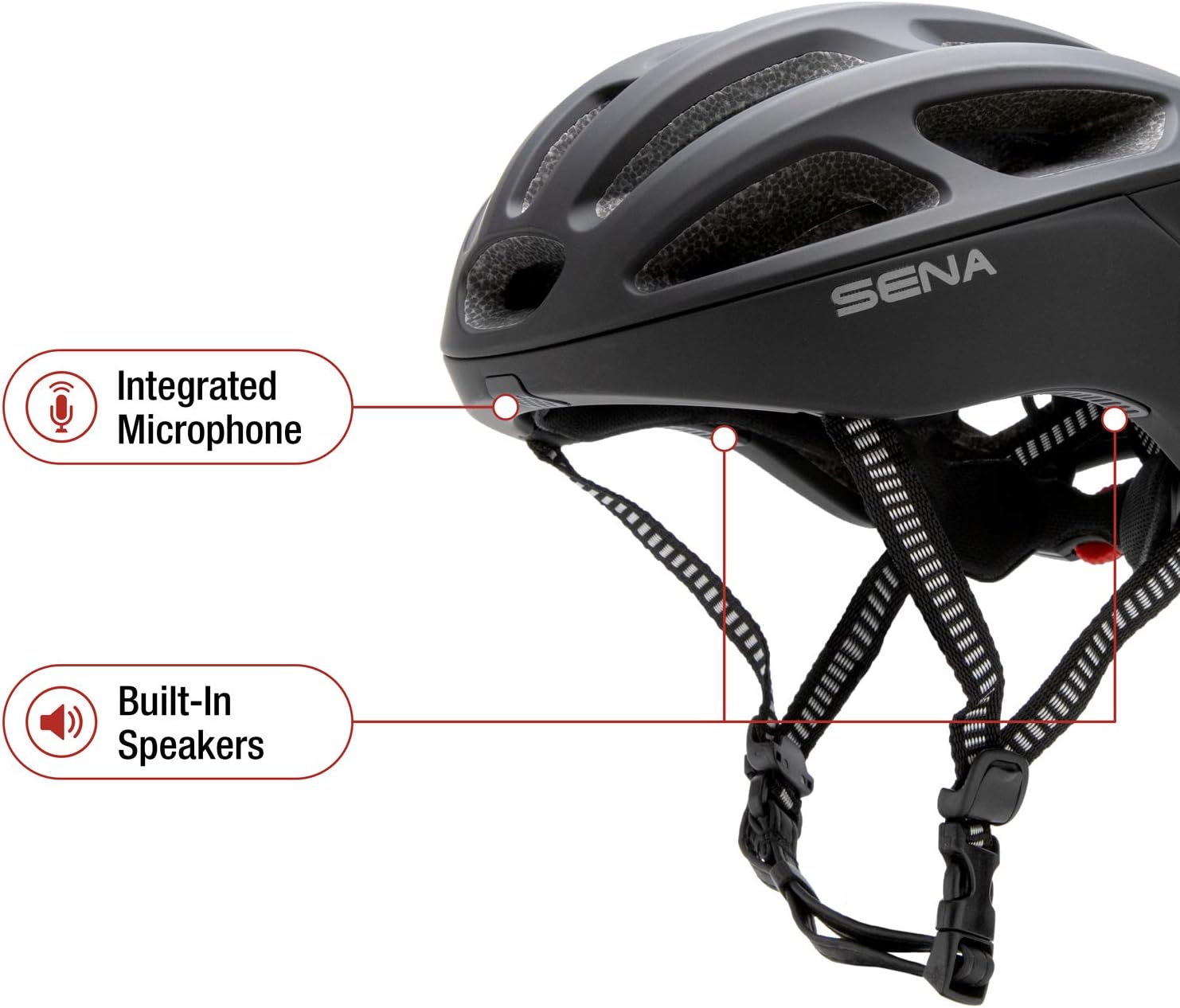
Figure 1: Sena R1 Smart Communications Helmet, side view.
Có gì trong hộp
- Sena R1 Smart Communications Helmet
- Cáp sạc USB

Figure 2: Key features of the Sena R1 Helmet.
Cài đặt
1. Measuring Your Head for Proper Fit
Before using your Sena R1 helmet, ensure it fits correctly for optimal comfort and safety. A proper fit is crucial for the helmet's protective capabilities.
- Đo chu vi: Use a flexible tape measure to wrap horizontally around your head, approximately one inch above your eyebrows and the top of your ears.
- Vừa vặn: Pull the tape measure snugly but comfortably. Ensure it remains level from front to back.
- Đo lường kỷ lục: Note the measurement where the tape overlaps.
- Compare to Size Chart: Refer to the Sena R1 sizing guide to find the helmet size closest to your head measurement.
Video 1: Sena Cycling Helmet Size Guide. This video demonstrates how to measure your head and adjust the helmet for a secure fit.
2. Điều chỉnh mũ bảo hiểm
- Loosen Dial Adjustment: Before placing the helmet on your head, open the dial adjustment at the back to ensure the helmet shell can fit down properly.
- Vị trí mũ bảo hiểm: The helmet should sit level on your head, not too far forward or backward. The front edge should be about one inch above your eyebrows.
- Tighten Dial Adjustment: Turn the dial at the back of the helmet clockwise to tighten it until it feels snug but comfortable. It should not be overly tight, just secure enough to prevent excessive movement.
- Dây đeo cằm có khóa: Fasten the chin strap. It should be loose enough to allow you to move your mouth comfortably, but tight enough that you can only fit two to three fingers between your chin and the strap.
- Điều chỉnh dây đeo bên hông: Adjust the buckles on the side straps so they form a 'V' shape just below your ears and lie flat against your head. The straps should not touch your ears.

Hình 3: Phía sau view of the Sena R1 helmet, highlighting the adjustment dial for a secure fit.
3. Sạc mũ bảo hiểm
Locate the charging port on the rear of the helmet, typically covered by a small rubber flap. Connect the provided USB charging cable to the port and to a power source. The LED indicator will show charging status.

Hình 4: Phía sau view of the Sena R1 helmet, showing the charging port and control buttons.
Hướng dẫn sử dụng
1. Bật/Tắt nguồn
- Bật nguồn: Press and hold the center button on the helmet's control panel until you hear an audible prompt or see the LED indicator light up.
- Tắt nguồn: Press and hold the center button again until the helmet powers down.
2. Bluetooth Pairing (Smartphone)
The Sena R1 helmet can be paired with your smartphone to access features like music, GPS navigation, and phone calls.
- Vào Chế độ Ghép nối: With the helmet powered off, press and hold the center button for several seconds until the LED flashes rapidly, indicating pairing mode.
- Enable Bluetooth on Smartphone: Go to your smartphone's Bluetooth settings and search for available devices.
- Select Sena R1: Choose 'Sena R1' from the list of devices. Once connected, the LED will change to a steady blue light.

Figure 5: Pairing your smartphone with the Sena R1 helmet for music, GPS, and phone calls.
3. Group Intercom
The R1 supports 4-way group intercom, allowing communication with up to three other riders within a range of up to 900 meters (0.5 miles) in open terrain.
- Bắt đầu ghép nối: On two helmets, press and hold the center button until you hear 'Intercom Pairing'. The LED will flash red.
- Connect Helmets: Tap the center button on one of the helmets to connect them.
- Thêm người lái xe: To add additional riders (up to four total), repeat the process by tapping the previously connected helmet and then the new helmet.
- Activate Group Intercom: Once all desired helmets are paired, tap any connected helmet to jump back into group intercom mode.
Video 2: Giới thiệu công nghệ Sena: Mũ bảo hiểm xe đạp Bluetooth R1. Video này cung cấp tổng quan về...view of the R1's features, including group intercom and smartphone connectivity.

Figure 6: Communicate with other riders using Bluetooth intercom.
4. Music, GPS, and Phone Calls
- Âm nhạc phát trực tuyến: Once paired with your smartphone, you can stream music from your favorite apps directly to the helmet's built-in speakers. Use the helmet's control buttons to adjust volume, skip tracks, or pause playback.
- Định vị toàn cầu: Audio cues from your smartphone's GPS application will be transmitted through the helmet speakers, providing turn-by-turn directions without needing to look at your phone.
- Cuộc gọi điện thoại: Answer or make phone calls using the integrated microphone and speakers. Sena's Advanced Noise Control technology helps ensure clear voice transmission by reducing wind and background noise.

Figure 7: Solo rider features include music streaming, GPS, and phone calls.
5. Đài phát thanh FM
The Sena R1 includes a built-in FM radio. Use the helmet's controls to scan for stations and adjust volume.
6. Ứng dụng Sena Cycling
Customize settings, manage friend groups for intercom, and access other features using the dedicated Sena Cycling App on your smartphone. The app provides a visual interface for easy configuration.

Figure 8: Manage settings from your phone with the Sena Cycling App.
BẢO TRÌ
1. Vệ sinh mũ bảo hiểm
- Bên ngoài: Wipe the helmet's exterior with a soft, damp vải và xà phòng nhẹ. Tránh hóa chất mạnh hoặc chất tẩy rửa có tính mài mòn.
- Interior Padding: The inner padding is removable and washable. Follow the care instructions on the padding label, typically hand wash with mild soap and air dry.
2. Chăm sóc pin
- Hãy sạc mũ bảo hiểm thường xuyên, ngay cả khi không sử dụng thường xuyên, để duy trì tuổi thọ pin.
- Avoid extreme temperatures when storing or charging the helmet.
Xử lý sự cố
- Không có điện: Ensure the helmet is fully charged. Check the charging cable and power source.
- Sự cố kết nối Bluetooth: Ensure the helmet is in pairing mode. Forget the device on your smartphone's Bluetooth settings and attempt to re-pair. Ensure no other Bluetooth devices are interfering.
- Hệ thống liên lạc nội bộ không kết nối: Ensure all helmets are within range and in intercom pairing mode. Follow the group intercom pairing steps carefully.
- Vấn đề về chất lượng âm thanh: Check volume levels on both the helmet and your connected device. Ensure the microphone is not obstructed.
Thông số kỹ thuật
| Tính năng | Chi tiết |
|---|---|
| Thương hiệu | Sena |
| Tên mẫu | R1-STD |
| Màu sắc | Đen mờ |
| Độ tuổi | Người lớn |
| Vật liệu bên ngoài | Polycacbonat (PC) |
| Vật liệu bên trong | Da thú |
| Trọng lượng sản phẩm | 380 gam |
| Kích thước mục | 10.4 x 13.1 x 7.6 inch |
| Tính năng đặc biệt | Bluetooth, Visor (Visor sold separately) |
| Kết nối | Bluetooth 4.1 |
| Hệ thống liên lạc nội bộ | 4-Way Group Intercom, up to 900m (0.5 miles) range |
| Âm thanh | Built-in HD Speakers & Microphone, Advanced Noise Control, FM Radio |
| Tuổi thọ pin | Up to 12 hours (Intercom) |
| Tiêu chuẩn an toàn | CPSC 16 CFR Phần 1203 |
Thông tin an toàn
Always wear your helmet correctly and ensure all straps and adjustment systems are properly secured before riding. A helmet can only provide protection if worn and fitted correctly. Regularly inspect your helmet for any signs of damage. Replace the helmet after any significant impact, even if visible damage is not apparent.
Bảo hành và Hỗ trợ
Mũ bảo hiểm liên lạc thông minh Sena R1 đi kèm với... Bảo hành 2 năm. For detailed warranty information, technical support, or to access user guides, please visit the official Sena webđịa điểm: www.sena.com.