
1. Giới thiệu
This manual provides essential information for the safe and efficient operation of your Zerone 10.8V-12V Lithium Battery Charger. This charger is designed for use with 10.8V to 12V Lithium-Ion batteries, offering quick and reliable charging. Please read this manual thoroughly before first use and retain it for future reference.

Image 1: The Zerone 10.8V-12V Lithium Battery Charger, showing its compact design and universal compatibility label.
2. Hướng dẫn an toàn
Luôn tuân thủ các biện pháp phòng ngừa an toàn sau đây để giảm nguy cơ bị điện giật, hỏa hoạn hoặc thương tích nghiêm trọng:
- Đọc bài hướng dẫn: Trước khi sử dụng bộ sạc, hãy đọc tất cả các hướng dẫn và dấu hiệu cảnh báo trên bộ sạc, pin và sản phẩm sử dụng pin.
- Chỉ sử dụng trong nhà: Không để bộ sạc dưới mưa hoặc điều kiện ẩm ướt.
- Vol thích hợptage: Đảm bảo nguồn điện voltage khớp với voltage được ghi rõ trên nhãn thông số kỹ thuật của bộ sạc.
- Tránh gây hư hại: Do not operate the charger if it has received a sharp blow, been dropped, or otherwise damaged. Take it to a qualified service person.
- Thông gió: Do not block any ventilation openings. Ensure adequate airflow around the charger during operation.
- Rút phích cắm khi không sử dụng: Always unplug the charger from the power outlet before attempting any maintenance or cleaning, and when not in use.
- Use specified batteries: Only charge batteries specifically designed for this charger. Charging other battery types may cause them to burst, leading to personal injury and damage.
- Không được gây đoản mạch: Không bao giờ được làm chập mạch các cực của pin.
- Tránh xa bọn trẻ: Thiết bị này không dành cho những người (bao gồm trẻ em) có khả năng thể chất, giác quan hoặc tinh thần hạn chế, hoặc thiếu kinh nghiệm và kiến thức, trừ khi họ được người chịu trách nhiệm về sự an toàn của họ giám sát hoặc hướng dẫn sử dụng thiết bị.
3. Nội dung gói hàng
Kiểm tra xem tất cả các vật phẩm có đầy đủ và trong tình trạng tốt hay không:
- 1 x Zerone 10.8V-12V Lithium Battery Charger
- 1 x Hướng dẫn sử dụng
4. Tính năng sản phẩm
The Zerone 10.8V-12V Lithium Battery Charger offers the following key features:
- Tương thích phổ quát: Specifically designed for 10.8V to 12V Lithium-Ion batteries.
- Đèn báo LED: Built-in LED display provides intuitive monitoring of battery status.
- Quản lý sạc thông minh: Utilizes a 'first in, first charged' system and protects against overload.
- Sạc nhanh: Capable of charging a 12V Lithium-Ion 1.5Ah battery in approximately 50 minutes.
- Khả năng tương thích với nhiều mẫu máy: Compatible with models such as DC10WD, DC10SB, DC10WC, BL1015, BL1016, BL1021B, and BL1041B.

Image 2: The charger displaying its compatibility with various battery models, including DC10WD, DC10SB, DC10WC, BL1015, BL1016, BL1021B, and BL1041B.
5. Thiết lập
Hãy làm theo các bước sau để thiết lập bộ sạc pin của bạn:
- Mở hộp bộ sạc: Carefully remove the charger and all components from the packaging.
- Kết nối với nguồn điện: Plug the charger's power cord into a standard 100V-260V AC electrical outlet. The charger's LED indicator will flash green once to confirm power connection.
- Chuẩn bị pin: Ensure the battery to be charged is clean and free from debris.
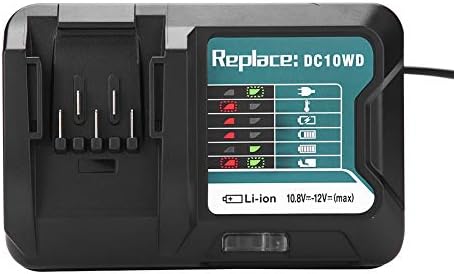
Image 3: The Zerone charger with its integrated power cord, ready for connection to an electrical outlet.
6. Hướng dẫn vận hành
Để sạc pin:
- Lắp pin: Align the battery with the charger's slot and slide it in until it clicks securely into place.
- Giám sát sạc: The LED indicator will show the charging status. Refer to the "LED Indicator Guide" section for detailed explanations of the light patterns.
- Sạc xong: Once the battery is fully charged, the LED indicator will show a solid green light.
- Tháo pin: Press the release button on the battery (if applicable) and slide it out of the charger.
- Rút phích cắm bộ sạc: Ngắt bộ sạc khỏi ổ cắm điện khi không sử dụng.

Image 4: The Zerone charger with a compatible lithium-ion battery inserted, ready for charging.
7. Hướng dẫn chỉ báo đèn LED
The charger features an LED display to communicate the battery's status:
| Đèn báo | Trạng thái |
|---|---|
| Màu xanh lá cây nhấp nháy | Charger is plugged in and ready. |
| Đèn nháy màu đỏ | Battery is in cooling mode. Charging will begin once the battery temperature is within the optimal range. |
| Red Sustained Light | Battery is currently charging (0-100%). |
| Green Sustained Light | Charging is completed. The battery is fully charged. |
| Red and Green Flashing | Indicates a defective battery pack or charger. |

Hình ảnh 5: Cận cảnh view of the charger's LED indicator panel, detailing the meaning of each light pattern for battery status.
8. Bảo trì
Proper maintenance ensures the longevity and performance of your charger:
- Vệ sinh: Disconnect the charger from the power supply before cleaning. Use a dry, soft cloth to wipe the exterior of the charger. Do not use water or chemical cleaners.
- Kho: Hãy bảo quản bộ sạc ở nơi khô ráo, thoáng mát, tránh ánh nắng trực tiếp và hơi ẩm.
- Kiểm tra thường xuyên: Periodically inspect the charger and its cord for any signs of damage. If damage is found, discontinue use and seek professional repair.
KHAI THÁC. Xử lý sự cố
Nếu bạn gặp sự cố với bộ sạc, hãy tham khảo các sự cố và giải pháp phổ biến sau đây:
- Bộ sạc không bật nguồn:
- Ensure the power cord is securely plugged into both the charger and a working electrical outlet.
- Kiểm tra ổ cắm điện bằng một thiết bị khác để xác nhận nó hoạt động bình thường.
- Battery not charging (Red Flashing LED):
- The battery may be too hot or too cold. Allow the battery to reach room temperature before attempting to charge again. Charging will automatically resume once the temperature is optimal.
- Battery not charging (Red and Green Flashing LED):
- This indicates a defective battery or charger. Try charging a different, known-good battery. If the issue persists, the charger may be faulty. If only the original battery causes this, the battery is likely defective.
- Sạc chậm:
- Ensure the battery is fully seated in the charger.
- Verify that the battery is compatible with this charger.
Nếu các bước trên không giải quyết được vấn đề, vui lòng liên hệ bộ phận hỗ trợ khách hàng.
10. Thông số kỹ thuật
| Đặc điểm kỹ thuật | Chi tiết |
|---|---|
| Số hiệu mẫu | Zeronegfvetp6dn8-01 |
| Đầu vào Voltage | 100V-260V AC, 50-60Hz |
| Đầu ra Voltage | 10.8V-12V (DC) |
| Kích thước sản phẩm | 4.72 x 1.97 x 5.91 inch |
| Trọng lượng sản phẩm | 11.6 ounce (0.33 kg) |
| Nhà sản xuất | Số không |
| Các loại pin tương thích | 10.8V-12V Lithium-Ion (e.g., BL1015, BL1016, BL1021B, BL1041B) |
| Các mẫu bộ sạc tương thích | DC10WD, DC10SB, DC10WC |

Image 6: The bottom view of the Zerone charger, showing its input/output specifications and model number.
11. Bảo hành và Hỗ trợ
For warranty information or technical support, please refer to the documentation provided with your purchase or contact Zerone customer service through the retailer where the product was purchased. Keep your purchase receipt as proof of purchase.