
1. Giới thiệu
Thank you for choosing the MAJORITY Snowdon Bluetooth Soundbar. This manual provides essential information for the safe and efficient operation of your device. Please read it thoroughly before use and retain it for future reference.

Image: The MAJORITY Snowdon Soundbar, a sleek black unit, is shown with its remote control. Key features like Bluetooth connectivity, 120 Watts power output, and 2.1 audio channels are highlighted.
2. Thông tin an toàn
Hãy tuân thủ các biện pháp phòng ngừa an toàn sau:
- Không để thiết bị tiếp xúc với mưa, hơi ẩm hoặc nhiệt độ quá cao hoặc quá thấp.
- Đảm bảo thông gió thích hợp; không chặn bất kỳ lỗ thông gió nào.
- Chỉ sử dụng bộ đổi nguồn được cung cấp kèm theo thiết bị.
- Không tự ý mở hoặc sửa chữa thiết bị. Hãy giao việc bảo dưỡng cho nhân viên kỹ thuật có chuyên môn.
- Đặt thiết bị tránh xa các nguồn nhiệt như lò sưởi, lỗ thông hơi, bếp hoặc các thiết bị khác sinh nhiệt.
3. Nội dung gói hàng
Xác minh rằng tất cả các mục đều có trong gói hàng:
- MAJORITY Snowdon Soundbar
- Điều khiển từ xa
- Bộ đổi nguồn
- Cáp âm thanh 3.5mm (Cáp AUX)
- RCA cáp
- Hướng dẫn sử dụng
- Wall Mounting Screws and Plugs (for optional wall installation)

Image: A clear layout of the MAJORITY Snowdon Soundbar and its accessories. The soundbar is positioned at the top, with the remote control, RCA cable, AUX cable, power adapter, and user manual arranged below it.
4. Sản phẩm hếtview
4.1 Các nút điều khiển ở mặt trước và mặt trên
- QUYỀN LỰC: Nhấn để bật hoặc tắt thiết bị.
- NGUỒN: Press to cycle through input modes (Bluetooth, Optical, AUX, RCA).
- TẦM NHÌN+: Tăng âm lượng.
- VOL-: Giảm âm lượng.
- ĐÔI: Nhấn và giữ để bắt đầu ghép nối Bluetooth.
- DÒNG TRONG: 3.5mm AUX input port.
4.2 Kết nối bảng điều khiển phía sau
- QUANG TRONG: For connecting to devices via optical cable.
- điện áp một chiều 18V: Cổng đầu vào nguồn.
- L/R RCA: For connecting to devices via RCA cables.

Image: A close-up of the rear panel of the soundbar, clearly displaying the various input ports including AUX, Optical, and RCA connections, along with the DC 18V power input.
5. Thiết lập
5.1 Vị trí
The soundbar can be placed on a flat surface in front of your TV or wall-mounted.
- Vị trí đặt trên bàn: Position the soundbar on a stable, flat surface directly below your television.
- Lắp trên tường: Use the provided screws and plugs to securely mount the soundbar to a wall. Ensure the wall can support the weight of the soundbar.

Image: The MAJORITY Snowdon Soundbar is shown mounted on a wall directly beneath a television, demonstrating its wall-mountable capability in a home environment.
5.2 Kết nối với nguồn
- Connect the power adapter to the DC 18V input port on the rear of the soundbar.
- Cắm bộ đổi nguồn vào ổ cắm trên tường.
5.3 Kết nối âm thanh
Hãy chọn một trong các phương pháp sau để kết nối nguồn âm thanh của bạn:
5.3.1 Kết nối Bluetooth
- Nhấn nút QUYỀN LỰC button on the soundbar or remote to turn it on.
- Nhấn nút NGUỒN button repeatedly until 'BT' (Bluetooth) mode is selected. The indicator light will flash.
- On your device (e.g., smartphone, tablet), enable Bluetooth and search for 'MAJORITY Snowdon'.
- Select 'MAJORITY Snowdon' to pair. Once connected, the indicator light will stop flashing.

Image: The MAJORITY Snowdon Soundbar is depicted alongside a smartphone, which shows a music player interface and a prominent 'Bluetooth 5.0' graphic, illustrating wireless connectivity.
5.3.2 Kết nối quang học
- Connect one end of an optical cable to the OPTICAL OUT port on your TV or audio device.
- Kết nối đầu kia với QUANG TRONG cổng trên soundbar.
- Nhấn nút NGUỒN button on the soundbar or remote until 'OPT' (Optical) mode is selected.
5.3.3 Kết nối AUX
- Connect one end of the 3.5mm audio cable to the headphone jack or AUX OUT port on your device.
- Kết nối đầu kia với ĐƯỜNG VÀO cổng trên soundbar.
- Nhấn nút NGUỒN button on the soundbar or remote until 'AUX' mode is selected.
5.3.4 RCA Connection
- Connect the red and white plugs of the RCA cable to the corresponding audio output ports on your TV or audio device.
- Connect the other end of the RCA cable to the L/R RCA input ports on the soundbar.
- Nhấn nút NGUỒN button on the soundbar or remote until 'RCA' mode is selected.
6. Hướng dẫn vận hành
6.1 Bật/Tắt nguồn
Nhấn nút QUYỀN LỰC Nhấn nút trên loa soundbar hoặc điều khiển từ xa để bật hoặc tắt thiết bị.
6.2 Lựa chọn nguồn
Nhấn nút NGUỒN button on the soundbar or remote control to switch between input modes: Bluetooth, Optical, AUX, and RCA.
6.3 Điều khiển âm lượng
Sử dụng TẦM+ Và vol- buttons on the soundbar or the volume buttons on the remote control to adjust the audio level.
6.4 Chức năng điều khiển từ xa
The included remote control provides convenient access to all soundbar functions:
- Quyền lực: Bật hoặc tắt loa soundbar.
- Nguồn: Select input mode.
- Tăng/Giảm âm lượng: Điều chỉnh mức âm lượng.
- Tắt tiếng: Tắt hoặc bật âm thanh.
- Phát/Tạm dừng: Control media playback in Bluetooth mode.
- Bài hát trước / sau: Skip tracks in Bluetooth mode.
- Chế độ EQ: Select preset equalizer settings (e.g., Music, Movie, News).
7. Bảo trì
Để đảm bảo độ bền và hiệu suất tối ưu cho loa thanh của bạn:
- Vệ sinh: Use a soft, dry cloth to clean the exterior of the soundbar. Do not use liquid cleaners or abrasive materials.
- Kho: Nếu cất giữ loa soundbar trong thời gian dài, hãy ngắt nguồn điện và bảo quản ở nơi khô ráo, thoáng mát.
- Tránh chướng ngại vật: Ensure no objects block the speaker grilles or ventilation openings.
KHAI THÁC. Xử lý sự cố
Nếu bạn gặp sự cố với loa thanh, hãy tham khảo các sự cố và giải pháp phổ biến sau đây:
| Vấn đề | Nguyên nhân có thể | Giải pháp |
|---|---|---|
| Không có điện | Cáp nguồn không được kết nối; Ổ cắm điện không hoạt động | Check power cable connection; Try a different power outlet |
| Không có âm thanh | Incorrect input source selected; Volume too low; Audio cable not connected properly | Select correct input source; Increase volume; Reconnect audio cables securely |
| Ghép nối Bluetooth không thành công | Loa soundbar không ở chế độ ghép nối; Thiết bị quá xa; Nhiễu sóng | Ensure soundbar is in BT pairing mode; Move device closer; Turn off other Bluetooth devices |
| Âm thanh bị méo | Âm lượng quá lớn; Chất lượng nguồn âm thanh kém; Kết nối cáp bị lỏng. | Reduce volume; Try a different audio source; Check cable connections |
9. Thông số kỹ thuật
| Tính năng | Chi tiết |
|---|---|
| Tên mẫu | Snowdon |
| Thương hiệu | SỐ ĐÔNG |
| Công suất đầu ra | 120 Watt |
| Kênh âm thanh | 2.1 (with integrated subwoofer) |
| Công nghệ kết nối | Bluetooth, AUX, Optical, RCA |
| Phiên bản Bluetooth | 5.0 |
| Kích thước (L x D x H) | 81cm x 8.3cm x 8.3cm |
| Cân nặng | 1.2 Kilôgam |
| Đáp ứng tần số | 18 KHz |
| Phương pháp kiểm soát | Điều khiển từ xa |
| Vật liệu | Nhựa |
| Màu sắc | Đen |
| Kiểu lắp đặt | Có thể gắn tường |
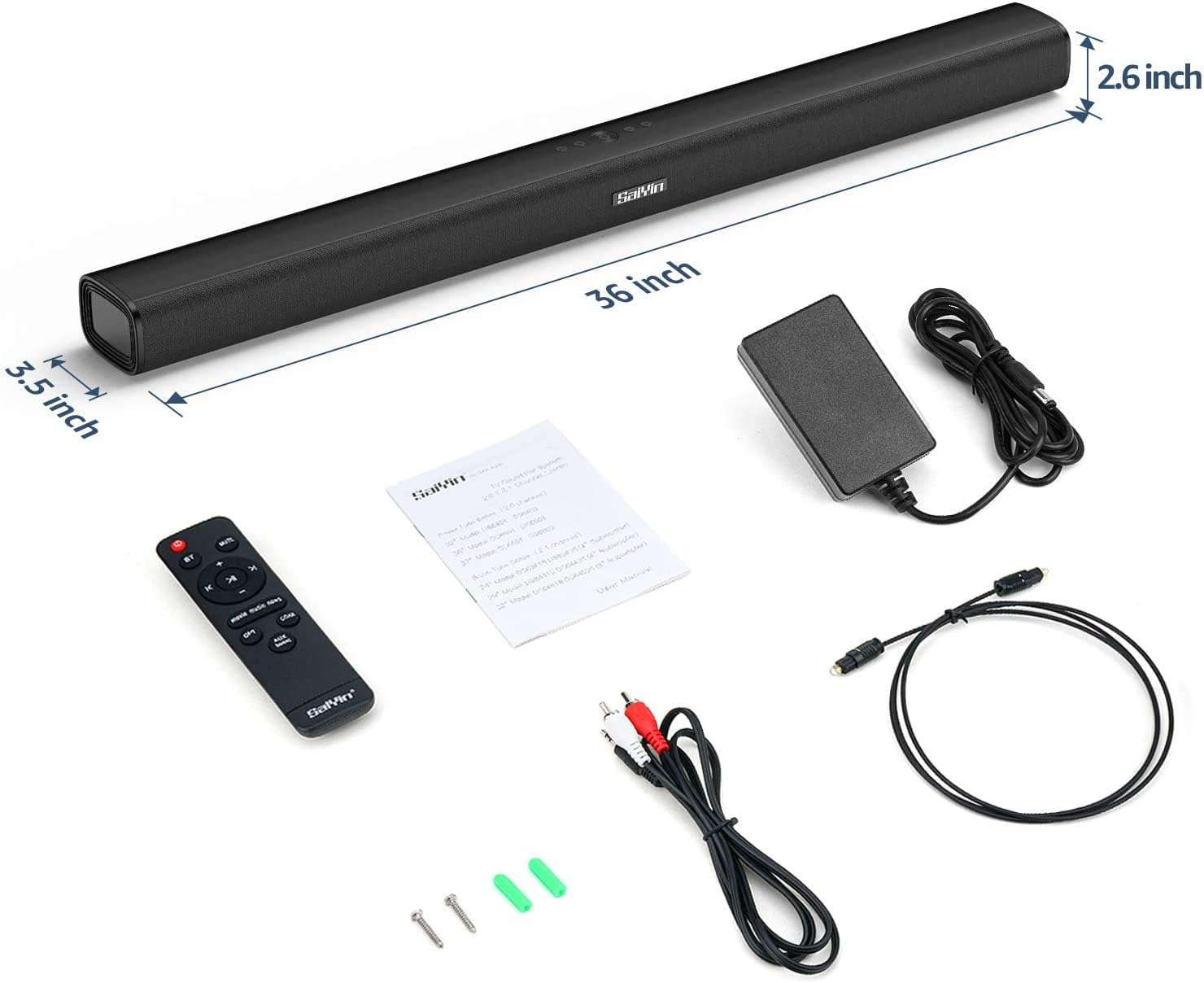
Image: The MAJORITY Snowdon Soundbar is displayed with its accessories, including the remote, power adapter, and various cables. Dimensions are overlaid on the image, showing the soundbar's length as 36 inches (approximately 91.4 cm), depth as 3.5 inches (approximately 8.9 cm), and height as 2.6 inches (approximately 6.6 cm).

Hình ảnh: Một chi tiết view of the soundbar's internal speaker component, emphasizing its 120W power output and Xtra Bass technology for enhanced low-frequency audio.
10. Bảo hành và Hỗ trợ
10.1 Thông tin bảo hành
The MAJORITY Snowdon Soundbar comes with a Bảo hành mở rộng 3 năm. Please retain your proof of purchase for warranty claims. For specific terms and conditions, refer to the warranty card included in your package or visit the official MAJORITY webđịa điểm.
10.2 Hỗ trợ khách hàng
For technical assistance, troubleshooting beyond this manual, or warranty inquiries, please contact MAJORITY customer support through their official webtrang web hoặc thông tin liên hệ được cung cấp trong tài liệu sản phẩm của bạn.