
1. Giới thiệu
This manual provides instructions for the proper setup, operation, and maintenance of your Acer B247Y 23.8-inch LED LCD Monitor. Please read this manual thoroughly before using your monitor to ensure optimal performance and to prevent damage.
The Acer B247Y is a 23.8-inch Full HD (1920 x 1080) monitor featuring an IPS panel for wide viewing angles, an anti-glare display, and a frameless design on three sides. It includes multiple connectivity options and an ergonomic stand for comfortable viewđang.
2. Nội dung gói hàng
Verify that all items are present in your package. If any items are missing or damaged, contact your retailer.
- Acer B247Y 23.8-inch LED LCD Monitor
- Chân đế màn hình (Đế và Cổ)
- Power Adapter (Internal) and Power Cable
- Cáp VGA
- Cáp DisplayPort 1.2
- Cáp HDMI
- Audio-in Cable (if included)
- Audio-out Cable (if included)
- Hướng dẫn sử dụng (tài liệu này)
3. Thiết lập
3.1 Lắp ráp giá đỡ màn hình
The monitor comes with a detachable foot stand. Follow these steps to assemble:
- Cẩn thận lấy màn hình và chân đế ra khỏi bao bì.
- Gắn cổ chân đế vào tấm chắn màn hình. Đảm bảo khớp chặt vào vị trí.
- Attach the stand base to the stand neck. Tighten any screws if provided, usually located on the underside of the base.
- Đặt màn hình đã lắp ráp trên bề mặt phẳng, ổn định.
Ghi chú: The monitor also supports VESA mount (100 x 100 mm) for wall or arm mounting. Refer to your VESA mount kit instructions for installation.
3.2 Kết nối màn hình
Kết nối màn hình với máy tính của bạn hoặc các thiết bị khác bằng cáp thích hợp.
- Kết nối video:
- Kết nối một đầu cáp DisplayPort với cổng DisplayPort trên máy tính và đầu kia với cổng DisplayPort trên màn hình.
- Alternatively, connect an HDMI cable from your computer's HDMI output to the monitor's HDMI input.
- For older systems, connect a VGA cable from your computer's VGA output to the monitor's VGA input.
- Kết nối âm thanh:
- If using VGA or DisplayPort without audio, connect an audio cable from your computer's audio output to the monitor's audio-in port for integrated speakers.
- To connect external speakers or headphones, use the monitor's audio-out port.
- Kết nối nguồn điện:
- Kết nối dây nguồn với đầu vào nguồn của màn hình, sau đó cắm đầu còn lại vào ổ cắm điện có nối đất.

Figure 3.2.1: Acer B247Y Monitor with Stand. This image illustrates the overall appearance of the monitor when fully assembled on its stand.
4. Hướng dẫn vận hành
4.1 Bật / Tắt nguồn
Nhấn nút nguồn, thường nằm ở phía dưới bên phải hoặc phía sau màn hình, để bật hoặc tắt màn hình. Đèn báo nguồn sẽ sáng khi màn hình được bật.
4.2 Adjusting Monitor Settings (OSD)
The monitor features an On-Screen Display (OSD) menu for adjusting various settings. Use the control buttons (typically located near the power button) to navigate and select options within the OSD menu.
Các thiết lập OSD phổ biến bao gồm:
- Hình ảnh: Brightness, Contrast, Color Temperature, Gamma, Acer eColor Management modes (e.g., Dark Room, Eco).
- Âm thanh: Volume control for integrated speakers or audio-out.
- Đầu vào: Select the active video input source (VGA, DisplayPort, HDMI).
- OSD: OSD timeout, language.
- Sự quản lý: Đặt lại về mặc định ban đầu.
4.3 Điều chỉnh công thái học
The Acer B247Y monitor stand offers several ergonomic adjustments to optimize your viewkinh nghiệm:
- Nghiêng: Adjust the screen angle from -5 degrees to 25 degrees (forward/backward).
- Xoay: Rotate the monitor horizontally up to +/- 45 degrees.
- Điều chỉnh chiều cao: Điều chỉnh chiều cao màn hình lên đến 120mm.
- Trục xoay: Xoay màn hình 90 độ để xem dọc viewđang.
5. Bảo trì
Bảo trì đúng cách sẽ đảm bảo độ bền và hiệu suất tối ưu cho màn hình của bạn.
- Làm sạch màn hình: Nhẹ nhàng lau màn hình bằng vải mềm, không xơ. Đối với các vết bẩn cứng đầu, hãyampen the cloth with a small amount of water or a non-abrasive screen cleaner. Do not spray liquid directly onto the screen.
- Làm sạch Casing: Sử dụng một miếng vải mềm, khô để lau màn hình casing. Tránh sử dụng chất tẩy rửa mạnh hoặc chất tẩy rửa có tính mài mòn.
- Thông gió: Đảm bảo các lỗ thông gió trên màn hình không bị chặn để tránh quá nhiệt.
- Tắt nguồn: Luôn tắt màn hình và rút phích cắm khỏi ổ điện trước khi vệ sinh hoặc khi không sử dụng trong thời gian dài.
KHAI THÁC. Xử lý sự cố
Nếu bạn gặp sự cố với màn hình, hãy tham khảo các bước khắc phục sự cố phổ biến sau:
- No Power / Monitor Does Not Turn On:
- Hãy đảm bảo rằng dây nguồn được kết nối chắc chắn với cả màn hình và ổ cắm điện đang hoạt động.
- Kiểm tra ổ cắm điện có hoạt động không bằng cách cắm thiết bị khác.
- Nhấn mạnh nút nguồn.
- No Image / "No Signal" Message:
- Check that the video cable (DisplayPort, HDMI, or VGA) is securely connected to both the monitor and your computer.
- Hãy đảm bảo máy tính của bạn đang bật nguồn và không ở chế độ ngủ.
- Sử dụng menu OSD để chọn thủ công nguồn đầu vào chính xác.
- Nếu có thể, hãy thử sử dụng cáp video hoặc cổng khác.
- Hình ảnh bị méo hoặc không rõ nét:
- Hãy đảm bảo độ phân giải màn hình trên máy tính của bạn được đặt ở độ phân giải gốc của màn hình (1920 x 1080).
- Adjust brightness, contrast, and other picture settings via the OSD menu.
- Check for any physical damage to the screen or cables.
- Không có âm thanh từ loa:
- Increase the volume using the OSD menu or your computer's sound settings.
- Ensure the audio cable (if used) is properly connected.
- Xác minh rằng thiết bị đầu ra âm thanh chính xác đã được chọn trong cài đặt âm thanh của máy tính.
7. Thông số kỹ thuật
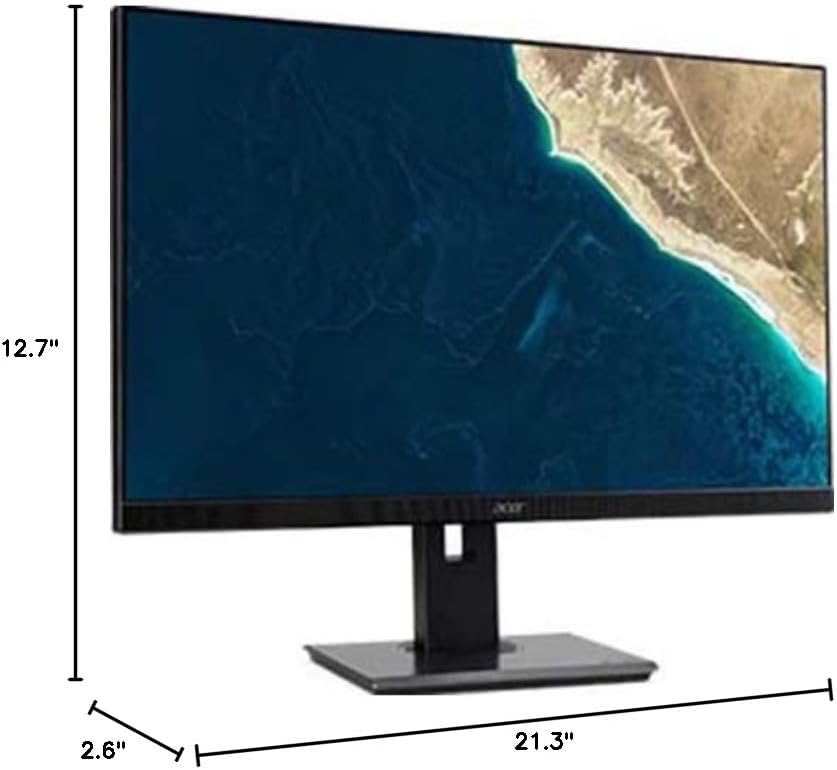
Figure 7.1.1: Acer B247Y Monitor Dimensions. This image shows the approximate height (12.7"), width (21.3"), and depth (2.6") of the monitor without the stand.
| Tính năng | Đặc điểm kỹ thuật |
|---|---|
| Số hiệu mẫu | B247Y |
| Kích thước màn hình | 23.8 inch (60.5 cm) |
| Kiểu hiển thị | LED LCD, IPS Panel, Anti-glare (AG) |
| Độ phân giải tối đa | 1920 x 1080 (Full HD) |
| Tỷ lệ khung hình | 16:9 |
| Tốc độ làm mới | 75Hz |
| Thời gian phản hồi | 4ms (gray-to-gray) |
| Độ sáng (điển hình) | 250 cd/m² |
| Tỷ lệ tương phản gốc | 1,000:1 |
| Tỷ lệ tương phản động | 100,000,000:1 |
| Viewing Angles (H / V) | 178° / 178° |
| Kết nối | VGA, DisplayPort 1.2, HDMI, Audio-in, Audio-out |
| Loa tích hợp | 2x2.0W |
| Điều chỉnh Ergonomic | Tilt (-5° to 25°), Swivel (+/- 45°), Height Adjustment (120mm), Pivot (90°) |
| Giá đỡ VESA | 100 x 100mm |
| Kích thước có chân đế (W x H x D) | 21.3" x 14.9"~19.6" x 7.6" (54.0cm x 37.9cm~49.9cm x 19.3cm) |
| Trọng lượng có chân đế | 12.3 pound (5.6 kg) |
| Bộ đổi nguồn | Nội bộ |
| Màu sắc | Đen |
8. Bảo hành và Hỗ trợ
Your Acer B247Y monitor comes with a Limited Three-Year Warranty. Please retain your proof of purchase for warranty claims.
For technical support, service, or warranty inquiries, please refer to the official Acer support website or contact their customer service department. Contact information can typically be found on the Acer webtrang web hoặc trong thẻ bảo hành đi kèm với sản phẩm của bạn.
Khóa Kensington: The monitor supports a Kensington lock for security. Attach a compatible Kensington lock (sold separately) to the security slot on the monitor to deter theft.