
1. Giới thiệu
Thank you for choosing the MXR M293 Booster Mini Guitar Effects Pedal. This compact and powerful pedal combines the sought-after sonic characteristics of the Echoplex Preamp with the robust boosting capabilities of the MXR Micro Amp. Designed for guitarists seeking to enhance their tone, add grit, and achieve significant volume boosts, the Booster Mini is an essential addition to any pedalboard.
This manual provides detailed instructions for setting up, operating, and maintaining your MXR M293 Booster Mini pedal, along with information on the included accessories.
2. Tính năng sản phẩm
- Combines the sonic characteristics of the Echoplex Preamp with the boosting power of the MXR Micro Amp.
- Compact, pedalboard-friendly mini housing.
- Volume control provides up to +25dB of clean boost.
- Tone control allows for high-frequency roll-off, shaping your boosted signal.
- Internal Echoplex Preamp level control for adding subtle to significant grit to your signal.
3. Nội dung gói hàng
Your MXR M293 Booster Mini Guitar Effects Pedal bundle includes:
- 1 x MXR M293 Booster Mini Guitar Effects Pedal
- 2 x 6-inch Right Angle Patch Cables
- 1 x Dunlop Pick Pack (assorted gauges and materials)

Image: The complete MXR M293 Booster Mini bundle, showing the pedal, two right-angle patch cables, and a selection of Dunlop guitar picks.

Hình ảnh: Cận cảnh view of the assorted Dunlop guitar picks included in the bundle, showcasing various gauges and materials.

Image: One of the included 6-inch right-angle patch cables, designed for efficient pedalboard connections.
4. Điều khiển và kết nối
The MXR M293 Booster Mini features a straightforward control layout for ease of use.

Hình ảnh: Từ trên xuống view of the MXR M293 Booster Mini pedal, highlighting the Volume and Tone control knobs and the footswitch.
- Núm VOLUME: Controls the overall output level of the pedal. Turn clockwise to increase the boost, up to +25dB.
- Núm TONE: Adjusts the high-frequency content of the boosted signal. Turn clockwise for a brighter tone, counter-clockwise to roll off highs.
- Công tắc chân: Tham gia hoặc bỏ qua hiệu ứng.
- Đầu vào Jack: Connect your guitar or the output of another pedal here.
- Giắc cắm đầu ra: Kết nối với bạn ampbộ khuếch đại hoặc đầu vào của bàn đạp tiếp theo trong chuỗi tín hiệu của bạn.
- Đầu vào nguồn điện (9V DC): Connect a standard 9-volt DC power adapter (center-negative) here. The pedal operates at 9 Volts and 9 Milliamps.
- Internal Echoplex Preamp Kiểm soát mức độ: Located inside the pedal, this trim pot allows for fine-tuning the amount of grit or saturation added to your signal. Adjust with a small screwdriver.
5. Thiết lập
Follow these steps to integrate the MXR M293 Booster Mini into your guitar rig:
- Kết nối nguồn điện: Connect a 9-volt DC power adapter (center-negative) to the pedal's power input. Ensure the power supply meets the 9 Volts and 9 Milliamps requirement.
- Chuỗi tín hiệu:
- Connect your guitar (or the output of a preceding pedal) to the Booster Mini's Jack đầu vào.
- Connect the Booster Mini's Jack đầu ra đến bạn amplifier (or the input of a subsequent pedal). Use the included patch cables for connecting to other pedals on your board.
- Cài đặt ban đầu: Start with the VOLUME knob at a low setting (e.g., 9 o'clock) and the TONE knob at noon.
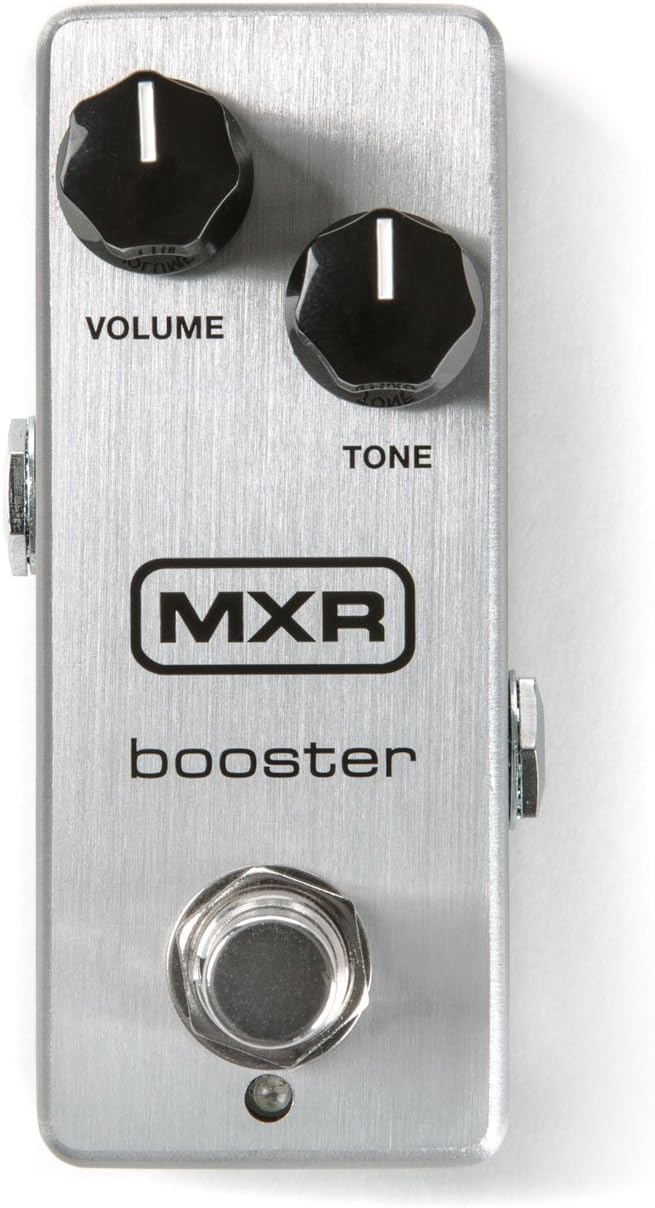
Image: The MXR M293 Booster Mini pedal shown alongside a compatible 9V DC power adapter, illustrating the power connection.
6. Hướng dẫn vận hành
Once connected, you can begin using your MXR M293 Booster Mini:
- Tạo hiệu ứng: Press the footswitch to engage the Booster Mini. The LED indicator will illuminate when the effect is active. Press again to bypass the effect.
- Điều chỉnh âm lượng: Slowly turn the VOLUME knob clockwise to increase the boost level. Be mindful of your amplifier's volume to avoid sudden loud sounds. This control provides a clean boost, perfect for pushing your amp into overdrive or for solos.
- Điều chỉnh âm sắc: Use the TONE knob to fine-tune the high-end response. Turn it clockwise for a brighter, more present sound, or counter-clockwise to smooth out harsh frequencies or achieve a warmer tone.
- Adding Grit (Internal Control): For a subtle to pronounced overdriven character, adjust the internal Echoplex Preamp level control. This requires opening the pedal. Use a small screwdriver to carefully turn the trim pot. Experiment to find your desired level of saturation.
- Vị trí trong chuỗi tín hiệu:
- Before Overdrive/Distortion: Placing the Booster Mini before gain pedals will increase the input signal to those pedals, resulting in more saturation and sustain.
- After Overdrive/Distortion: Placing it after gain pedals will increase the overall volume of your distorted sound without adding more distortion, ideal for solo boosts.
7. Bảo trì
Proper care will ensure the longevity and optimal performance of your MXR M293 Booster Mini:
- Vệ sinh: Lau bàn đạp bằng khăn mềm, khô. Không sử dụng chất tẩy rửa có tính ăn mòn hoặc dung môi.
- Kho: Bảo quản bàn đạp ở nơi khô ráo, tránh nhiệt độ và độ ẩm quá cao.
- Quyền lực: Always use a regulated 9V DC center-negative power supply. Disconnect power when not in use for extended periods.
- Kết nối: Periodically check all cable connections for wear and tear. Ensure jacks are clean and free of debris.
KHAI THÁC. Xử lý sự cố
| Vấn đề | Nguyên nhân có thể | Giải pháp |
|---|---|---|
| Không có âm thanh khi đạp bàn đạp. |
|
|
| Tiếng ồn hoặc tiếng ù không mong muốn. |
|
|
| LED not illuminating. |
|
|
9. Thông số kỹ thuật
| Thuộc tính | Chi tiết |
|---|---|
| Người mẫu | M293 |
| Thương hiệu | MXR |
| Trọng lượng sản phẩm | 1.01 pound (khoảng 0.46 kg) |
| Kích thước gói hàng | 11.61 x 2.99 x 2.83 inch (khoảng 29.5 x 7.6 x 7.2 cm) |
| Định dạng tín hiệu | Tương tự |
| Tậptage Yêu cầu | 9 Vôn DC (cực âm ở giữa) |
| Amperage hòa | 9 triệuamps |
| Màu sắc | Đen, Bạc |
10. Thông tin an toàn
Vui lòng đọc và tuân thủ các nguyên tắc an toàn sau đây:
- Do not expose the pedal to water or excessive moisture.
- Tránh vận hành bàn đạp dưới ánh nắng trực tiếp hoặc gần các nguồn nhiệt.
- Use only the specified power supply (9V DC, center-negative). Using an incorrect power supply can damage the unit and void your warranty.
- Do not attempt to open or service the unit beyond adjusting the internal trim pot. Refer all servicing to qualified personnel.
- Để xa tầm tay trẻ em.
11. Bảo hành và Hỗ trợ
MXR products are known for their quality and reliability. For warranty information, technical support, or service inquiries, please visit the official MXR webtrang web hoặc liên hệ với bộ phận chăm sóc khách hàng của họ. Giữ lại hóa đơn mua hàng để làm bằng chứng mua hàng khi yêu cầu bảo hành.
Official MXR Webđịa điểm: www.jimdunlop.com/mxr/