
1. Giới thiệu
The Hioki CM3286 Clamp On Power Tester is a versatile instrument designed for precise measurement of electrical parameters. It is capable of measuring voltage, current, power, power factor, phase angle, reactive power, and frequency. Additionally, it can detect phase sequence on live lines within single-phase or three-phase circuits at any desired point. This manual provides essential information for the safe and effective operation, maintenance, and troubleshooting of your CM3286 device.
2. Thông tin an toàn
CẢNH BÁO: Đọc kỹ tất cả các cảnh báo và hướng dẫn an toàn trước khi sử dụng sản phẩm này. Việc không tuân thủ các cảnh báo và hướng dẫn có thể dẫn đến điện giật, hỏa hoạn hoặc thương tích nghiêm trọng.
- Always observe local and national safety codes.
- Không sử dụng thiết bị nếu thiết bị có vẻ bị hư hỏng hoặc hoạt động bất thường.
- Ensure the device is rated for the voltage and current levels you intend to measure.
- Wear appropriate personal protective equipment (PPE), such as insulated gloves and eye protection.
- Avoid touching live conductors with bare hands or non-insulated tools.
- Không vận hành thiết bị trong môi trường ẩm ướt hoặc khí quyển dễ cháy nổ.
- Keep fingers behind the tactile barrier on the instrument during measurements.
- Disconnect the device from the circuit before opening the battery compartment.
3. Nội dung gói hàng
Verify that all items listed below are present and undamaged upon opening the package:
- Hioki CM3286 Clamp On Power Tester Unit
- Dây dẫn thử nghiệm (Đỏ và Đen)
- Hộp đựng
- Pin AAA (x2)
- Hướng dẫn sử dụng (tài liệu này)
4. Tính năng và thành phần của sản phẩm

Figure 4.1: Hioki CM3286 Clamp On Power Tester (Overall View)
This image displays the complete Hioki CM3286 Clamp On Power Tester, showcasing its ergonomic design, the large clamp jaw for current measurement, and the clear digital display. The function dial and various control buttons are visible on the front panel.
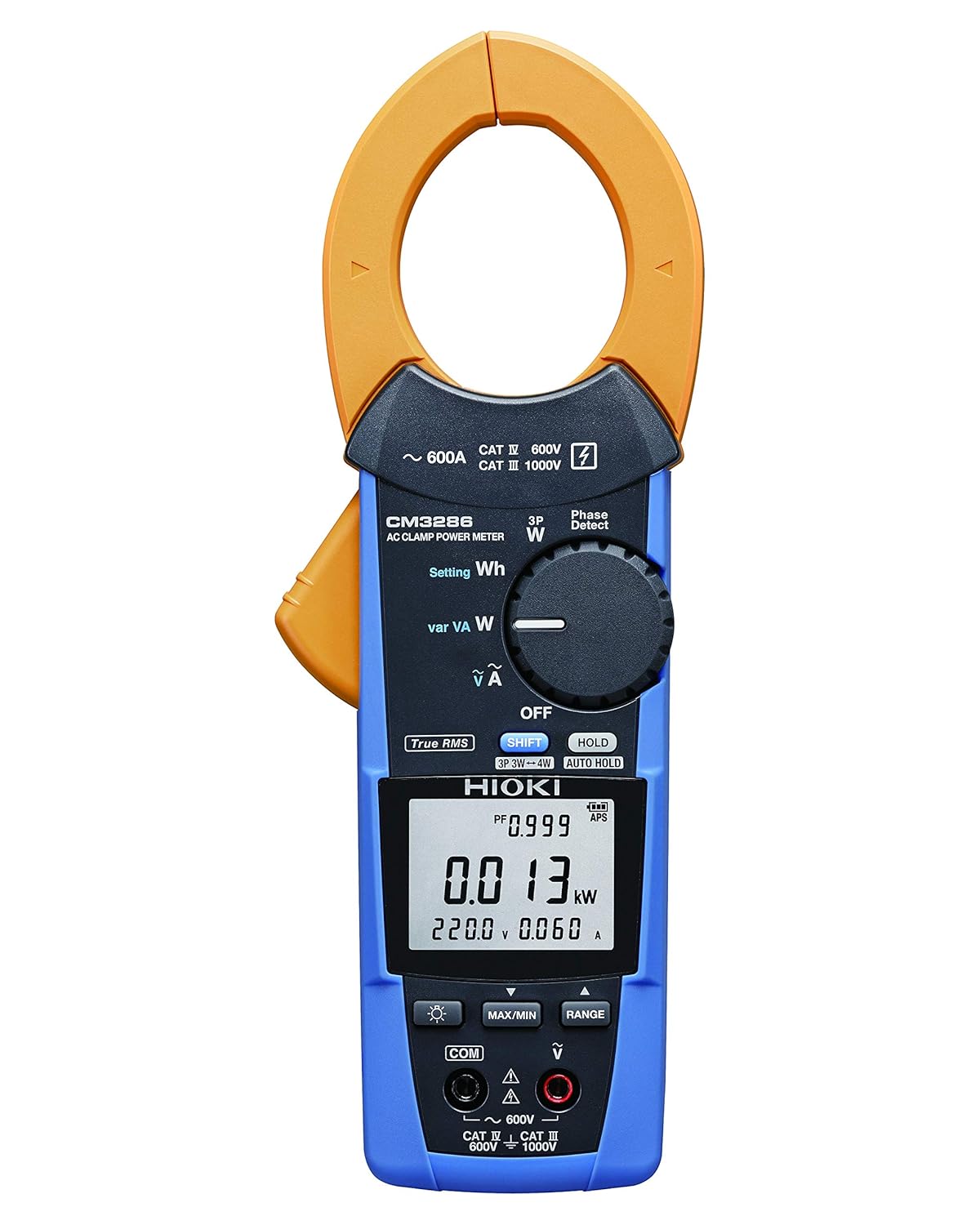
Figure 4.2: Hioki CM3286 Clamp On Power Tester (Front Panel Detail)
This image provides a closer look at the front panel of the Hioki CM3286, highlighting the digital display, the rotary function dial with various measurement settings (e.g., W, Wh, V, A), and the control buttons such as SHIFT, HOLD, MAX/MIN, and RANGE. The input terminals for voltage measurement are also visible at the bottom.
Các thành phần chính:
- Clamp Hàm: Được sử dụng để đo dòng điện xoay chiều không tiếp xúc.
- Quay số chức năng: Selects the desired measurement mode (e.g., Voltag(e, Dòng điện, Công suất, Tần số).
- Màn hình LCD: Hiển thị số đo, đơn vị và chỉ số.
- Thiết bị đầu cuối đầu vào: Dùng để kết nối dây dẫn thử nghiệm cho điện áptage and other measurements.
- Nút HOLD: Đóng băng giá trị hiển thị hiện tại.
- Nút TỐI ĐA/PHÚT: Ghi lại các giá trị đo tối đa và tối thiểu.
- Nút PHẠM VI: Tự động chọn phạm vi đo.
- Nút SHIFT: Accesses secondary functions marked in blue on the dial.
5. Thiết lập
5.1. Lắp đặt pin
- Đảm bảo thiết bị đã tắt nguồn.
- Tìm nắp đậy ngăn chứa pin ở phía sau thiết bị.
- Use a screwdriver (if necessary) to open the cover.
- Lắp hai (2) pin AAA, chú ý đúng cực (+/-) như được chỉ dẫn bên trong ngăn chứa.
- Lắp lại nắp ngăn chứa pin và cố định lại.
5.2. Bật nguồn ban đầu
After battery installation, turn the function dial from "OFF" to any measurement setting to power on the device. The display should illuminate, indicating readiness for use.
6. Hướng dẫn vận hành
6.1. Bật/Tắt nguồn
- To power on, rotate the function dial from the "OFF" position to the desired measurement function.
- To power off, rotate the function dial back to the "OFF" position.
6.2. Đo dòng điện xoay chiều (Cl)amp)
- Rotate the function dial to the "A" (Current) setting.
- Mở clamp bằng cách ấn cần gạt.
- Enclose only one conductor (live or neutral) within the clamp hàm. Đảm bảo hàm được đóng hoàn toàn.
- Đọc giá trị hiện tại trên màn hình LCD.
6.3. Tậptage Đo lường (V)
- Rotate the function dial to the "V" (Voltage) thiết lập.
- Connect the red test lead to the "V" input terminal and the black test lead to the "COM" input terminal.
- Connect the test leads in parallel across the circuit or component to be measured.
- Đọc tậptaggiá trị e trên màn hình LCD.
6.4. Power Measurement (W, Wh, var, VA)
The CM3286 can measure various power parameters. Select the appropriate setting on the function dial (W for active power, Wh for energy, var for reactive power, VA for apparent power). Connect test leads for voltage và clamp the jaw around the current conductor as per the specific measurement method outlined in the full manual (not provided here, but implied by the device's capabilities).
6.5. Đo tần số (Hz)
Select the "Hz" setting on the function dial. Connect test leads across the circuit where frequency is to be measured, similar to voltagđo lường.
6.6. Phát hiện trình tự pha
The device features a "Phase Detect" function. Refer to the detailed instructions in the complete manual for proper connection and interpretation of phase sequence on single-phase or three-phase circuits.
6.7. Using Buttons (HOLD, MAX/MIN, RANGE, SHIFT)
- GIỮ: Nhấn để giữ nguyên giá trị hiển thị hiện tại. Nhấn lại để tiếp tục.
- LỚN NHẤT NHỎ NHẤT: Press to enter Max/Min recording mode. The display will show the maximum or minimum value recorded since activation. Press again to cycle through Max, Min, and current readings.
- PHẠM VI: Nhấn để chuyển đổi giữa chế độ tự động chọn phạm vi và chọn phạm vi thủ công. Ở chế độ chọn phạm vi thủ công, nhấn liên tục để chuyển qua các phạm vi có sẵn.
- SỰ THAY ĐỔI: Press to access secondary functions indicated in blue text next to the primary function on the dial.
7. Bảo trì
7.1. Vệ sinh
Lau máy bằng khăn mềm, damp cloth. Do not use abrasive cleaners or solvents. Ensure the device is completely dry before storage or next use.
7.2. Thay thế pin
When the low battery indicator appears on the display, replace the batteries promptly to ensure accurate measurements. Follow the battery installation steps outlined in Section 5.1.
7.3. Lưu trữ
Store the device in its carrying case in a cool, dry place, away from direct sunlight and extreme temperatures. If storing for extended periods, remove the batteries to prevent leakage.
KHAI THÁC. Xử lý sự cố
| Vấn đề | Nguyên nhân có thể | Giải pháp |
|---|---|---|
| Thiết bị không bật nguồn. | Pin chết hoặc lắp không đúng cách. | Kiểm tra cực tính của pin; thay pin. |
| No reading on display. | Incorrect function selected; open circuit; test leads not connected properly. | Select correct function; ensure circuit is complete; check test lead connections. |
| Hiển thị "OL" hoặc "OVER". | Measurement exceeds selected range or device maximum. | Select a higher range (if manual ranging) or ensure measurement is within device limits. |
| Các bài đọc không chính xác. | Low battery; environmental interference; damaged test leads. | Replace batteries; move away from strong electromagnetic fields; inspect and replace test leads if damaged. |
9. Thông số kỹ thuật
| Tham số | Giá trị |
|---|---|
| Số hiệu mẫu | CM3286 |
| Thương hiệu | Hioki |
| Kích thước gói hàng | 9.92 x 2.76 x 2.05 inch |
| Trọng lượng sản phẩm | 0.45 kg (15.87 ounce) |
| Pin | 2 pin AAA (có kèm theo) |
| Nguồn điện | Điện có dây (Note: This refers to the type of power it measures, not its own power source. The device is battery-powered.) |
| Nhà sản xuất | Hioki |
| Ngày đầu tiên có sẵn | Ngày 20 tháng 2020 năm XNUMX |
10. Bảo hành và Hỗ trợ
For detailed warranty information, please refer to the warranty card included with your product or visit the official Hioki website. Hioki provides comprehensive customer support for its products.
If you encounter any issues not covered in this manual or require technical assistance, please contact Hioki customer support through their official channels. Ensure you have your product model number (CM3286) and purchase details ready when contacting support.
Lưu ý: Điều khoản và điều kiện bảo hành có thể thay đổi tùy theo khu vực.