
1. Giới thiệu
The LiteBee Flysky FS-GR3E is a compact and reliable 3-channel 2.4Ghz AFHDS receiver designed for use with various Flysky transmitters in RC car and boat applications. This manual provides essential information for proper setup, operation, and maintenance of your receiver.
2. Thông tin an toàn
- Always ensure correct polarity when connecting power to avoid damage to the receiver or other components.
- Operate your RC model in open areas, away from people, vehicles, and obstacles to prevent accidents.
- Regularly check all connections for security and proper seating before each operation.
- Keep the receiver away from moisture, water, and extreme temperatures to ensure optimal performance and longevity.
- Do not attempt to modify the receiver. Unauthorized modifications may void the warranty and lead to malfunction or damage.
3. Nội dung gói hàng
- 1 x LiteBee Flysky FS-GR3E 2.4Ghz 3CH Receiver
4. Thông số kỹ thuật
| Kênh | 3 |
| Kiểu mẫu | RC Car / RC Boat |
| Độ nhạy của máy thu RF | -105dBm |
| Điều chế | GFSK |
| Loại hệ thống | AFHDS (Hệ thống nhảy tần số tự động kỹ thuật số) |
| Độ nhạy | 1024 |
| An toàn | Yes (on Channel 2) |
| Binding Port | Yes (on Channel 3) |
| Cổng điện | Yes (VCC) |
| Đầu vào nguồn điện | 4-11V DC |
| Cân nặng | 5g |
| Chiều dài ăng-ten | 26mm |
| Kích thước | 37.6mm x 22.3mm x 13mm |
| Màu sắc | Đen |
| Máy phát tương thích | Flysky FS-GT2, FS-GT2B, FS-GT3B, FS-GT3C |

Figure 1: Dimensions of the FS-GR3E receiver.
5. Thiết lập
5.1. Kết nối vật lý
This section details the physical connection of the FS-GR3E receiver to your RC model's components.
- Connect the steering servo to Kênh 1 trên máy thu.
- Connect the Electronic Speed Controller (ESC) or throttle servo to Kênh 2 trên máy thu.
- Connect any auxiliary functions (e.g., lights, additional servos) to Kênh 3. This port is also used for binding.
- Ensure the power input (4-11V DC) is supplied to the receiver, typically through the ESC or a dedicated battery connected to the VCC port.

Figure 2: LiteBee Flysky FS-GR3E 3CH RC Receiver with labeled ports for connection.
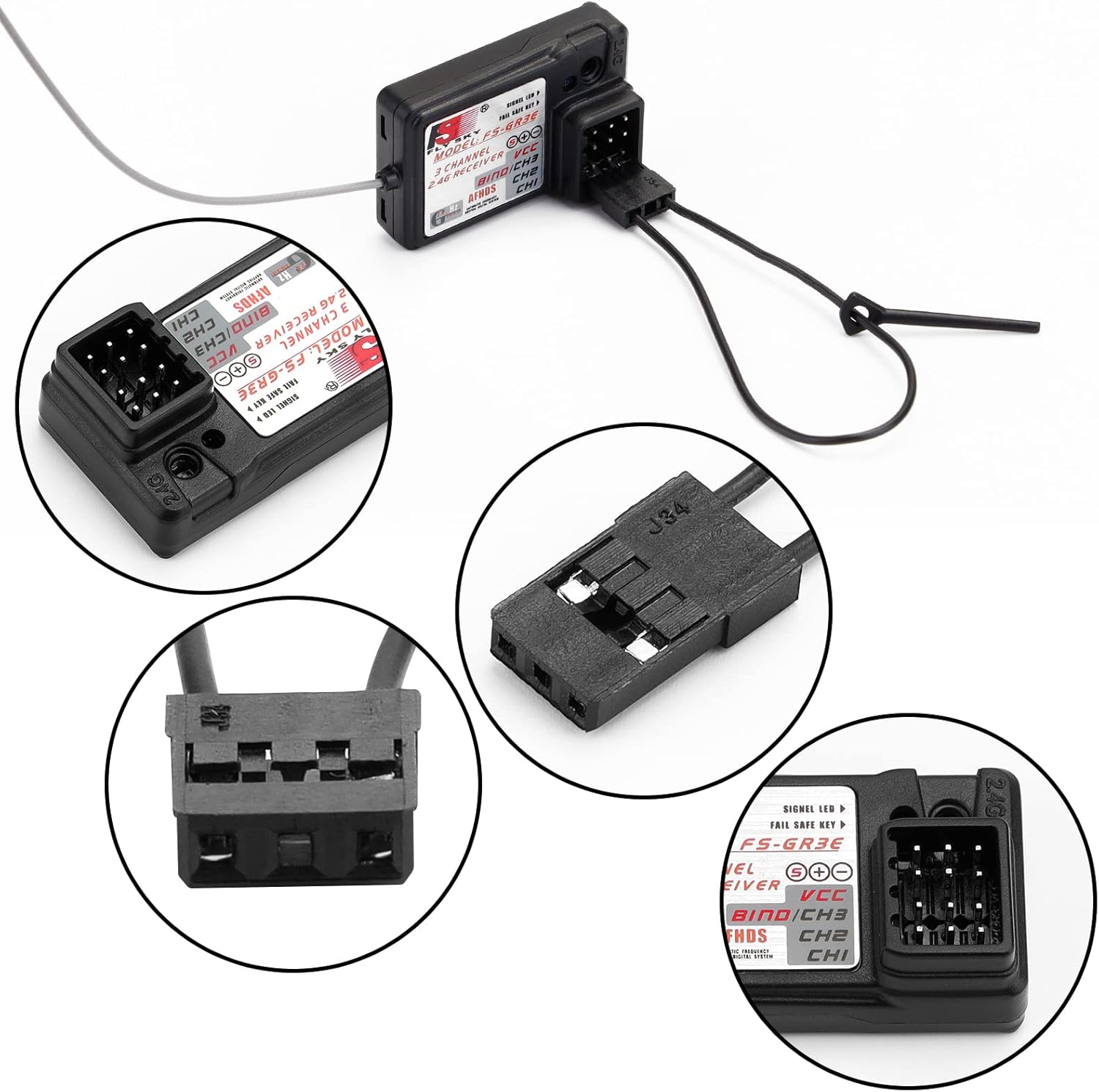
Hình 3: Chi tiết view of the receiver's connection ports, including the BIND/CH3 port.

Hình 4: Ví dụample of the FS-GR3E receiver connected within an RC car setup.
5.2. Quy trình đóng gáy
The binding process links your FS-GR3E receiver to your Flysky transmitter, establishing a unique communication link. This process ensures that your receiver only responds to commands from your specific transmitter.
- Ensure your Flysky transmitter is powered off.
- Insert the binding plug (a small jumper wire or dedicated plug, often included with your transmitter or receiver) into the LIÊN KẾT/CH3 port on the FS-GR3E receiver.
- Power on the receiver. The receiver's LED should flash rapidly, indicating it is in binding mode.
- Trong khi giữ LIÊN KẾT button on your Flysky transmitter (if available, or follow your transmitter's specific binding procedure), power on the transmitter.
- The receiver's LED should stop flashing and remain solid, indicating a successful bind.
- Nhả nút BIND trên bộ phát.
- Power off both the receiver and the transmitter.
- Tháo phích cắm kết nối khỏi bộ thu.
- Power on the transmitter first, then the receiver. The receiver's LED should illuminate solid, confirming the connection.
- Test all channels (steering, throttle, etc.) to ensure proper operation before using the model.
Video 1: Ví dụample of a Flysky receiver binding process. While the video shows an FS-IA6B receiver, the binding steps are generally similar for Flysky AFHDS receivers like the FS-GR3E.
5.3. Khả năng tương thích
The FS-GR3E receiver is compatible with Flysky transmitters utilizing the AFHDS protocol. Refer to the compatibility chart below for specific models.

Figure 5: Flysky receiver compatibility chart, indicating which transmitters work with various receivers, including the GR3E.
6. Hướng dẫn vận hành
- Trình tự bật nguồn: Always power on your transmitter first, then power on your RC model (receiver). This ensures the transmitter is broadcasting a signal before the receiver attempts to connect.
- Trình tự tắt nguồn: Always power off your RC model (receiver) first, then power off your transmitter. This prevents unintended movements due to loss of signal while the model is still powered.
- Chức năng an toàn: The FS-GR3E features a failsafe on Channel 2 (throttle). In case of signal loss or low battery, the failsafe will automatically set the throttle to a pre-programmed position (usually neutral or brake) to prevent the model from running away. Refer to your transmitter's manual for instructions on setting failsafe values.
- After powering on, observe the receiver's LED. A solid LED indicates a successful connection to the transmitter.
7. Bảo trì
- Vệ sinh: Giữ cho bộ thu luôn sạch sẽ, không bám bụi bẩn và hơi ẩm. Sử dụng khăn mềm, khô để lau chùi. Tránh sử dụng dung môi hoặc hóa chất mạnh.
- Kết nối: Periodically check all wiring and connections for wear, damage, or looseness. Secure any loose connections.
- Ăng-ten: Ensure the antenna is properly positioned and not damaged. Avoid bending, coiling, or cutting the antenna wire, as this can significantly reduce range and signal quality.
- Kho: Store the receiver in a dry, cool place when not in use. Protect it from physical impact and static electricity.
KHAI THÁC. Xử lý sự cố
- Không có nguồn điện đến bộ thu:
- Kiểm tra kết nối pin và đảm bảo pin đã được sạc.
- Verify correct polarity of power connections to the receiver.
- Ensure the Electronic Speed Controller (ESC) or external power source is functioning correctly.
- Bộ thu không kết nối:
- Confirm the binding plug is correctly inserted into the BIND/CH3 port.
- Ensure the transmitter is in binding mode according to its manual.
- Verify that the transmitter and receiver are compatible (both use the Flysky AFHDS system).
- Try binding in a location away from other 2.4GHz devices that might cause interference.
- Intermittent Signal / Short Range:
- Kiểm tra xem có vật cản vật lý nào giữa bộ phát và bộ thu hay không.
- Ensure the receiver antenna is not damaged, coiled, or shielded by carbon fiber or metal parts within the model.
- Avoid operating near strong electromagnetic interference sources (e.g., power lines, large metal structures).
- Check the transmitter battery level.
- Servos/ESC Not Responding:
- Verify that the receiver is successfully bound to the transmitter (solid LED).
- Check servo/ESC connections to the correct receiver channels.
- Ensure servos/ESC are powered and functioning independently.
9. Bảo hành và Hỗ trợ
For warranty claims or technical support regarding your LiteBee Flysky FS-GR3E receiver, please contact your original retailer or the manufacturer directly. It is recommended to retain your proof of purchase for warranty validation.