
1. Sản phẩm hếtview
The Zerone Multi-Language Translator Bluetooth Earphone is a portable wireless device designed for real-time language translation and audio playback. It features Bluetooth 4.1 connectivity, high-fidelity audio output, and a compact in-ear design for comfortable use during various activities.

Hình ảnh 1.1: Chính view of the Zerone Multi-Language Translator Bluetooth Earphone.
2. Nội dung gói hàng
Vui lòng xác minh rằng tất cả các mục được liệt kê dưới đây đều có trong gói hàng của bạn:
- Zerone Multi-Language Translator Bluetooth Earphone
- Cáp sạc USB
- Các đầu nút tai bổ sung (nhiều kích cỡ)
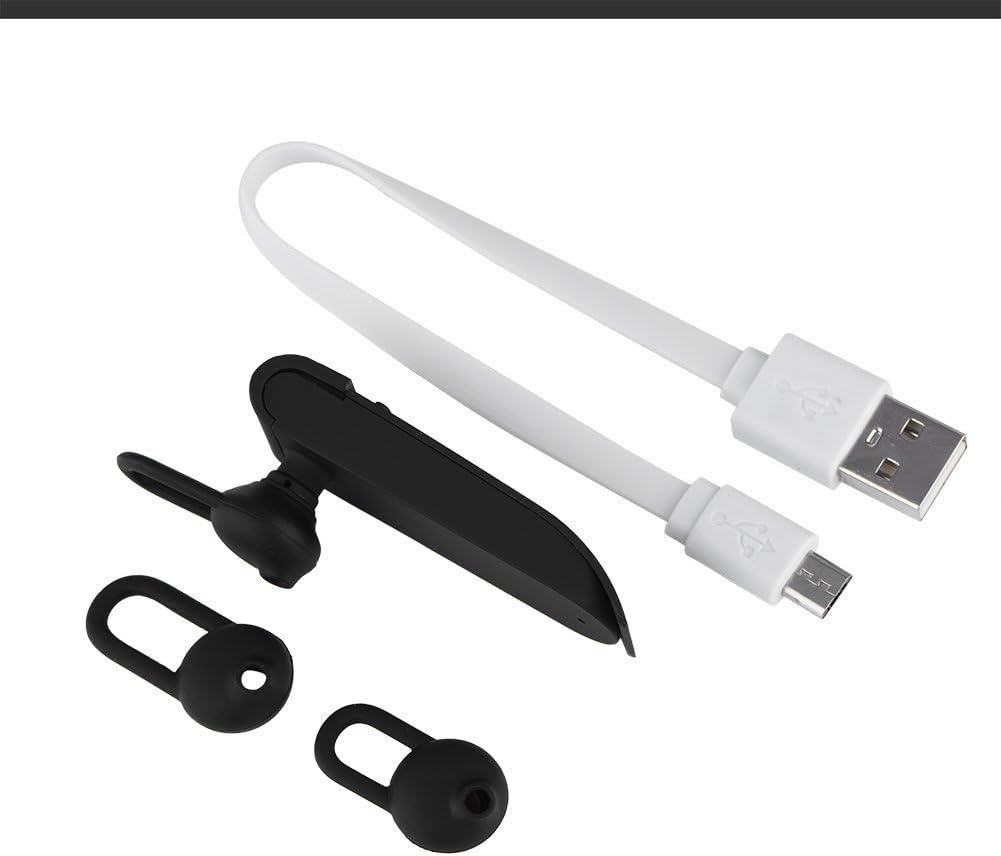
Image 2.1: The earphone with its charging cable and two additional ear tips.
3. Tính năng sản phẩm
- Multi-Language Translation: Supports up to 16 languages for real-time translation. Speak into the earphone, and it will translate into the desired language.
- Đầu ra âm thanh độ trung thực cao: Equipped with an 8mm moving coil speaker for clear, smooth audio and enhanced bass.
- True Wireless In-Ear Design: Mini and compact, offering a stable and comfortable fit without tangled wires, suitable for various activities.
- Kết nối Bluetooth 4.1: Optimized Bluetooth 4.1 version ensures a stable and fast wireless connection with a range of up to 10 meters.
- Kéo dài tuổi thọ pin: Built-in 90mAh rechargeable lithium battery provides approximately 5-8 hours of playback time and up to 13 hours of talk time.

Image 3.1: Visual representation of the 16 languages translation feature.

Image 3.2: Illustration of the high fidelity audio output with an 8mm moving coil speaker.

Image 3.3: Visual representation of the Bluetooth true wireless connection with a 10-meter transmission range.

Image 3.4: Details on the earphone's 90mAh rechargeable lithium battery and extended usage times.
4. Thiết lập
4.1 Sạc tai nghe
Before initial use, fully charge the earphone. Connect the provided USB charging cable to the earphone's charging port and the other end to a USB power source (e.g., computer, wall adapter). The charging time is approximately 2 hours.
4.2 Ghép nối Bluetooth
- Ensure the earphone is fully charged and powered off.
- Press and hold the multi-function button on the earphone until the indicator light flashes red and blue alternately, indicating pairing mode.
- Trên điện thoại thông minh hoặc thiết bị hỗ trợ Bluetooth, hãy truy cập vào cài đặt Bluetooth.
- Tìm kiếm available devices and select "Zerone Translator Earphone" (or similar name) from the list.
- Sau khi kết nối, đèn báo thường sẽ sáng màu xanh lam liên tục hoặc nhấp nháy màu xanh lam chậm.
4.3 Companion Application (for Translation)
To utilize the multi-language translation feature, you will need to download and install a compatible companion application on your smartphone. Refer to the packaging or product documentation for the specific app name and download instructions. Ensure your phone is connected to the internet for translation services.
5. Hướng dẫn vận hành
5.1 Bật/Tắt nguồn
- Bật nguồn: Press and hold the multi-function button for approximately 3 seconds until the indicator light turns blue.
- Tắt nguồn: Press and hold the multi-function button for approximately 5 seconds until the indicator light turns red.
5.2 Phát lại nhạc
- Phát/Tạm dừng: Nhấn nhanh nút đa chức năng.
- Bài hát tiếp theo: Nhấn đúp vào nút đa chức năng.
- Bản nhạc trước: Nhấn ba lần vào nút đa chức năng.
5.3 Quản lý cuộc gọi
- Trả lời/Kết thúc cuộc gọi: Nhấn nhanh nút đa chức năng.
- Từ chối cuộc gọi: Nhấn và giữ nút đa chức năng trong 2 giây.
5.4 Sử dụng chức năng dịch
After successfully pairing the earphone with your device and setting up the companion application:
- Open the translation application on your smartphone.
- Chọn ngôn ngữ nguồn và ngôn ngữ đích trong ứng dụng.
- Activate the translation mode as instructed by the application (this may involve pressing a button on the earphone or within the app).
- Speak clearly into the earphone's microphone. Your speech will be translated and played back through the earphone or your phone's speaker, depending on the app's settings.

Image 5.1: A conceptual image demonstrating the earphone's translation capability between two languages.
6. Bảo trì
- Vệ sinh: Hãy dùng khăn mềm, khô để lau tai nghe. Không sử dụng chất tẩy rửa có tính ăn mòn hoặc nhúng thiết bị vào nước.
- Kho: Bảo quản tai nghe ở nơi khô ráo, thoáng mát, tránh ánh nắng trực tiếp và nhiệt độ quá cao hoặc quá thấp.
- Chăm sóc pin: To prolong battery life, avoid fully discharging the earphone frequently. Charge it regularly, even if not in use for extended periods.
KHAI THÁC. Xử lý sự cố
| Vấn đề | Nguyên nhân có thể | Giải pháp |
|---|---|---|
| Earphone does not power on | Pin yếu | Sạc tai nghe trong ít nhất 30 phút. |
| Không thể ghép nối với thiết bị | Earphone not in pairing mode; Bluetooth off on device; device too far | Ensure earphone is in pairing mode (flashing red/blue). Turn on Bluetooth on your device. Move device closer to earphone (within 10m). |
| No sound during playback/calls | Volume too low; earphone not connected; media output not selected | Increase volume on both earphone and connected device. Re-pair the earphone. Check device's audio output settings. |
| Translation function not working | Companion app not open/configured; no internet connection; microphone blocked | Ensure the companion app is open and correctly configured. Verify internet connectivity. Check if the earphone's microphone is clear. |
8. Thông số kỹ thuật
| Tính năng | Chi tiết |
|---|---|
| Số hiệu mẫu | 4351510494 |
| Công nghệ kết nối | Không dây (Bluetooth) |
| Phiên bản Bluetooth | 4.1 |
| Phạm vi Bluetooth | Lên đến 10 mét |
| Dung lượng pin | Pin Lithium 90mAh |
| Thời gian chơi | 5-8 giờ |
| Thời gian nói chuyện | Lên đến 13 giờ |
| Thời gian sạc | Khoảng 2 giờ |
| Jack cắm tai nghe | USB (để sạc) |
| Vật liệu | Nhựa |
| Vị trí tai | Trong tai |
| Yếu tố hình thức | Trong tai |
| Loại điều khiển | Điều khiển phương tiện, cảm ứng |
| Kiểm soát tiếng ồn | Chống ồn chủ động |
| Trọng lượng sản phẩm | 2.39 ounce |
9. Bảo hành và Hỗ trợ
For warranty information and technical support, please refer to the documentation included with your purchase or visit the official Zerone webtrang web. Giữ lại bằng chứng mua hàng để yêu cầu bảo hành.