
WISE TIGER WT-RT8501
Hướng dẫn sử dụng bộ định tuyến không dây WISE TIGER AC1200
Model: WT-RT8501
1. Sản phẩm hếtview
The WISE TIGER AC1200 Wireless Router is a high-speed dual-band router designed for robust wireless internet connectivity in homes, offices, and restaurants. It features 802.11AC/N/G/B/A Wi-Fi technology, beamforming for enhanced signal reliability, and four external 5dBi antennas to ensure long-range coverage, even in basements or attics.
This router supports up to 300Mbps at 2.4GHz and 866Mbps at 5GHz, providing smooth online gaming and video streaming experiences. It also includes a WAN port and four LAN Fast ports (10/100Mbps) for wired connections. Security features include WPA/WPA2-PSK encryption, firewall, parental controls, and guest network capabilities.

Hình 1: Mặt trước view of the WISE TIGER AC1200 Wireless Router.
2. Nội dung gói hàng
Vui lòng kiểm tra xem có đầy đủ các mục trong gói hàng của bạn không:
- Bộ định tuyến băng tần kép không dây AC1200
- Bộ cấp nguồn
- Hướng dẫn cài đặt nhanh
- Cáp mạng
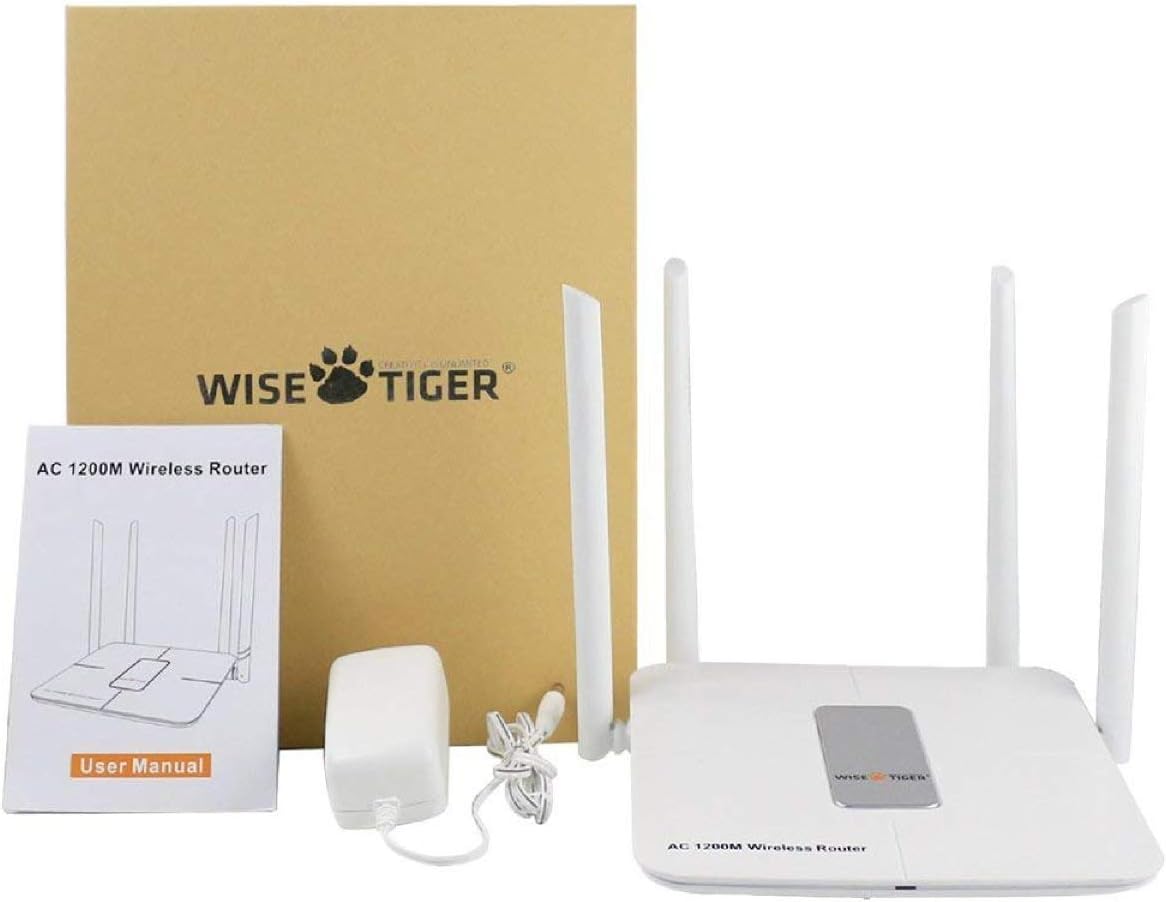
Figure 2: All components included in the WISE TIGER AC1200 Wireless Router package.
3. Product Diagram and Ports
Familiarize yourself with the router's physical layout and ports:

Hình 3: Phía sau view of the router with labeled ports.
- Cổng LAN (x4): Connect your wired devices such as computers, gaming consoles, or smart TVs.
- Cổng Internet (WAN): Kết nối cáp Ethernet của modem vào cổng này để truy cập internet.
- Công suất đầu vào: Kết nối bộ chuyển đổi nguồn được cung cấp tại đây.
- Nút Đặt lại: Used to restore the router to factory default settings. Press and hold for several seconds while the router is powered on.
- Nút WPS: For quick and secure wireless connection setup with WPS-compatible devices.
4. Thông số kỹ thuật
| Tính năng | Đặc điểm kỹ thuật |
|---|---|
| Thương hiệu | HỔ khôn ngoan |
| Tên mẫu | WT-RT8501 |
| Loại không dây | 802.11a/b/g/n/ac |
| Lớp băng tần | Băng tần kép (2.4 GHz và 5 GHz) |
| Tốc độ truyền dữ liệu | Up to 300Mbps (2.4GHz), 866Mbps (5GHz) |
| Ăng-ten | 4 ăng-ten ngoài 5dBi |
| Cổng Ethernet | 1 x WAN, 4 x LAN (10/100Mbps) |
| Nút | WPS, Đặt lại |
| Bảo vệ | WPA/WPA2-PSK, Firewall, Parental Controls, Guest Network |
| Khả năng tương thích của hệ điều hành | Windows XP/7/8/10/Vista, Mac, Android |
| Trọng lượng sản phẩm | 2.75 ounce |
| Kích thước sản phẩm | 1.48 x 6.6 x 5.58 inch |

Figure 4: Router dimensions for placement planning.
5. Hướng dẫn cài đặt
Follow these steps to set up your WISE TIGER AC1200 Wireless Router:
5.1 Kết nối phần cứng ban đầu
- Kết nối cáp WAN: Plug the broadband wire from your modem into the blue WAN port on the router.
- Connect LAN Cable (Optional): For wired devices, connect one end of the network patch cable to a yellow LAN port on the router and the other end to your PC's LAN network port.
- Bật nguồn: Connect the power adapter to the router's power input and plug it into an electrical outlet.
5.2 Truy cập Web Giao diện
- Join Wi-Fi: On your computer or mobile device, connect to the router's default Wi-Fi network. The default Wi-Fi name (SSID) and password can usually be found on a sticker on the bottom of the router.
- Mở trình duyệt: Mở một web trình duyệt (ví dụ: Chrome, Firefox, Edge).
- Nhập địa chỉ IP: Trong thanh địa chỉ, nhập
192.168.0.1và nhấn Enter. - Đăng nhập: Enter the default username and password. Typically, both are
admin.
5.3 WAN Setup (Internet Connection Type)
Select the connection type provided by your Internet Service Provider (ISP):
- PPPoE: If your ISP provides a username and password for internet access, select PPPoE and enter the credentials.
- IP tĩnh: If your ISP provided a fixed IP address, subnet mask, default gateway, and DNS settings, select Static IP and input these details.
- IP động: If your ISP uses a DHCP server, select Dynamic IP. The router will automatically obtain network settings. No account or static IP info is needed.
- PPTP/L2TP: If your ISP provided PPTP/L2TP connection details including a server IP or domain, select this option and enter the required information.
- WISP (Wireless ISP): This mode allows the router to connect to another Wi-Fi network as its internet source, acting as a Wi-Fi repeater. Select a Wi-Fi network from the list and log in with its password.
5.4 Cài đặt không dây
Configure your Wi-Fi networks for both 2.4GHz and 5GHz bands:
- Tên Wi-Fi (SSID): Change the default Wi-Fi name to a custom one for easy identification.
- Mã hóa: Select a strong encryption type, such as WPA2-PSK, for network security.
- Mật khẩu Wi-Fi: Hãy đặt mật khẩu mạnh và độc đáo cho mạng Wi-Fi của bạn.
- Độ rộng băng tần: Adjust the channel width for optimal performance (e.g., 20/40MHz for 2.4GHz, 40/80MHz for 5GHz).
Video 1: Official product video demonstrating the unboxing, features, and installation process of the WISE TIGER AC1200 Wireless Router.
6. Vận hành bộ định tuyến của bạn
6.1 Vị trí tối ưu
For the best wireless performance, place your router in a central location, away from obstructions like thick walls, metal objects, and other electronic devices that may cause interference. The four high-gain external antennas are designed to provide extensive coverage.

Figure 5: Illustration of the router's high-power signal penetration.

Figure 6: Visual representation of 2.4GHz (longer distance) and 5GHz (faster transmission) band characteristics.
6.2 Tính năng nâng cao
- Kiểm soát của phụ huynh: Quản lý và hạn chế quyền truy cập internet cho các thiết bị hoặc người dùng cụ thể.
- Mạng khách: Create separate Wi-Fi networks for guests, providing internet access without sharing your main network password or resources. The router supports up to 3 guest access points.
- Tường lửa: The built-in firewall helps protect your network from unauthorized access and malicious attacks.
- MAC Filtering (Restricted List): You can block or allow specific devices on your network based on their MAC addresses. This feature is found under the 'Restricted list' in the web giao diện.
- Kiểm soát băng thông: Allocate specific download and upload limits to connected devices to manage network traffic effectively. This can be configured in the 'Bandwidth Control' section of the web giao diện.
7. Bảo trì
Việc bảo trì thường xuyên đảm bảo hiệu suất tối ưu và tuổi thọ của bộ định tuyến:
- Cập nhật chương trình cơ sở: Periodically check the WISE TIGER official webTrang web này cung cấp các bản cập nhật phần mềm. Cập nhật phần mềm có thể cải thiện hiệu năng, bổ sung tính năng mới và sửa lỗi.
- Khởi động lại thường xuyên: Rebooting your router every few weeks can help clear its memory and resolve minor connectivity issues. Simply unplug the power adapter, wait 10 seconds, and plug it back in.
- Vệ sinh: Giữ bộ định tuyến sạch sẽ và không bám bụi. Dùng khăn mềm, khô để lau bên ngoài. Đảm bảo các lỗ thông gió không bị tắc.
KHAI THÁC. Xử lý sự cố
If you encounter issues with your router, try the following solutions:
- Không có kết nối mạng:
- Check all cable connections (WAN, LAN, Power) to ensure they are secure.
- Verify your modem is working correctly. Try rebooting both the modem and the router.
- Confirm your WAN settings in the router's web interface match your ISP's requirements.
- Tín hiệu Wi-Fi yếu hoặc vùng chết:
- Relocate the router to a more central position in your home/office.
- Adjust the router's antennas for better signal direction.
- Minimize interference from other electronic devices (cordless phones, microwaves).
- Consider using the WISP mode to extend coverage if you have another Wi-Fi network.
- Không thể truy cập bộ định tuyến Web Giao diện:
- Hãy đảm bảo thiết bị của bạn được kết nối với Wi-Fi của bộ định tuyến hoặc thông qua cáp Ethernet đến cổng LAN.
- Xác minh bạn đang nhập đúng địa chỉ IP (
192.168.0.1). - Xóa bộ nhớ đệm và cookie của trình duyệt hoặc thử một trình duyệt khác.
- If you forgot your login credentials, you may need to perform a factory reset.
- Khôi phục cài đặt gốc: If all else fails, use a paperclip or pin to press and hold the Reset button on the back of the router for about 10 seconds while it is powered on. This will restore all settings to their factory defaults, including Wi-Fi name and password. You will then need to reconfigure the router.
9. Bảo hành và Hỗ trợ
WISE TIGER provides a Bảo hành 1 năm for this product. In case the product does not meet your satisfaction or experiences issues within this period, a new replacement will be provided.
For technical support or warranty claims, please refer to the contact information provided in your product packaging or visit the official WISE TIGER webtrang web cung cấp các nguồn hỗ trợ mới nhất.
Vui lòng giữ lại bằng chứng mua hàng để bảo hành.
Ask a question about this manual
Ask about setup, troubleshooting, compatibility, parts, safety, or missing instructions. Manuals+ will review the question and use this page’s manual context to help answer it.