
1. Giới thiệu
The EPEVER VS6048AU is a 60A common positive Pulse Width Modulation (PWM) solar charge controller designed for 12V, 24V, 36V, and 48V solar panel power systems. It incorporates advanced digital techniques to ensure efficient and reliable battery charging and load management. This controller is suitable for various applications, including solar home systems, traffic signals, solar street lights, and solar garden lamps.
Các tính năng chính:
- 3-Stage sạc PWM thông minh: Bulk, Boost / Equalize, Float.
- Supports three battery charging options: Sealed, Gel, and Flooded.
- Integrated LCD display for dynamic monitoring of operating data and working conditions.
- Dual USB output ports (Max. 5VDC/2.4A) for charging electronic devices.
- Các nút điều khiển được thiết kế thân thiện với người dùng, mang lại trải nghiệm vận hành thoải mái và tiện lợi.
- Multiple load control modes for versatile application.
- Chức năng thống kê năng lượng.
- Chức năng bù nhiệt độ của pin.
- Extensive electronic protections for system safety.

Image 1.1: The EPEVER VS6048AU Solar Charge Controller shown in various application settings, including home power supply, street lighting, monitoring, and green energy solutions.
2. Thông tin an toàn
Vui lòng đọc kỹ tất cả hướng dẫn và cảnh báo trước khi lắp đặt và vận hành. Không tuân theo các hướng dẫn này có thể gây ra điện giật, hỏa hoạn hoặc thương tích nghiêm trọng.
- Ensure all wiring is correctly polarized and securely connected to prevent damage to the controller and other components.
- Luôn ngắt kết nối tấm pin mặt trời và nguồn điện ắc quy trước khi lắp đặt hoặc điều chỉnh bộ điều khiển.
- Install the controller in a well-ventilated area, away from flammable gases, moisture, and direct sunlight.
- Hãy sử dụng cầu dao hoặc cầu chì phù hợp cho mạch điện của tấm pin mặt trời, ắc quy và tải.
- Không tự tháo rời hoặc cố gắng sửa chữa bộ điều khiển. Hãy liên hệ với nhân viên có trình độ để được bảo trì.
- Wear appropriate personal protective equipment, including eye protection, when working with batteries.
- Giữ trẻ em tránh xa các bộ phận của hệ thống năng lượng mặt trời.
Các biện pháp bảo vệ điện tử: The VS6048AU controller includes comprehensive electronic protections:
- Bảo vệ phân cực ngược PV
- Pin quá mứctagbảo vệ e
- Pin bảo vệ quá mức xả
- Bảo vệ ngược cực pin
- Bảo vệ quá nhiệt pin
- Bảo vệ quá tải
- Tải bảo vệ ngắn mạch
- Bộ điều khiển bảo vệ quá nhiệt

Image 2.1: Visual representation of the electronic protections integrated into the controller and a basic solar power system connection diagram.
3. Sản phẩm hếtview
Familiarize yourself with the components and interface of your EPEVER VS6048AU solar charge controller.

Hình ảnh 3.1: Mặt trước view of the EPEVER VS6048AU controller with key components labeled.
- Màn hình LCD: Shows system status, parameters, and error codes.
- Nút MENU: Used to navigate through different display interfaces and enter/exit setting modes.
- Nút SET: Used to confirm selections, modify parameters, and clear data.
- USB Output Ports (5VDC/2.4A): Dùng để sạc các thiết bị điện tử bên ngoài.
- Temp. Sensor Port (RTS Port): Connects to the optional remote temperature sensor for accurate battery temperature compensation.
- Đầu cuối PV: Kết nối với dàn pin mặt trời.
- Đầu cực của pin: Kết nối với bộ pin.
- Trạm trung chuyển hàng hóa: Kết nối với tải DC.
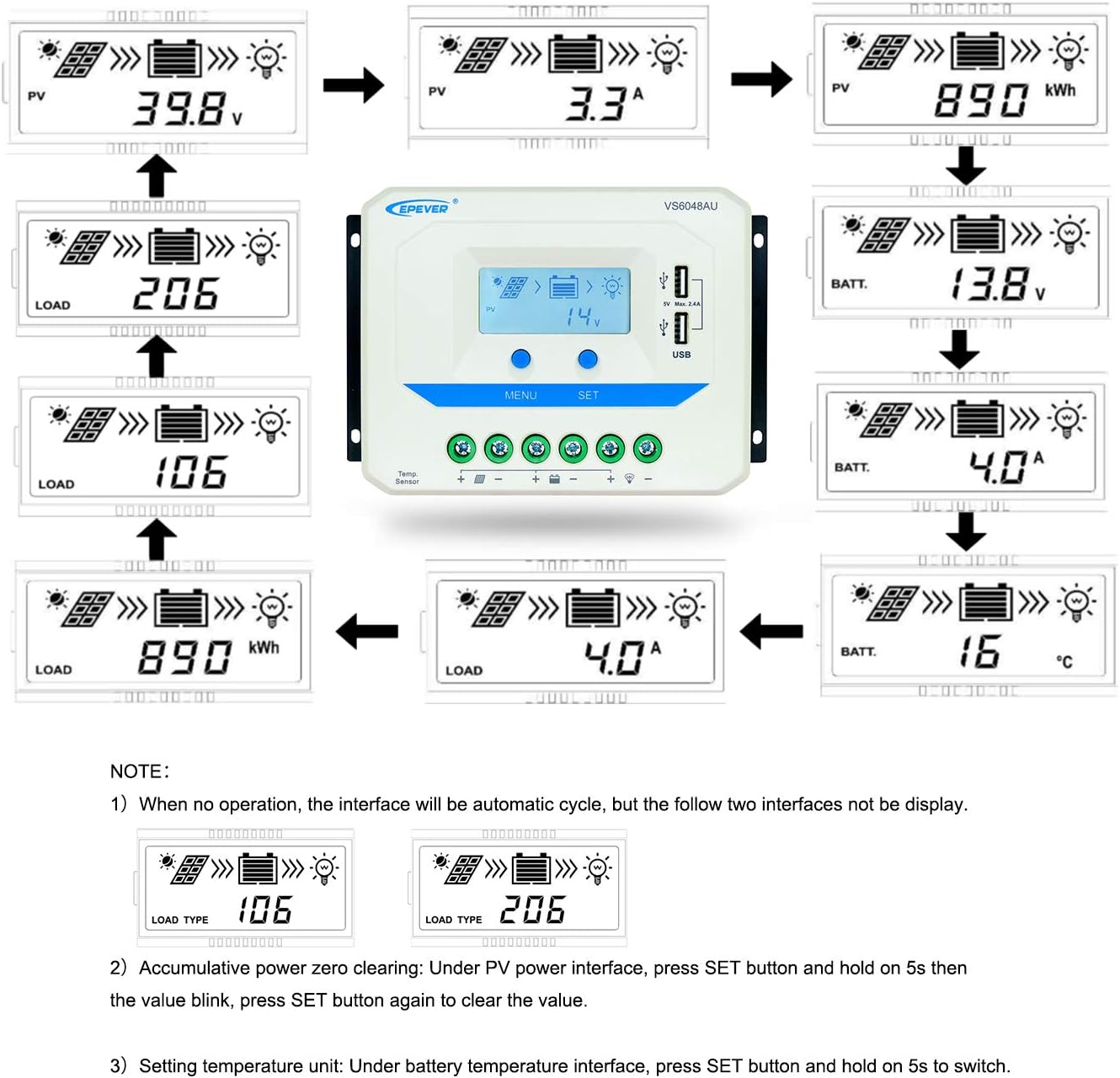
Image 3.2: Dimensions of the EPEVER VS6048AU Solar Charge Controller (approximately 21.4 cm x 12.87 cm x 7.22 cm).
LCD Display Status Description
The LCD display provides visual feedback on the system's operational status. Refer to the table below for icon meanings:

Image 3.3: Detailed description of the icons displayed on the VS6048AU LCD screen.
4. Thiết lập và Cài đặt
Follow these steps for proper installation of your solar charge controller. Ensure all power sources are disconnected before making any connections.
Trình tự nối dây:
- Kết nối pin: Connect the battery to the controller's battery terminals. Ensure correct polarity (positive to positive, negative to negative). The controller will detect the battery voltage.
- Kết nối tải: Kết nối tải DC với các cực tải của bộ điều khiển. Đảm bảo đúng cực tính.
- Kết nối tấm pin mặt trời: Kết nối dàn pin mặt trời với các cực PV của bộ điều khiển. Đảm bảo đúng cực tính.
Quan trọng: Always connect the battery first, then the solar panel, and finally the load. Disconnect in the reverse order: load, then solar panel, then battery.
Video hướng dẫn cài đặt:
Video 4.1: An official EPEVER video demonstrating the connection process for the solar charge controller, including battery and load connections. This visual guide can assist with proper installation.
5. Hướng dẫn vận hành
The EPEVER VS6048AU controller features an intuitive LCD display and button interface for monitoring and configuration.
Màn hình LCD dẫn đường:
When no operation is performed, the LCD interface will automatically cycle through various display screens, showing real-time data such as PV voltage, dòng điện, điện áp pintage, and load status.
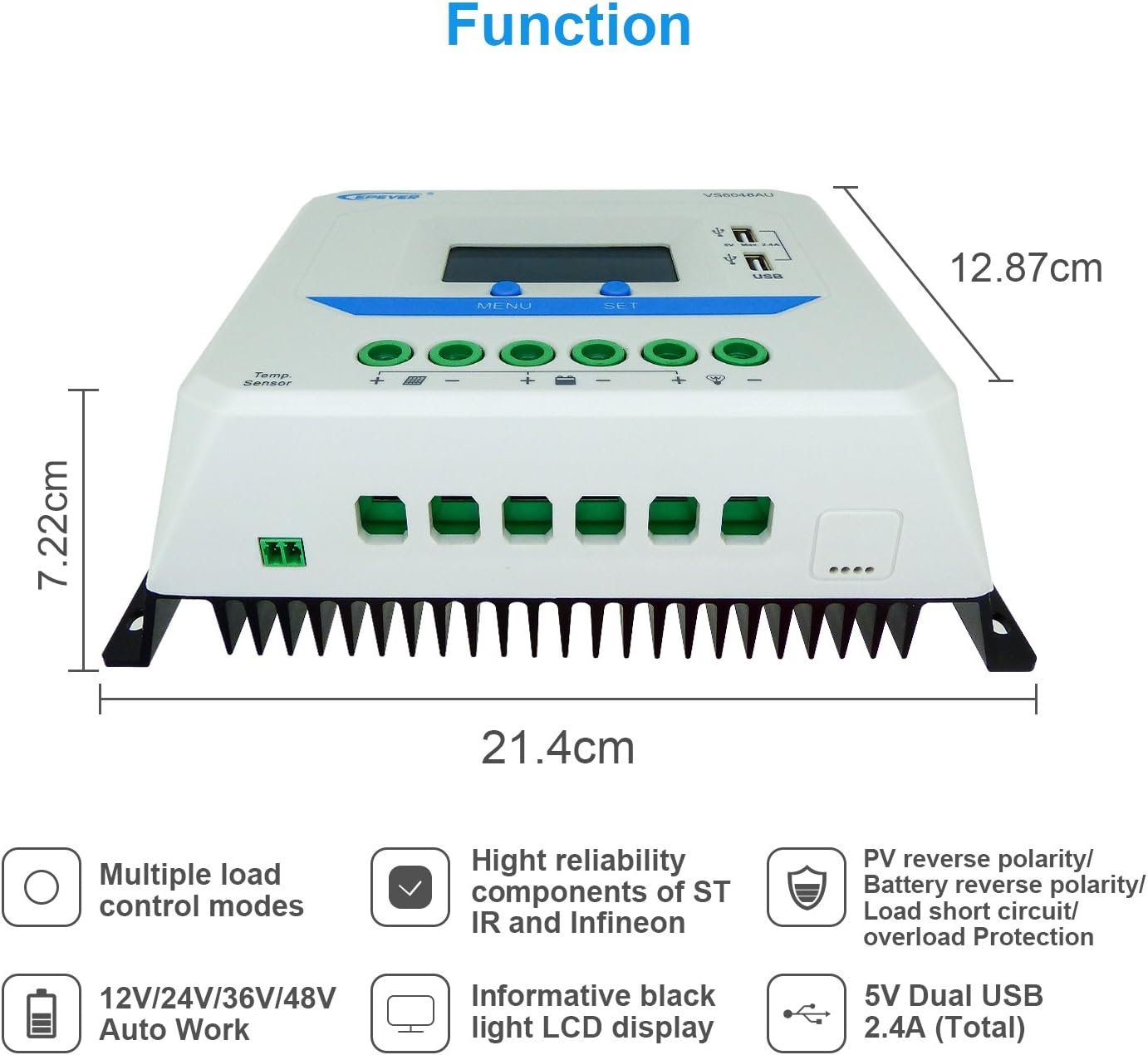
Image 5.1: Illustration of the automatic cycling interfaces on the VS6048AU LCD display.
- Nhấn nút THỰC ĐƠN button to manually cycle through the display interfaces.
- Nhấn và giữ THỰC ĐƠN button to enter or exit the parameter setting mode.
- In parameter setting mode, use the BỘ button to adjust values or confirm selections.
Hoạt động đặc biệt:
- Accumulative Power Clearing: Under the PV power interface, press and hold the BỘ button for 5 seconds until the value blinks, then press BỘ again to clear the accumulative power value.
- Đơn vị nhiệt độ cài đặt: Under the battery temperature interface, press and hold the BỘ nhấn nút trong 5 giây để chuyển đổi giữa độ C (°C) và độ F (°F).
Chế độ sạc:
Bộ điều khiển sử dụng pin 3 giây.tage intelligent PWM charging algorithm:
- Sạc hàng loạt: Pin được sạc ở dòng điện tối đa cho đến khi đạt dung lượng nhất định.tage đạt đến mức Boost voltage.
- Boost/Equalize Charging: The battery is charged at a constant voltage. An Equalize charge is typically performed once a month to balance battery cells.
- Sạc nổi: Dung lượng pintage is maintained at the Float voltage, and the charging current is reduced to a trickle to keep the battery fully charged.
The controller supports charging for Sealed, Gel, and Flooded battery types. Ensure the correct battery type is selected in the settings for optimal charging performance.
Đầu ra USB:
The dual USB ports provide a maximum output of 5VDC/2.4A for charging compatible electronic devices.
6. Bảo trì
Regular maintenance ensures the longevity and optimal performance of your EPEVER VS6048AU solar charge controller.
- Độ sạch sẽ: Giữ bộ điều khiển sạch sẽ, không bụi bẩn. Dùng khăn khô để lau chùi.
- Kết nối: Kiểm tra định kỳ tất cả các kết nối dây điện để đảm bảo độ kín và chống ăn mòn. Kết nối lỏng lẻo có thể gây quá nhiệt và hư hỏng.
- Thông gió: Ensure the installation area has adequate ventilation to prevent overheating of the controller.
- Điều tra: Inspect the controller and wiring for any signs of damage, such as frayed cables or cracked casing. Replace damaged components immediately.
- Tình trạng pin: Theo dõi lượng pintage and performance regularly. Ensure the battery type setting in the controller matches your battery.
KHAI THÁC. Xử lý sự cố
Phần này đề cập đến các vấn đề thường gặp mà bạn có thể gặp phải với bộ điều khiển sạc năng lượng mặt trời của mình.
| Vấn đề | Nguyên nhân có thể | Giải pháp |
|---|---|---|
| Không hiển thị trên LCD | Pin không được kết nối hoặc âm lượng thấptage; cực tính đảo ngược. | Kiểm tra kết nối và cực của pin. Đảm bảo dung lượng pintage trên 9V. |
| Pin không sạc được | PV panels not connected; PV reverse polarity; insufficient sunlight; PV open circuit voltage quá thấp. | Check PV connections and polarity. Ensure adequate sunlight. Verify PV open circuit voltage nằm trong thông số kỹ thuật. |
| Tải không hoạt động | Load disconnected; load short circuit; load overload; battery low voltage ngắt kết nối. | Check load connections. Remove short circuit. Reduce load. Recharge battery. |
| Bộ điều khiển quá nhiệt | Poor ventilation; excessive ambient temperature; prolonged high current operation. | Ensure proper ventilation. Relocate controller to a cooler environment. Reduce load if possible. |
| Đầu ra USB không hoạt động | Device not compatible; controller fault. | Try another USB device. If issue persists, contact support. |
8. Thông số kỹ thuật
Detailed technical specifications for the EPEVER VS6048AU Solar Charge Controller.

Image 8.1: Comprehensive technical specifications table for the EPEVER VS-AU series, including the VS6048AU model.
| Tham số | Giá trị (VS6048AU) |
|---|---|
| Người mẫu | VS6048AU |
| Hệ thống danh nghĩa Voltage | 12V/24V/36V/48V Auto Work |
| Pin đầu vào Voltage Phạm vi | 9V ~ 64V |
| Dòng điện sạc/xả định mức | 60A |
| Tối đa PV mở mạch Voltage | 96V |
| Loại pin | Được niêm phong (Mặc định) / Dạng gel / Ngập nước |
| Tăng khối lượng sạctage | Sealed: 14.4V, Gel: 14.2V, Flooded: 14.6V |
| Cân bằng khối lượng sạctage | Sealed: 14.6V, Gel: No, Flooded: 14.8V |
| Khối lượng sạc nổitage | Kín/Gel/Ngập: 13.8V |
| Âm lượng thấptage Kết nối lại Voltage | Kín/Gel/Ngập: 12.6V |
| Âm lượng thấptage Ngắt kết nối Voltage | Kín/Gel/Ngập: 11.1V |
| Tự tiêu thụ | ≤10mA (12V), ≤18mA (24V) |
| Bù nhiệt độ | -3mV/°C/2V (77°F) |
| Tiếp địa | Tích cực chung |
| Đầu ra USB | 5VDC/2.4A (Tổng cộng) |
| Kích thước tổng thể | 214x128.7x72.2mm |
| Thiết bị đầu cuối | 3AWG (25mmXNUMX) |
| Trọng lượng tịnh | 1.02kg |
| Bao vây | IP30 |
| Nhiệt độ môi trường làm việc | -25°C ~ +55°C |
| Độ ẩm | ≤95% (NC) |
9. Bảo hành và Hỗ trợ
EPEVER products are designed for reliability and performance. For technical assistance or warranty inquiries, please refer to the following:
- Hỗ trợ kỹ thuật: EPEVER provides technical support through its local service centers. For assistance, please contact the authorized dealer or service center in your region.
- Thông tin bảo hành: Please refer to the warranty card included with your product or visit the official EPEVER webtrang web để biết các điều khoản và điều kiện bảo hành chi tiết.
- Free Solar System Design: EPEVER's service centers may offer free solar system design assistance to help you optimize your setup.