
1. Giới thiệu
The ZEBRONICS ZEB-DB250JP is a versatile Bluetooth wireless gamepad designed for an enhanced gaming experience across multiple platforms. It features 17 buttons, dual analog sticks, dual vibration motors, and quad front triggers for precise control. This gamepad is compatible with Android smartphones, tablets, Android TV boxes, Android TVs, and PCs running Windows 98 / 2000 / ME / XP / NT / VISTA / 7 / 8 / 10. It also supports PS3 consoles. The ergonomic design ensures comfortable use, and a phone mount is included for mobile gaming.
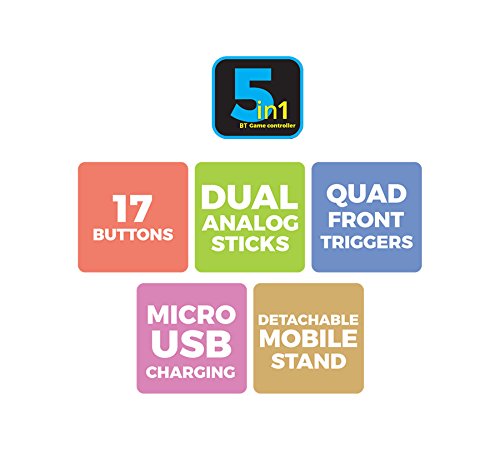
Hình 1: Hếtview of ZEB-DB250JP key features including 17 buttons, dual analog sticks, quad front triggers, micro USB charging, and a detachable mobile stand.
2. Có gì trong hộp
- 1 x ZEB-DB250JP Joypad
- 1 x Cáp sạc Micro USB
- 1 x Detachable Phone Mount
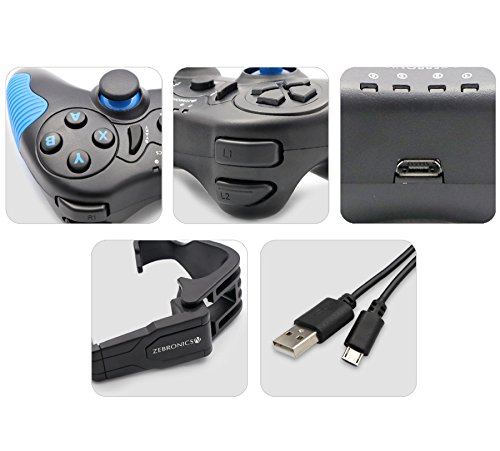
Image 2: A collage showing the ZEB-DB250JP gamepad, its triggers, micro USB port, detachable phone mount, and charging cable.
3. Thiết lập
3.1 Sạc tay cầm chơi game
Before initial use, fully charge the gamepad. Connect the provided Micro USB cable to the gamepad's charging port and the other end to a USB power source (e.g., computer USB port, USB wall adapter). The built-in 300mAh battery provides extended playtime.

Hình ảnh 3: Trên cùng view of the ZEB-DB250JP gamepad, highlighting the Micro USB charging port located between the L1/R1 and L2/R2 triggers.
3.2 Bluetooth Pairing (Android Devices & PS3)
- Hãy đảm bảo tay cầm chơi game đã được sạc đầy.
- Nhấn và giữ TRANG CHỦ button along with the X button simultaneously until the indicator lights on the gamepad begin to flash, indicating it is in pairing mode.
- On your Android smartphone, tablet, Android TV box, or Android TV, navigate to the Bluetooth settings.
- Tìm kiếm available devices and select "ZEB-DB250JP" (or similar name) from the list.
- Once connected, the indicator light on the gamepad will become solid. The Bluetooth range is approximately 8 meters.
- For PS3, connect the gamepad via USB cable first, then follow the console's instructions for pairing a new controller.
3.3 Kết nối máy tính
For PC gaming, the ZEB-DB250JP can be connected via the provided USB cable. Simply plug the Micro USB end into the gamepad and the USB-A end into an available USB port on your computer. The gamepad is compatible with Windows 98 / 2000 / ME / XP / NT / VISTA / 7 / 8 / 10 and should be recognized automatically.
3.4 Attaching the Phone Mount
To use the gamepad with your smartphone, attach the included phone mount to the designated slot on the gamepad. Secure your smartphone firmly into the mount.
4. Hướng dẫn vận hành
Bố cục 4.1 nút
The ZEB-DB250JP features a standard gamepad layout with 17 buttons, including:
- Hai cần điều khiển analog: Để di chuyển chính xác và điều khiển máy ảnh.
- D-Pad: Phím điều hướng dùng để điều hướng menu và nhập các lệnh cụ thể trong trò chơi.
- Các nút hành động (A, B, X, Y): Dành cho các hành động trong trò chơi.
- Quad Front Triggers (L1, L2, R1, R2): For additional actions, often used for shooting or accelerating.
- Nút Home: For power on/off and system functions.
- SELECT/BACK and START/MENU Buttons: For game menus and options.


Image 4: Left side of the ZEB-DB250JP gamepad showing the D-pad and left analog stick. Image 5: Right side of the ZEB-DB250JP gamepad showing the action buttons (A, B, X, Y) and right analog stick.
4.2 Bật/Tắt nguồn
- Để bật nguồn, hãy nhấn TRANG CHỦ cái nút.
- Để tắt nguồn, hãy bấm và giữ TRANG CHỦ button for a few seconds until the gamepad shuts down.
4.3 Trò chơi
Once connected, the gamepad should be recognized by compatible games. Refer to your game's settings for controller configuration and button mapping. The dual vibration motors provide haptic feedback for an immersive gaming experience.
5. Bảo trì
- Vệ sinh: Hãy dùng khăn mềm, khô để lau tay cầm chơi game. Tránh sử dụng hóa chất mạnh hoặc vật liệu có tính mài mòn.
- Kho: Bảo quản tay cầm chơi game ở nơi khô ráo, thoáng mát, tránh ánh nắng trực tiếp và nhiệt độ cao.
- Chăm sóc pin: Để kéo dài tuổi thọ pin, hãy tránh xả hết pin thường xuyên. Sạc tay cầm chơi game thường xuyên, ngay cả khi không sử dụng trong thời gian dài.
KHAI THÁC. Xử lý sự cố
- Tay cầm chơi game không kết nối được qua Bluetooth:
- Ensure the gamepad is charged.
- Make sure the gamepad is in pairing mode (HOME + X).
- Turn off and on Bluetooth on your device.
- Forget the device from your Bluetooth settings and try pairing again.
- Ensure your device is within the 8-meter Bluetooth range. - Các nút không phản hồi hoặc phản hồi chậm:
- Kiểm tra mức pin và sạc nếu pin yếu.
- Ensure there are no obstructions between the gamepad and the connected device.
- For PC, try connecting via USB cable to rule out wireless interference.
- Restart the gamepad and the connected device. - Tay cầm chơi game không sạc được:
- Verify the Micro USB cable is securely connected to both the gamepad and the power source.
- Try a different Micro USB cable or power adapter.
- Ensure the power source is functional. - Rung không hoạt động:
- Check if the game supports vibration feedback.
- Ensure vibration settings are enabled in the game or device settings.
7. Thông số kỹ thuật
| Thương hiệu | ZEBRONICS |
| Tên mẫu | cần analog |
| Thiết bị tương thích | Android, PC, PS3 |
| Loại bộ điều khiển | Tay cầm chơi game |
| Công nghệ kết nối | Bluetooth (v3.0) |
| Tính năng sản phẩm | Wireless, Dual Vibration Motors |
| Số lượng nút | 17 |
| Loại nguồn điện | Pin chạy bằng |
| Ắc quy | Pin tích hợp 300mAh |
| Phạm vi Bluetooth | 8m |
| Trọng lượng sản phẩm | 370 gam |
| Kích thước mục | 17 x 12 x 6 Centimet |
| Màu sắc | Red (as per product details, though main image shows black/red) |
| Số hiệu mẫu | DB250JP |
8. Bảo hành và Hỗ trợ
The ZEBRONICS ZEB-DB250JP Bluetooth Gamepad Joystick comes with a Bảo hành 1 năm. For any warranty claims or service, please carry the product to an authorized ZEBRONICS Service Center. For a list of service centers, refer to the product information provided at the time of purchase or visit the official ZEBRONICS webđịa điểm.
For further assistance or technical support, please contact ZEBRONICS customer service.


