
1. Giới thiệu
Cảm ơn bạn đã muaasing the Zebronics ZEB-A18 Plus 17.3-inch LED Monitor. This manual provides essential information for setting up, operating, and maintaining your monitor. Please read it thoroughly before use and retain it for future reference.
1.1 Có gì trong hộp
- Màn hình
- Bộ đổi nguồn
- Đế màn hình
- Hướng dẫn sử dụng
- Cáp VGA
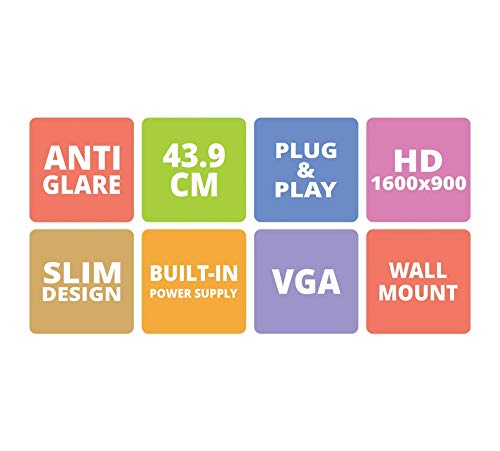
Figure 1: Key features of the Zebronics ZEB-A18 Plus monitor, including Anti Glare, 43.9 CM screen size, Plug & Play functionality, HD 1600x900 resolution, Slim Design, Built-in Power Supply, VGA connectivity, and Wall Mount compatibility.
2. Thông tin an toàn
Để đảm bảo hoạt động an toàn và tránh hư hỏng, vui lòng tuân thủ các biện pháp phòng ngừa an toàn sau:
- Không để màn hình tiếp xúc với mưa hoặc hơi ẩm.
- Không mở màn hình casing; chuyển mọi dịch vụ bảo dưỡng cho nhân viên có trình độ.
- Đặt màn hình trên bề mặt phẳng, ổn định.
- Đảm bảo thông gió thích hợp xung quanh màn hình.
- Chỉ sử dụng bộ đổi nguồn được cung cấp.
- Ngắt kết nối dây nguồn khi có sấm sét hoặc khi không sử dụng trong thời gian dài.
3. Thiết lập
3.1 Lắp ráp chân đế
- Cẩn thận lấy màn hình và chân đế ra khỏi bao bì.
- Gắn chân đế vào cổ chân đế.
- Secure the assembled stand to the back of the monitor using the provided screws. Ensure it is firmly attached.
3.2 Kết nối màn hình
- Kết nối nguồn điện: Kết nối bộ chuyển đổi nguồn với đầu vào nguồn của màn hình, sau đó cắm bộ chuyển đổi vào ổ cắm điện.
- Kết nối video: Connect one end of the VGA cable to the VGA port on your computer's graphics card and the other end to the VGA input port on the monitor.
- Kết nối âm thanh (nếu có): The monitor has built-in speakers. No separate audio cable is typically needed for VGA connections as audio is not transmitted via VGA. Ensure your computer's audio output is configured correctly.
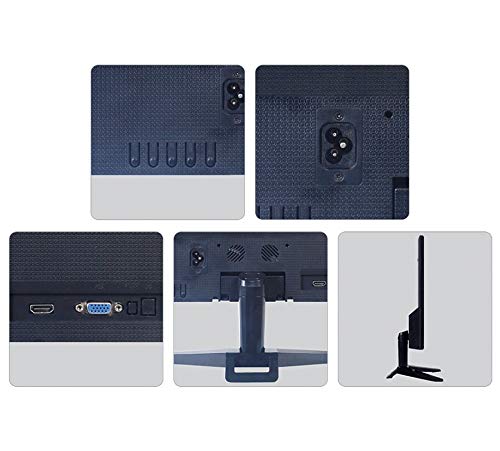
Hình 2: Phía sau view of the Zebronics ZEB-A18 Plus monitor showing the power input, VGA port, and side profile. This image illustrates the available connection points for power and video input.
4. Hướng dẫn vận hành
4.1 Bật / Tắt nguồn
Nhấn nút nguồn trên màn hình để bật hoặc tắt màn hình. Đèn báo nguồn sẽ sáng khi màn hình hoạt động.
4.2 Basic Display Adjustments
The monitor features an On-Screen Display (OSD) menu for adjusting various settings. Use the control buttons (usually located on the bottom or back of the monitor) to navigate the OSD menu. Common adjustments include:
- Độ sáng: Điều chỉnh độ sáng tổng thể của màn hình.
- Sự tương phản: Điều chỉnh sự khác biệt giữa vùng sáng và vùng tối.
- Cài đặt màu: Tinh chỉnh nhiệt độ màu hoặc từng mức RGB riêng lẻ.
- Chọn đầu vào: Manually select the video input source (e.g., VGA).
4.3 Loa tích hợp
The ZEB-A18 Plus monitor includes built-in speakers. Ensure your computer's audio output is directed to the monitor if you wish to use them. Volume can typically be controlled via your computer's operating system.
5. Bảo trì
5.1 Vệ sinh màn hình
- Luôn rút phích cắm màn hình ra khỏi ổ cắm điện trước khi vệ sinh.
- Dùng vải mềm, không có xơ vải nhẹ nhàng dampđược làm sạch bằng nước hoặc chất tẩy rửa màn hình không gây mài mòn.
- Không xịt chất tẩy rửa trực tiếp lên màn hình.
- Tránh sử dụng hóa chất mạnh, dung môi hoặc vật liệu mài mòn.
- Lau sạch casinlau sạch bằng khăn mềm, khô.
KHAI THÁC. Xử lý sự cố
Nếu bạn gặp sự cố với màn hình, hãy tham khảo các sự cố và giải pháp phổ biến sau đây:
- No Display / "No Signal" Message:
- Ensure the monitor is powered on and the power indicator is lit.
- Check that the VGA cable is securely connected to both the monitor and the computer.
- Verify that your computer is powered on and not in sleep mode.
- Hãy thử khởi động lại máy tính của bạn.
- If using multiple monitors, ensure the correct display output is selected on your computer.
- Poor Image Quality (Blurry, Distorted, Incorrect Colors):
- Check the VGA cable for damage or loose connections.
- Điều chỉnh cài đặt độ phân giải trên máy tính của bạn sao cho phù hợp với độ phân giải gốc của màn hình (1600 x 900).
- Sử dụng menu OSD để điều chỉnh độ sáng, độ tương phản và cài đặt màu sắc.
- Không có âm thanh phát ra từ loa tích hợp:
- Ensure the monitor's volume is not muted or set too low via the OSD (if available) or your computer's audio settings.
- Verify that your computer's audio output is correctly configured to send sound to the monitor.
7. Thông số kỹ thuật
| Thương hiệu | ZEBRONICS |
| Tên mẫu | ZEB A18 Plus |
| Số hiệu mẫu | ZEB-A18 |
| Kích thước màn hình | 17.2 inch |
| Kiểu hiển thị | DẪN ĐẾN |
| Độ phân giải hiển thị tối đa | 1600 x 900 (HD+) |
| Tỷ lệ khung hình | 16:9 |
| Tốc độ làm mới | 60Hz |
| Thời gian phản hồi | 8 mili giây |
| Độ sáng của ảnh | 220 cd/m² |
| Tỷ lệ tương phản | 400:1 |
| Viewgóc ing | 178 Độ |
| Kết nối | VGA |
| Loa tích hợp | Đúng |
| Kiểu lắp đặt | Treo tường |
| Màu sắc | Đen |
| Tiêu thụ điện năng | 15W |
| Cân nặng | 1.1 kg |
| Kích thước kèm chân đế (Chiều rộng x Chiều sâu x Chiều cao) | 415 x 13 x 340mm |
8. Bảo hành và Hỗ trợ
8.1 Thông tin bảo hành
Your Zebronics ZEB-A18 Plus monitor is covered by a limited warranty. Please refer to the warranty card included with your product for specific terms and conditions. Keep your purchase receipt as proof of purchase for warranty claims.
8.2 Hỗ trợ khách hàng
For technical assistance, troubleshooting, or warranty inquiries, please contact Zebronics customer support. Contact details can typically be found on the official Zebronics webtrên trang web hoặc trên bao bì sản phẩm.