
Giới thiệu
This manual provides essential instructions for the safe and efficient operation, maintenance, and troubleshooting of the YUCHENGTECH XY-100MW Halogen Moisture Analyzer. Please read this manual thoroughly before using the device to ensure proper functionality and to prevent damage or injury.
Thông tin an toàn
Luôn tuân thủ các biện pháp phòng ngừa an toàn sau:
- Hãy đảm bảo thiết bị được kết nối với ổ cắm điện có nối đất và đúng công suất.tage (220V 50Hz, or 110V with a transformer).
- Do not operate the analyzer in environments with flammable gases or liquids.
- Avoid touching the heating element during or immediately after operation, as it will be extremely hot.
- Use appropriate personal protective equipment (PPE) when handling samples or cleaning the device.
- Keep the device clean and free from dust and spills.
- Chỉ những nhân viên có chuyên môn mới được phép thực hiện bảo trì hoặc sửa chữa.
Cài đặt
1. Mở hộp và kiểm tra
Carefully remove the moisture analyzer from its packaging. Inspect the device for any signs of damage that may have occurred during transit. Retain all packaging materials for future transport or storage.
XUẤT KHẨU. Vị trí
Place the analyzer on a stable, level surface, away from direct sunlight, drafts, vibrations, and heat sources. Ensure adequate space around the unit for ventilation and easy access.
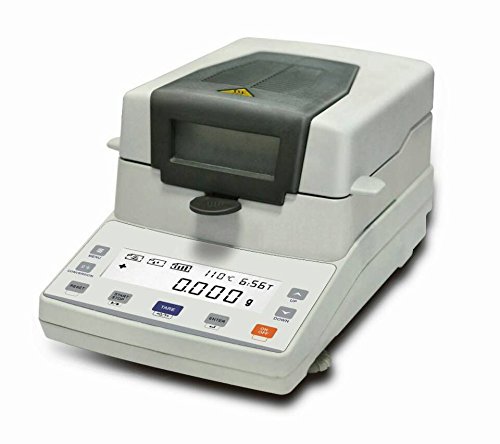
Figure 1: YUCHENGTECH XY-100MW Halogen Moisture Analyzer ready for operation. The lid is open, revealing the sample pan and heating chamber. A blue granular sample có thể nhìn thấy trong chảo.
3. Kết nối nguồn điện
Connect the power cord to the analyzer and then to a suitable grounded power outlet. If using a 110V power supply, ensure a compatible transformer is used as specified by the manufacturer.
4. Chuẩn bị ban đầu
Before first use, ensure the sample pan support and heating element are correctly installed and clean. Allow the device to warm up for at least 15 minutes after connecting power before performing any measurements.
Hướng dẫn sử dụng
1. Bật/Tắt nguồn
Nhấn nút QUYỀN LỰC button to turn the analyzer on. The display will illuminate and perform a self-test. To turn off, press and hold the QUYỀN LỰC Nhấn giữ nút cho đến khi màn hình tắt.
2. Sample Chuẩn bị
Chuẩn bị của bạnample according to standard laboratory procedures. Ensure the sample is evenly spread on a clean, dry sample pan. The recommended sample size is typically between 1-10 grams, depending on the material and desired accuracy.
3. Thiết lập tham số
Use the control panel buttons to set the desired drying temperature (range: 40-199 degrees Celsius) and drying time. Consult your material's specifications for optimal settings. The temperature adjustment increment is 1 degree Celsius.
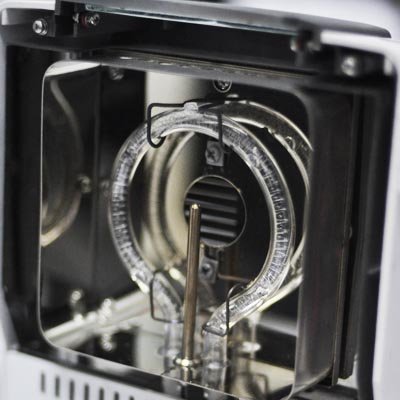
Hình 2: Chi tiết view of the halogen heating element, responsible for drying the sample. Ensure this area is kept clean and free from obstructions.
4. Starting a Test
- Đặt s đã chuẩn bịampĐặt chảo lên giá đỡ chảo.
- Đậy nắp nhẹ nhàng.
- Nhấn nút BẮT ĐẦU button to begin the drying process. The display will show the current weight, temperature, and elapsed time.
5. Đọc kết quả
Once the test is complete, the analyzer will beep, and the final moisture content (typically displayed as a percentage) will be shown on the screen. Record the results as needed. Open the lid and carefully remove the sample pan using heat-resistant gloves.
BẢO TRÌ
1. Vệ sinh
Thường xuyên vệ sinh sample pan, pan support, and the interior of the heating chamber. Use a soft, damp cloth and mild detergent. Ensure the device is unplugged and cooled down before cleaning. Do not use abrasive cleaners or solvents.
2. Hiệu chuẩn
Periodic calibration with certified reference weights is recommended to maintain measurement accuracy. Refer to the calibration section in the full user manual (if provided separately) for detailed instructions.
3. Lưu trữ
When not in use for extended periods, store the analyzer in a clean, dry, and temperature-controlled environment. Cover the device to protect it from dust.
Xử lý sự cố
| Vấn đề | Nguyên nhân có thể | Giải pháp |
|---|---|---|
| Thiết bị không bật nguồn. | Không có nguồn điện; dây nguồn bị lỏng; ổ cắm bị hỏng. | Check power cord connection; verify outlet functionality; ensure transformer is used for 110V. |
| Các bài đọc không chính xác. | Unstable surface; dirty pan/chamber; calibration needed; incorrect sampchuẩn bị le. | Place on a stable surface; clean components; perform calibration; ensure proper sample spreading. |
| Bộ phận làm nóng không hoạt động. | Element failure; incorrect temperature setting. | Verify temperature setting; contact support if element appears faulty. |
| Màn hình hiển thị thông báo lỗi. | Lỗi nội bộ cụ thể. | Note the error code and consult the full user manual or contact customer support. |
Thông số kỹ thuật
| Tính năng | Giá trị |
|---|---|
| Người mẫu | XY-100MW |
| Dung tích | 110g |
| Khả năng đọc | 1mg |
| Khả năng lặp lại | 0.01% |
| Kích thước chảo | Ø90mm |
| Phạm vi nhiệt độ sưởi ấm | 40-199 độ C |
| Điều chỉnh nhiệt độ | 1 độ C |
| Nhiệt độ môi trường | 5-35 độ C |
| Tậptage | 220V 50Hz (110V requires transformer) |
Bảo hành và Hỗ trợ
This YUCHENGTECH product is covered by a standard manufacturer's warranty. For detailed warranty terms and conditions, please refer to the documentation included with your purchase or visit the official YUCHENGTECH website. For technical support, service, or spare parts, please contact your local distributor or the manufacturer directly.
Manufacturer: YUCHENGTECH
Model Number: YUCHENG715