
Giới thiệu
This manual provides instructions for the proper use and care of your Helios 77M-4 50mm F1.8 vintage lens. Designed for Sony E-mount cameras, this manual focus lens offers a classic photographic experience with its distinct optical characteristics. Please read this manual thoroughly before using the lens to ensure optimal performance and longevity.
Linh kiện ống kính
Familiarize yourself with the main components of your Helios 77M-4 lens.
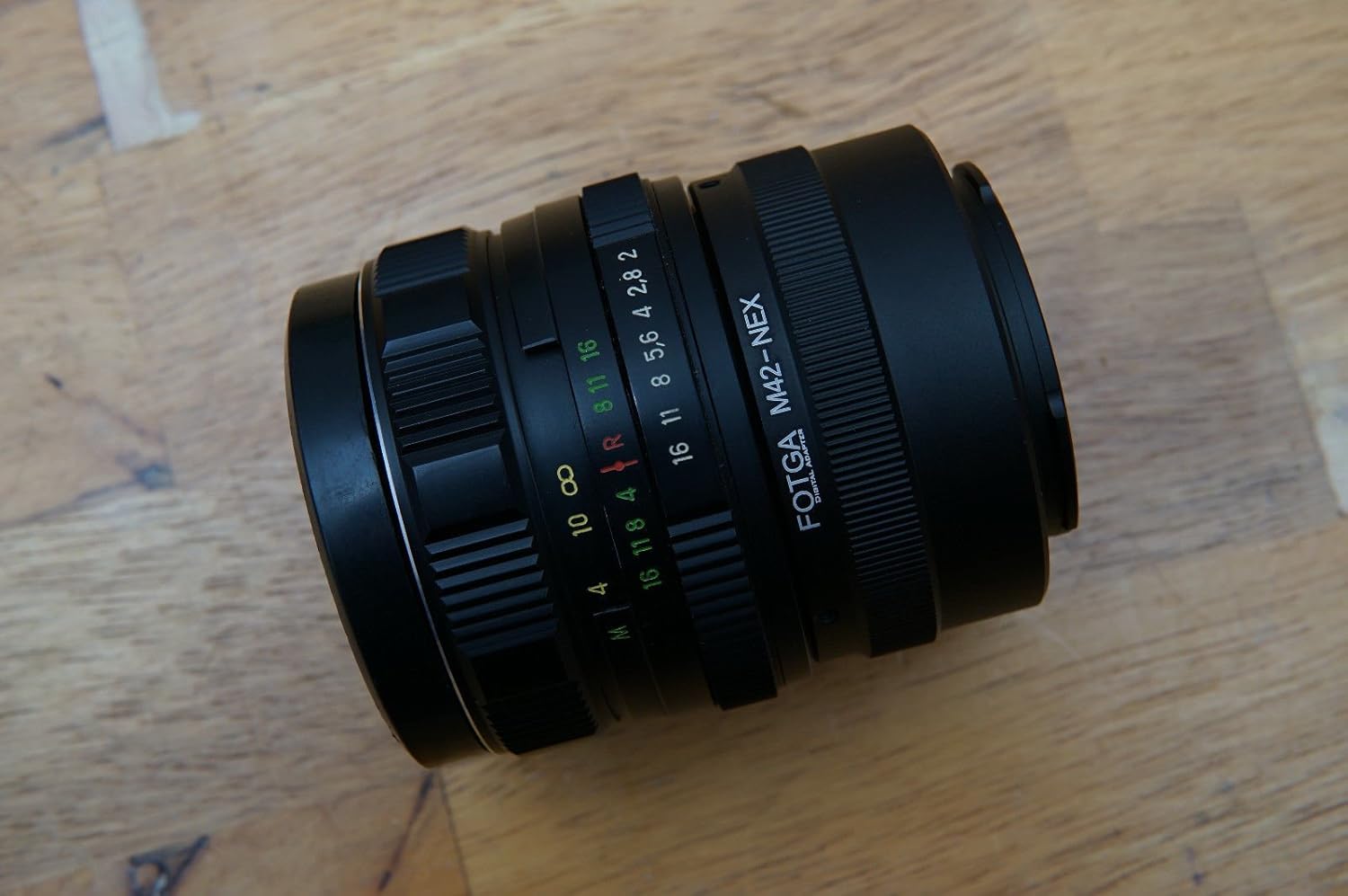
Image: The Helios 77M-4 50mm F1.8 lens, displaying its manual focus ring, aperture ring, and depth of field scale. This view highlights the robust construction and clear markings essential for manual operation.
- Vòng lấy nét: Used to adjust the focus manually.
- Vòng khẩu độ: Used to set the desired aperture (f-stop).
- Thang độ sâu trường ảnh: Provides an indication of the depth of field at various apertures.
- Vòng gắn: Kết nối ống kính với thân máy ảnh.
Cài đặt
Gắn ống kính
- Đảm bảo máy ảnh của bạn đã tắt.
- Remove the rear lens cap from the Helios 77M-4 lens and the body cap from your Sony E-mount camera.
- Align the white index mark on the lens barrel with the corresponding white index mark on the camera body.
- Lắp ống kính vào ngàm máy ảnh và xoay theo chiều kim đồng hồ cho đến khi nghe tiếng "tách". Không được dùng lực mạnh khi lắp ống kính.
- Once mounted, remove the front lens cap.

Image: The Helios 77M-4 lens securely attached to a Sony E-mount camera body. This illustrates the correct mounting position, ready for use.
Cài đặt máy ảnh
Since this is a manual lens, you will need to adjust your camera settings:
- Đặt máy ảnh của bạn thành Hướng dẫn sử dụng (M) or Aperture Priority (A) cách thức.
- Cho phép "Release without lens" or "Shoot without lens" in your camera's menu, as the camera will not detect an electronic connection to the lens.
- Consider using "Focus Peaking" Và "Magnified View" features on your camera for easier manual focusing. Refer to your camera's manual for specific instructions on these features.
Vận hành ống kính
Điều chỉnh khẩu độ
The aperture is controlled directly on the lens using the aperture ring. Rotate the ring to select your desired f-stop. A wider aperture (smaller f-number like F1.8) allows more light and creates a shallower depth of field, ideal for portraits. A narrower aperture (larger f-number) allows less light and creates a deeper depth of field, suitable for landscapes.
Lấy nét thủ công
To focus, rotate the focus ring on the lens barrel until your subject appears sharp in the viewfinder or on the LCD screen. Utilize your camera's focus peaking and magnification features for precise focusing, especially at wider apertures.
- Tập trung đạt đỉnh: Làm nổi bật các khu vực được lấy nét bằng đường viền màu.
- Phóng to View: Zooms in on a portion of the image for critical focus assessment.
BẢO TRÌ
Vệ sinh ống kính
- Use a soft, lint-free microfiber cloth specifically designed for optical surfaces to clean the front and rear elements.
- Đối với những vết bẩn cứng đầu, hãy thấm một lượng nhỏ dung dịch vệ sinh ống kính lên khăn lau, không thấm trực tiếp lên ống kính.
- Hãy dùng chổi thổi bụi để loại bỏ các hạt bụi trước khi lau nhằm tránh làm trầy xước.
- Tuyệt đối không sử dụng vật liệu mài mòn hoặc hóa chất mạnh.
Kho
- Luôn gắn nắp ống kính trước và sau khi không sử dụng ống kính.
- Bảo quản ống kính ở nơi khô ráo, thoáng mát, tránh ánh nắng trực tiếp và nhiệt độ cao.
- If storing for extended periods, consider using a dehumidifying agent to prevent fungus growth.
Xử lý sự cố
| Vấn đề | Nguyên nhân có thể | Giải pháp |
|---|---|---|
| Camera does not recognize lens / Cannot take photos | Manual lens, no electronic contacts. | Enable "Release without lens" or "Shoot without lens" in camera settings. |
| Hình ảnh bị mờ | Incorrect focus or camera shake. | Ensure proper manual focus using focus peaking/magnification. Use a faster shutter speed or tripod to prevent camera shake. |
| Images are too dark/bright | Cài đặt phơi sáng không chính xác (khẩu độ, tốc độ màn trập, ISO). | Adjust aperture on the lens. Adjust shutter speed and ISO on the camera to achieve desired exposure. |
| Dust or smudges on images | Các thấu kính bị bẩn. | Clean lens elements carefully using a blower brush and microfiber cloth. |
Thông số kỹ thuật
| Tính năng | Chi tiết |
|---|---|
| Người mẫu | Helios 77M-4 |
| Độ dài tiêu cự | 50mm |
| Khẩu độ tối đa | F1.8 |
| Loại ống kính | Ống kính Prime tiêu chuẩn |
| Gắn kết tương thích | Sony E-Mount (NEX, A7 series, 6500, a6300, a6000, a5100, a5000, a3000) |
| Loại tiêu điểm | Lấy nét thủ công |
| Nhà sản xuất | 77M-4 (as per product data) |
Bảo hành và Hỗ trợ
This product is a vintage lens. Specific warranty information may vary depending on the seller and purchase conditions. Please refer to your purchase documentation for details regarding any applicable warranty.
For technical support or inquiries, please contact the retailer or the original manufacturer if contact information is available. As a vintage item, direct manufacturer support may be limited.