
Giới thiệu
This manual provides essential information for the safe and efficient use of your SANSUI SCM39-B11 39V High-Vision LCD TV. Please read these instructions thoroughly before operating the television and retain them for future reference. This television features a reliable Japanese design, incorporating a main board developed by Toshiba Visual Solutions Corporation, with evaluation and production management handled by a specialized team in Echizen City, Fukui Prefecture.
The SCM39-B11 model is a 2017 release, designed for terrestrial digital broadcasting, and supports external HDD recording via USB connection.
Thông tin an toàn
Luôn tuân thủ các biện pháp phòng ngừa an toàn cơ bản khi sử dụng tivi này để giảm nguy cơ hỏa hoạn, điện giật và thương tích.
- Không nên để tivi tiếp xúc với mưa hoặc hơi ẩm.
- Không được chặn các lỗ thông gió. Đảm bảo có đủ không gian xung quanh tivi để luồng không khí lưu thông tốt.
- Do not place the television on an unstable cart, stand, tripod, bracket, or table.
- Hãy rút phích cắm tivi khi có giông bão hoặc khi không sử dụng trong thời gian dài.
- Chuyển mọi dịch vụ bảo dưỡng cho nhân viên có trình độ.
Nội dung gói
Xác minh rằng tất cả các mục đều có trong gói hàng:
- SANSUI SCM39-B11 39V LCD TV
- Điều khiển từ xa
- Pin (dành cho điều khiển từ xa)
- MiniB-CAS Card
- B-CAS Card Cover (with screws)
- Chân đế (có ốc vít)
- Hướng dẫn sử dụng (tài liệu này)
- Thẻ bảo hành
Hướng dẫn thiết lập
1. Lắp đặt chân đế
Carefully place the television screen-down on a soft, flat surface. Attach the included stand to the bottom of the television using the provided screws. Ensure the stand is securely fastened before placing the television upright.

Hình ảnh: Mặt trước view of the SANSUI SCM39-B11 TV with its stand, showing the display and the two silver-colored feet.
2. Cáp kết nối
Refer to the back panel of the television for connection ports.

Hình ảnh: Phía sau view of the SANSUI SCM39-B11 TV, displaying the back panel with various input ports including HDMI, USB, and antenna connections.
- Kết nối ăng ten: Connect your terrestrial digital antenna cable to the ANTENNA IN port.
- Thiết bị HDMI: Connect DVD players, Blu-ray players, game consoles, or other HDMI-compatible devices to the HDMI 1 or HDMI 2 ports. This model has 2 HDMI ports.
- USB External HDD: For recording, connect a compatible external USB Hard Disk Drive (HDD) to the USB port.
- Quyền lực: Connect the power cord to the AC inlet on the television and then to a wall outlet.
3. Thiết lập ban đầu
After connecting all cables and powering on the TV, the initial setup wizard will guide you through the process. This typically includes:
- Sự lựa chọn ngôn ngữ.
- Region selection.
- Automatic channel scan for terrestrial digital broadcasts. Ensure your antenna is properly connected for this step.
Hướng dẫn sử dụng
Các hoạt động cơ bản
- Bật/Tắt nguồn: Nhấn nút QUYỀN LỰC nút trên điều khiển từ xa.
- Lựa chọn kênh: Sử dụng CH +/- buttons or the number buttons on the remote.
- Điều chỉnh âm lượng: Sử dụng VÒNG +/- nút bấm.
- Nguồn vào: Nhấn nút ĐẦU VÀO button to cycle through connected devices (TV, HDMI 1, HDMI 2, etc.).
Recording with External HDD
This TV supports recording terrestrial digital broadcasts to an external USB HDD. Ensure your HDD is connected to the USB port.
- Lên lịch ghi âm: Use the Electronic Program Guide (EPG) to select programs for recording. The EPG supports a 1-week display.
- Automatic Chapter Marking: The TV can detect commercials during recording and automatically set chapter marks, allowing for easier navigation during playback.
Chức năng phát lại
When playing back recorded content from an external HDD, the following functions are available:
- Phát lại Lặp lại: Replay a section or the entire program.
- Chase Playback: Watch a program from the beginning while it is still being recorded.
- 1.5x Speed Playback: Watch recorded content at an accelerated speed.
Cải thiện hình ảnh và âm thanh
- Blue Light Guard: Activate this function via the remote control to reduce blue light emission by up to approximately 50%, which may help reduce eye strain.
- Picture Enhancer: This feature automatically adjusts the super-resolution processing level according to the input content, ensuring optimal image display at all times.
- Japanese Paper Speakers: The integrated speakers utilize Japanese paper for clear sound reproduction across high to low frequencies.
Các tính năng bổ sung
- Screen Freeze Function: Pause the live broadcast or current display.
- HDMI Connected Device Linkage: Control compatible HDMI-connected devices using the TV remote.
- Bi-directional Data Communication: Supports two-way data communication.
BẢO TRÌ
Vệ sinh tivi
- Màn hình: Lau nhẹ màn hình bằng khăn mềm, khô, không xơ. Đối với các vết bẩn cứng đầu, hãy dùng khăn mềm lau nhẹ.ampen the cloth with water or a specialized screen cleaner (ensure it is safe for LCD screens) and wipe carefully. Do not spray liquid directly onto the screen.
- Thân hình: Wipe the television body with a soft, dry cloth. Avoid using abrasive cleaners, waxes, or solvents as they can damage the finish.
Chăm sóc điều khiển từ xa
- Replace batteries when the remote control's response becomes slow or inconsistent.
- Không trộn lẫn pin cũ và pin mới, hoặc các loại pin khác nhau.
- Keep the remote control away from moisture and direct sunlight.
Xử lý sự cố
Nếu bạn gặp sự cố với tivi, hãy tham khảo các vấn đề và giải pháp thường gặp dưới đây trước khi liên hệ với bộ phận hỗ trợ.
| Vấn đề | Nguyên nhân có thể / Giải pháp |
|---|---|
| Không có điện | Ensure the power cord is securely plugged into both the TV and the wall outlet. Check if the outlet is functioning. |
| No picture / No signal | Verify antenna connection. Check the input source selection (e.g., HDMI 1, HDMI 2, TV). Perform a channel scan if necessary. |
| Không có âm thanh | Check volume level and mute status. Ensure external audio devices are properly connected if used. |
| Điều khiển từ xa không hoạt động | Kiểm tra và thay pin. Đảm bảo không có vật cản nào giữa điều khiển từ xa và cảm biến hồng ngoại của TV. |
| External HDD recording issues | Ensure the USB HDD is properly connected and formatted for the TV. Some HDDs may have compatibility issues. Try a different USB port or HDD if available. |
| HDMI device not recognized | Ensure the HDMI cable is securely connected. Try a different HDMI port or cable. Power cycle both the TV and the HDMI device. |
Thông số kỹ thuật sản phẩm

Image: A table detailing the specifications of the SANSUI SCM39-B11 TV, including screen size, resolution, tuner type, recording capabilities, connectivity, and power consumption.
| Tính năng | Đặc điểm kỹ thuật |
|---|---|
| Tên mẫu | SCM39-B11 |
| Kích thước màn hình | 39V-type (39 inches) |
| Công nghệ hiển thị | Màn hình tinh thể lỏng |
| Nghị quyết | High-Vision (HD 1366 x 768) |
| Bộ chỉnh âm | Terrestrial Digital x1, BS Digital: None, CS Digital: None |
| External HDD Recording | Hỗ trợ qua USB |
| Cổng HDMI | 2 hệ thống |
| Cổng USB | Hệ thống 1 |
| Tương thích với giá treo tường | VESA200mmx200mm |
| Trọng lượng sản phẩm | 6.1kg |
| Kích thước (Rộng x Cao x Sâu) | Approx. 88.8 cm x 57.5 cm x 21.0 cm (with stand) |
| Tiêu thụ điện năng | 61W |
| Năm phát hành | 2017 |

Hình ảnh: Mặt trước view of the SANSUI SCM39-B11 TV with overlaid measurements for width (88.8cm), height (57.5cm), and weight (6.1kg).

Hình ảnh: Bên view of the SANSUI SCM39-B11 TV, illustrating the depth of the television body (9.9cm) and the total depth including the stand (21cm).
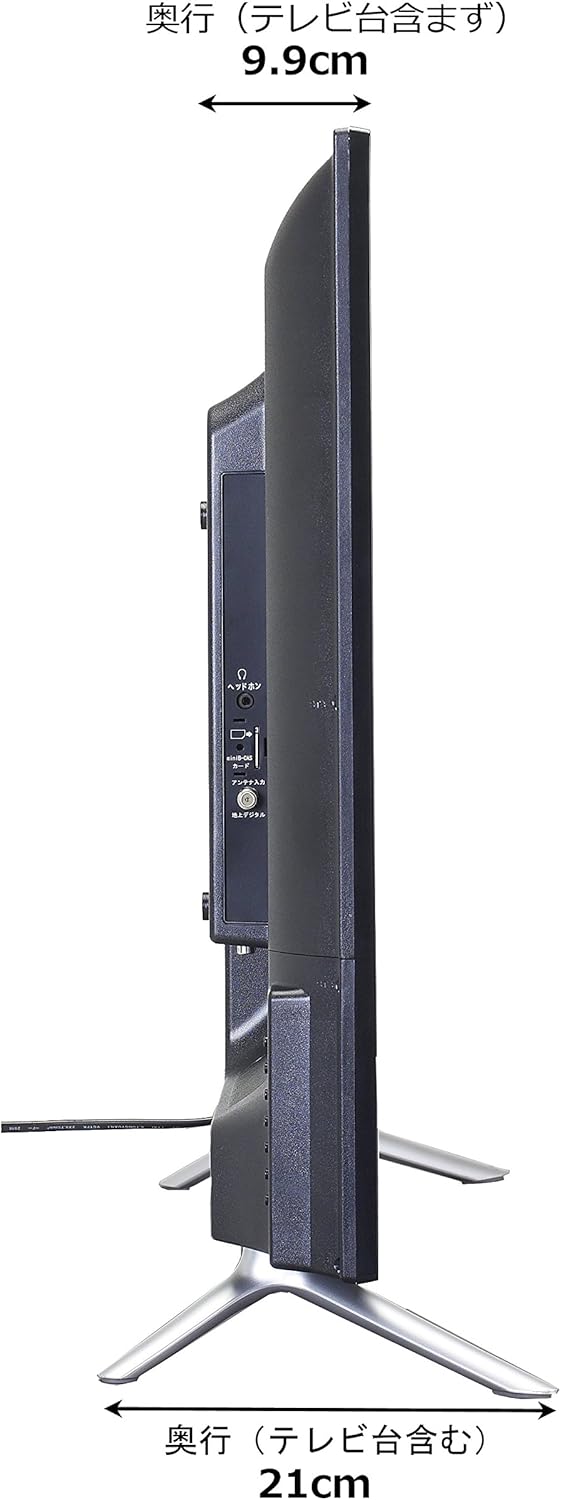
Image: Diagram showing the SANSUI SCM39-B11 TV on a stand next to a human figure (approx. 160cm tall) for visual scale, with TV dimensions indicated.
Bảo hành và Hỗ trợ
Your SANSUI SCM39-B11 television comes with a warranty. Please refer to the included warranty card for details regarding coverage period and terms. Keep your purchase receipt as proof of purchase.
For technical support, service, or inquiries not covered in this manual, please contact SANSUI customer service. Contact information can typically be found on the warranty card or the official SANSUI webđịa điểm.