
Giới thiệu
Thank you for choosing the Aqualin Dual Outlet Irrigation Timer Controller. This device is designed to automate your garden watering, providing convenience and efficient water management. With two independently programmable outlets, you can customize watering schedules for different areas of your garden or lawn. Please read this manual carefully to ensure proper installation, operation, and maintenance of your irrigation timer.
Sản phẩm trênview
The Aqualin YL21060 features a clear LCD display, intuitive controls, and robust construction for outdoor use. It offers flexible programming options, including a rain delay function to conserve water.

The Aqualin Dual Outlet Irrigation Timer Controller, shown attached to a faucet, featuring a digital display and two independent water outlets.
Các tính năng chính:
- Hai ổ cắm độc lập: Program two separate watering zones with unique schedules.
- Lập trình linh hoạt: Set desired frequency and duration for each zone.
- Chức năng hoãn trận đấu do mưa: Skip watering sessions during and after rainy days (1-7 days).
- Tưới nước thủ công: Initiate immediate watering without interrupting programmed cycles.
- Chống thấm IPX5: Designed for outdoor durability.
- Cài đặt dễ dàng: Features a swivel joint for quick connection to standard faucets (3/4" or 1").
- Màn hình LCD: Clear digital display for easy programming and monitoring.
- Bộ lọc đầu vào: Helps prevent debris from entering the system.

Một quaview of the Aqualin timer's features, including manual watering, IPX5 waterproofing, two independent zones, an inlet filter, an LCD display, and a rain delay function.
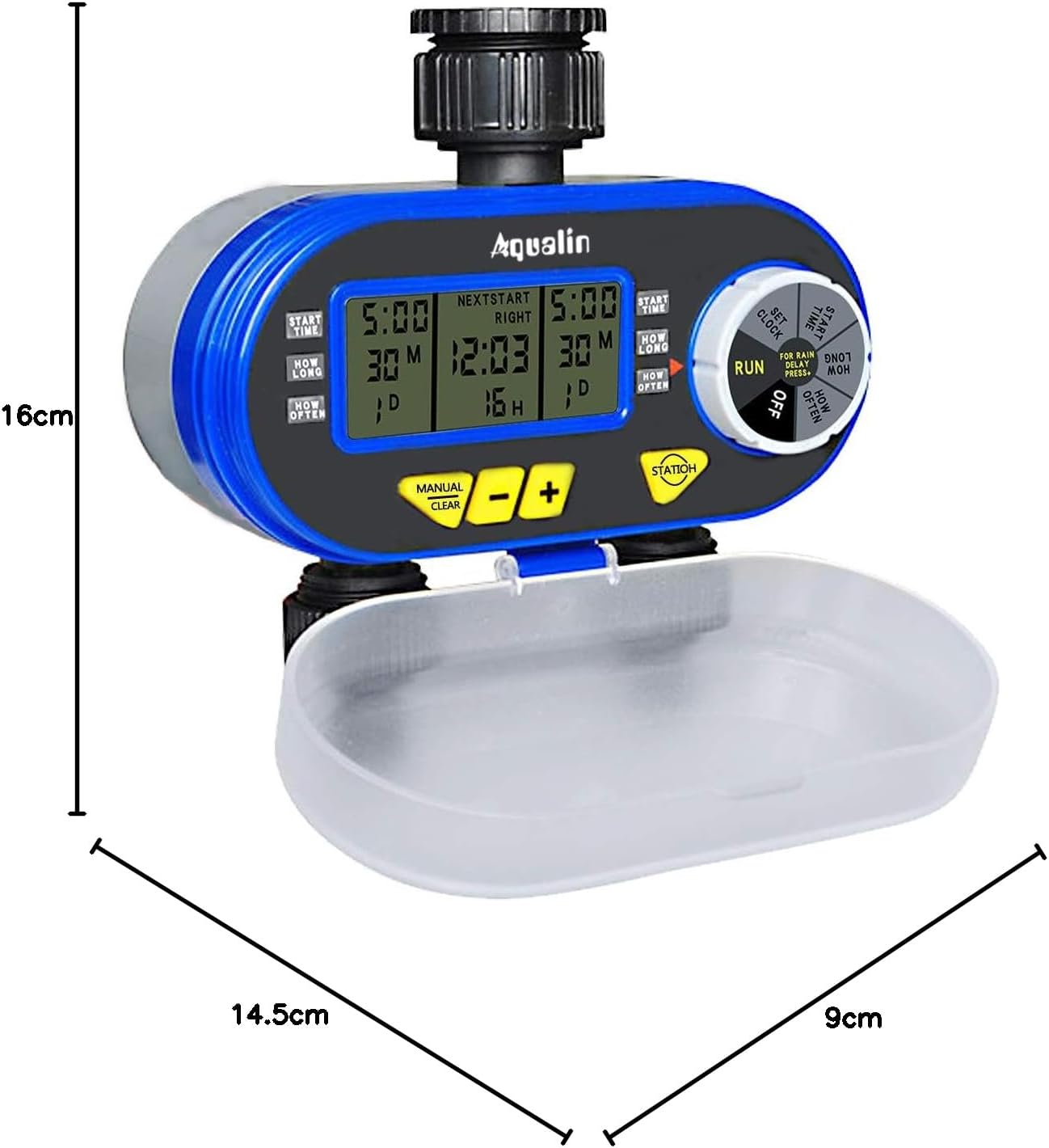
A diagram showing the physical dimensions of the Aqualin timer: 16cm height, 14.5cm length, and 9cm depth.
Cài đặt
- Lắp đặt pin:
- Open the battery compartment cover located at the back of the unit.
- Insert two (2) AA alkaline batteries, ensuring correct polarity.
- Đóng chặt ngăn chứa pin.
- Kết nối với vòi nước:
- Attach the timer to a standard 3/4" (19mm) or 1" (25mm) outdoor faucet. The swivel joint allows for easy, tool-free connection.
- Ensure the connection is tight to prevent leaks. Do not overtighten.
- Kết nối vòi tưới vườn của bạn với hai đầu ra độc lập ở phía dưới của bộ hẹn giờ.
- Cài đặt thời gian ban đầu:
- Rotate the main dial to the 'SET CLOCK' position.
- Use the '+' and '-' buttons to adjust the current time.
- Press 'ENTER' to confirm the setting.
- Cảm biến mưa (Tùy chọn):
- If using an external rain sensor, connect it to the designated rain sensor hole.
- Ensure the internal contacts for the rain sensor are not bent if no sensor is connected, as this can prevent watering.

Cận cảnh view highlighting the 360-degree anti-leak design, the rain sensor input hole, and the battery compartment cover of the Aqualin timer.
Hướng dẫn sử dụng
The Aqualin timer offers both automatic and manual watering modes for maximum flexibility.
Video demonstrating the automatic and manual functions of the Aqualin Dual Outlet Irrigation Timer Controller, showing how to set watering schedules and activate manual irrigation.
1. Automatic Function Programming:
The timer allows independent programming for two zones (Zone 1 and Zone 2).

This image illustrates the independent programming capabilities of the Aqualin timer, with separate settings for start time, duration, and frequency for Zone 1 and Zone 2.
- Đặt thời gian bắt đầu:
- Rotate the dial to 'START TIME'.
- Use '+' and '-' to set the desired start time for Zone 1. Press 'ENTER'.
- Repeat for Zone 2.
- Thiết lập thời lượng (thời gian):
- Rotate the dial to 'HOW LONG'.
- Use '+' and '-' to set the watering duration for Zone 1 (1 minute to 240 minutes). Press 'ENTER'.
- Repeat for Zone 2.
- Thiết lập tần suất:
- Rotate the dial to 'HOW OFTEN'.
- Use '+' and '-' to set the watering frequency for Zone 1 (e.g., every 12 hours, every 3 days). Press 'ENTER'.
- Repeat for Zone 2.
- Chạy chương trình:
- Once all settings are configured, rotate the dial to 'RUN'. The timer will now operate according to your programmed schedule.
2. Rain Delay Function:
To prevent overwatering and save water, use the rain delay feature.

The timer's display showing the Rain Delay feature, which allows skipping irrigation for 1 to 7 days to conserve water.
- While in 'RUN' mode, press the 'RAIN DELAY' button.
- Use '+' or '-' to select the desired delay period (e.g., 24, 48, 72 hours, or up to 7 days).
- Press 'ENTER' to activate the rain delay. Watering will resume automatically after the selected period.
3. Manual Watering:
Để tưới nước ngay lập tức mà không ảnh hưởng đến lịch trình đã định của bạn:

The Aqualin timer in manual watering mode, allowing for immediate irrigation without altering programmed schedules.
- While in 'RUN' mode, press the 'MANUAL/CLEAR' button.
- Use '+' or '-' to set the desired manual watering duration (1 to 360 minutes).
- Press 'ENTER' to start manual watering.
- To stop manual watering, press 'MANUAL/CLEAR' again.
BẢO TRÌ
- Thay thế pin: Replace AA batteries every 1.5 to 3 months, or when the low battery indicator appears on the display, to ensure continuous operation.
- Vệ sinh bộ lọc đầu vào: Periodically check and clean the inlet filter to prevent clogging and maintain optimal water flow. Remove the timer from the faucet, unscrew the inlet connection, and rinse the filter under running water.
- Mùa đông: Before the first frost, disconnect the timer from the faucet and hoses. Drain any remaining water from the unit and store it indoors in a dry, frost-free location.
- Vệ sinh chung: Xóa hẹn giờ với quảng cáoamp vải để loại bỏ bụi bẩn và mảnh vụn. Không sử dụng chất tẩy rửa có tính mài mòn hoặc dung môi.
Xử lý sự cố
| Vấn đề | Nguyên nhân có thể | Giải pháp |
|---|---|---|
| Không có dòng nước chảy |
|
|
| Rò rỉ từ các mối nối |
|
|
| Timer not programming correctly |
|
|
| Ngăn chứa pin bị kẹt | Battery compartment inserted incorrectly. | Ensure the battery compartment is inserted in the correct orientation. Forcing it can cause damage. |
Thông số kỹ thuật
| Tính năng | Chi tiết |
|---|---|
| Thương hiệu | Aqualin |
| Số hiệu mẫu | YL21060 |
| Vật liệu | ABS |
| Kích thước (D x R x C) | 14.5cm x 9cm x 16cm |
| Số cài đặt | 2 (Khu vực độc lập) |
| Kết nối vòi | 3/4" (19mm) or 1" (25mm) |
| Thời gian tưới nước | 1 phút đến 240 phút |
| Nguồn điện | 2 x Pin AA |
| GTIN | 613869410455 |
Bảo hành và Hỗ trợ
The Aqualin Dual Outlet Irrigation Timer Controller comes with a standard manufacturer's warranty. For specific warranty details, technical assistance, or to download a detailed PDF instruction manual, please visit the official Aqualin webtrang web hoặc liên hệ với bộ phận chăm sóc khách hàng của họ. Giữ lại hóa đơn mua hàng để làm bằng chứng mua hàng khi yêu cầu bảo hành.
Các tình huống sử dụng

This image illustrates the versatility of the Aqualin timer, suitable for various watering applications such as gardens, lawns, farms, and potted plants.