
Giới thiệu
This manual provides comprehensive instructions for the setup, operation, and maintenance of your GPX Digital AM/FM Clock Radio, model C224B. Please read this manual thoroughly before using the device to ensure proper functionality and to maximize your user experience. Keep this manual for future reference.
Sản phẩm trênview
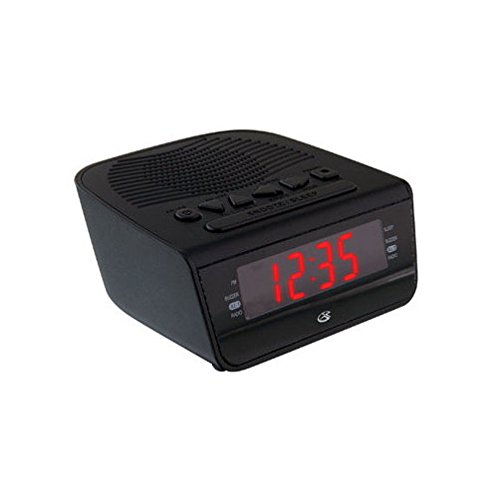
Hình 1: Đằng trước view of the GPX Digital AM/FM Clock Radio. This image shows the compact black unit with its digital display and control buttons.
The GPX Digital AM/FM Clock Radio (C224B) is designed for reliable timekeeping and audio entertainment. Key features include a clear multi-display clock, AM/FM radio tuner, dual alarm functionality, and a battery backup option to ensure continuous operation during power interruptions. Its compact and modern design makes it suitable for various indoor settings.
Cài đặt
1. Tháo dỡ
Carefully remove the clock radio from its packaging. Ensure all components are present: the clock radio unit and the power adapter.
2. Kết nối nguồn điện
- Plug the power adapter into the DC input jack located on the back of the clock radio.
- Plug the other end of the power adapter into a standard wall outlet (AC 120V, 60Hz).
- Màn hình sẽ sáng lên, báo hiệu thiết bị đang nhận nguồn điện.
3. Lắp đặt bộ lưu điện dự phòng (Tùy chọn)
Để dự phòng nguồn điện trong thời giantages, install batteries (not included).
- Xác định vị trí ngăn chứa pin ở phía dưới của thiết bị.
- Mở nắp ngăn chứa pin.
- Insert the required batteries (e.g., 2 x AAA, check unit for specific type) according to the polarity markings (+ and -).
- Đóng chặt nắp ngăn chứa pin.
Ghi chú: Batteries are for backup only and will not power the display or radio functions continuously. They preserve time and alarm settings during a power interruption.
Hướng dẫn sử dụng
1. Đặt thời gian
- Nhấn và giữ ĐẶT THỜI GIAN nhấn nút cho đến khi màn hình nhấp nháy.
- Sử dụng GIỜ Và PHÚT các nút để điều chỉnh thời gian.
- Nhấn ĐẶT THỜI GIAN Nhấn lại để xác nhận và thoát khỏi chế độ cài đặt thời gian.
2. Cài đặt báo thức (Báo thức 1 và Báo thức 2)
This unit features dual alarms, allowing you to set two independent wake-up times.
- Nhấn và giữ BÁO ĐỘNG 1 BỘ (hoặc BÁO ĐỘNG 2 BỘ) button until the alarm time flashes.
- Sử dụng GIỜ Và PHÚT buttons to adjust the desired alarm time.
- Nhấn BÁO ĐỘNG 1 BỘ (hoặc BÁO ĐỘNG 2 BỘ) again to confirm the time.
- Immediately after confirming the time, use the CHẾ ĐỘ BÁO ĐỘNG button to select the alarm source: CUỘN or RADIO.
- The alarm icon (e.g., AL1 or AL2) will appear on the display, indicating the alarm is active.
To turn off an alarm, press the corresponding BÁO ĐỘNG 1 BẬT/TẮT (hoặc BÁO ĐỘNG 2 BẬT/TẮT) button. The alarm icon will disappear.
3. Vận hành radio AM/FM
- Nhấn nút BẬT/TẮT ĐÀI để bật radio.
- Nhấn nút BAN NHẠC Nút để chuyển đổi giữa băng tần AM và FM.
- Sử dụng TUẦN + or ĐIỀU HƯỚNG - các nút để điều chỉnh thủ công đến đài phát thanh mong muốn.
- To automatically scan for the next available station, press and hold TUẦN + or ĐIỀU HƯỚNG - trong vài giây.
- Điều chỉnh âm lượng bằng cách sử dụng KHỐI LƯỢNG + or ÂM LƯỢNG - nút bấm.
- Để tắt radio, hãy bấm BẬT/TẮT ĐÀI nút một lần nữa.
4. Chức năng báo lại
Khi có báo động, hãy nhấn nút GIẤC NGŨ NGẮN Nhấn nút này để tạm thời tắt báo thức trong khoảng 9 phút. Báo thức sẽ kêu lại sau khi hết thời gian tạm dừng.
5. Chức năng ngủ
Chức năng ngủ cho phép đài phát thanh hoạt động trong một khoảng thời gian nhất định trước khi tự động tắt.
- Trong khi radio đang phát, hãy nhấn nút NGỦ Nhấn nút nhiều lần để chuyển đổi giữa các khoảng thời gian ngủ có sẵn (ví dụ: 90, 60, 30, 15 phút, TẮT).
- Đài sẽ tự động tắt sau thời gian đã chọn.
BẢO TRÌ
1. Vệ sinh
To clean the unit, wipe the exterior with a soft, slightly damp cloth. Do not use abrasive cleaners or solvents, as these may damage the finish. Ensure the unit is unplugged before cleaning.
2. Thay thế pin
If the battery backup function is not working, or if the unit loses time during a power outage, the backup batteries may need replacement. Follow the "Battery Backup Installation" steps in the Setup section to replace them.
Xử lý sự cố
| Vấn đề | Nguyên nhân có thể | Giải pháp |
|---|---|---|
| Thiết bị không bật nguồn. | Bộ chuyển đổi nguồn không được kết nối hoặc ổ cắm bị lỗi. | Hãy đảm bảo bộ chuyển đổi nguồn được cắm chắc chắn vào thiết bị và ổ cắm điện hoạt động bình thường. Thử cắm vào một ổ cắm khác xem sao. |
| Chuông báo động không kêu. | Chưa cài đặt báo thức, âm lượng báo thức quá nhỏ hoặc báo thức đã tắt. | Verify alarm time and source (buzzer/radio) are set correctly. Ensure alarm is activated (icon visible). Increase radio volume if alarm source is radio. |
| Bắt sóng vô tuyến kém. | Tín hiệu yếu hoặc nhiễu. | Adjust the position of the unit or the antenna (if external). Move away from other electronic devices that may cause interference. |
| Thời gian/cài đặt bị mất sau khi mất điệntage. | Pin dự phòng đã hết hoặc chưa được lắp. | Install fresh backup batteries or replace existing ones. |
Thông số kỹ thuật
- Người mẫu: C224B
- Nguồn điện: AC 120V, 60Hz (main); Battery Powered (backup)
- Kiểu hiển thị: Màn hình kỹ thuật số LED
- Ban nhạc vô tuyến: AM/FM
- Kích thước (Xấp xỉ): Rộng 5.12" x Cao 5.12"
- Trọng lượng xấp xỉ.): 3 Bảng Anh
- Màu sắc: Đen
- Vật liệu: Nhựa
Bảo hành và Hỗ trợ
For warranty information or technical support, please refer to the warranty card included with your product or visit the official GPX website. Do not attempt to repair this unit yourself, as this may void your warranty.
GPX Official Webđịa điểm: www.gpx.com


