
1. Giới thiệu
Thank you for choosing the Baseus Encok S16 Neck Hung Bluetooth Wireless In-Ear Earphone. This manual provides detailed instructions for setup, operation, and maintenance to ensure optimal performance and longevity of your device. Please read this manual thoroughly before use.
2. Nội dung gói hàng
Xác minh rằng tất cả các mục đều có trong gói hàng:
- 1 x Baseus Encok S16 Wireless Earphone
- 1 x Cáp sạc
- 1 x Hướng dẫn sử dụng
- 1 x Thẻ bảo hành

Image: Contents of the Baseus Encok S16 earphone package, showing the earphones, charging cable, user manual, and warranty card.
3. Sản phẩm hếtview
The Baseus Encok S16 earphones feature a neck-hung design for comfortable and secure wear. Key features include:
- Cố định từ tính: Earbuds can be magnetically joined when not in use, preventing tangling and loss.
- Adjustable Coils: The earphone line length can be adjusted by sliding for a customized fit.
- Âm thanh chất lượng cao: Equipped with a dynamic speaker unit, composite diaphragm, and independent tune trope structure for clear audio.
- Năng lượng hiệu quả: Utilizes a British CSR chip and 120mAh battery for low power consumption and extended battery life.
- Tương thích phổ quát: Smartly matches with smartphones and tablet PCs, compatible with all Bluetooth 4.0 enabled devices.

Image: Close-up of the Baseus Encok S16 earbuds demonstrating their magnetic connection capability.
4. Thiết lập
4.1 Sạc tai nghe
- Connect the provided charging cable to the charging port on the earphone's control unit.
- Kết nối đầu còn lại của cáp sạc với nguồn điện USB (ví dụ: cổng USB của máy tính, bộ chuyển đổi nguồn USB).
- Đèn báo sẽ sáng trong quá trình sạc và tắt hoặc đổi màu khi sạc đầy.
- Sạc đầy thường mất khoảng 1.5 đến 2 giờ.
4.2 Ghép nối Bluetooth
- Đảm bảo tai nghe được sạc đầy.
- Press and hold the Power button on the control unit until the indicator light flashes red and blue alternately, indicating pairing mode.
- Trên điện thoại thông minh hoặc thiết bị hỗ trợ Bluetooth, hãy vào cài đặt Bluetooth.
- Tìm kiếm available devices and select "Baseus Encok S16" from the list.
- Once connected, the indicator light will flash blue slowly or turn solid blue.
- Nếu được yêu cầu nhập mật khẩu, hãy nhập "0000".
5. Hướng dẫn vận hành
5.1 Điều khiển cơ bản
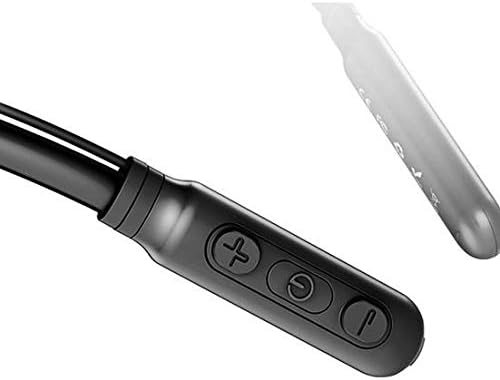
Image: Close-up of the Baseus Encok S16 earphone's inline control unit, showing the power/multi-function button, volume up, and volume down buttons.
| Cái nút | Chức năng |
|---|---|
| Nút nguồn (ở giữa) |
|
| Tăng âm lượng (+) |
|
| Giảm âm lượng (-) |
|
5.2 Đeo tai nghe
Place the neckband around your neck, ensuring the control unit is easily accessible. Insert the earbuds comfortably into your ears. Adjust the earphone line length using the sliding coils for a secure and comfortable fit.
6. Bảo trì
- Hãy thường xuyên vệ sinh tai nghe và bộ điều khiển bằng khăn mềm, khô.
- Avoid exposing the earphones to extreme temperatures, humidity, or corrosive liquids.
- Store the earphones in a cool, dry place when not in use. The magnetic earbuds can help prevent tangling during storage.
- Không tự ý tháo rời hoặc sửa chữa tai nghe, vì điều này sẽ làm mất hiệu lực bảo hành.
KHAI THÁC. Xử lý sự cố
| Vấn đề | Giải pháp |
|---|---|
| Không thể bật nguồn | Ensure the earphones are fully charged. Press and hold the Power button for 3 seconds. |
| Không thể ghép nối với thiết bị |
|
| Không có âm thanh hoặc âm lượng nhỏ |
|
| Kết nối không liên tục |
|
8. Thông số kỹ thuật
| Tính năng | Chi tiết |
|---|---|
| Thương hiệu | Cơ sở |
| Số hiệu mẫu | FWP-E-S16 |
| Công nghệ kết nối | Bluetooth |
| Phiên bản Bluetooth | 4.0 (compatible with devices enabling Bluetooth 4.0) |
| Yếu tố hình thức | In Ear, Neck Hung |
| Loại điều khiển | Điều khiển bằng giọng nói, cảm ứng (qua các nút bấm) |
| Dung lượng pin | 120mAh |
| Cân nặng | 30 gam |
| Các thành phần bao gồm | Wireless Earphone, Charging Cable, User Manual, Warranty Card |
9. Bảo hành và Hỗ trợ
This product comes with a Limited Warranty. Please refer to the included Warranty Card for detailed terms and conditions regarding coverage and duration.
For technical support or warranty claims, please contact your retailer or visit the official Baseus webtrang web cung cấp thông tin dịch vụ khách hàng.
Mã số nhận dạng thương mại toàn cầu (GTIN): 06953156264489