
Giới thiệu
This manual provides detailed instructions for the setup, operation, and maintenance of your A4tech Bloody Light Strike B314 Gaming Keyboard. Please read this manual thoroughly before using the product to ensure optimal performance and longevity.
Các tính năng chính
- Bloody 4 Light Strike Mechanical Switches: Experience ultra-fast response times of 0.2ms with infrared optic switches, providing a competitive edge in gaming.
- Độ bền được cải thiện: Designed for intensive use, featuring A,S,D,W silicon keys with a convex shape for improved control and longevity.
- Neon Glare System LED Backlighting: Customize your gaming environment with vibrant LED backlighting, making keys easy to locate in low-light conditions.
- 9 phím lập trình được: Personalize your gaming experience by assigning custom functions to 9 individually programmable keys.
- Double Secure Water-Resistance: The keyboard is electronically sealed with a water drain hole, protecting it from accidental spills and extending its lifespan.
Nội dung gói
Xác minh rằng tất cả các mục đều có trong gói hàng:
- Bloody Light Strike B314 Gaming Keyboard
- Hướng dẫn sử dụng (tài liệu này)

Image: The retail packaging for the Bloody Light Strike B314 Gaming Keyboard, showing the keyboard with LED backlighting and key features highlighted.
Hướng dẫn thiết lập
- Kết nối bàn phím: Cắm đầu nối USB của bàn phím vào cổng USB có sẵn trên máy tính.
- Cài đặt trình điều khiển: The keyboard is typically plug-and-play. Your operating system should automatically detect and install the necessary drivers. If prompted, follow the on-screen instructions.
- Cài đặt phần mềm (Tùy chọn): For advanced customization, including programming keys and managing backlighting, download and install the official Bloody software from the A4tech webđịa điểm.
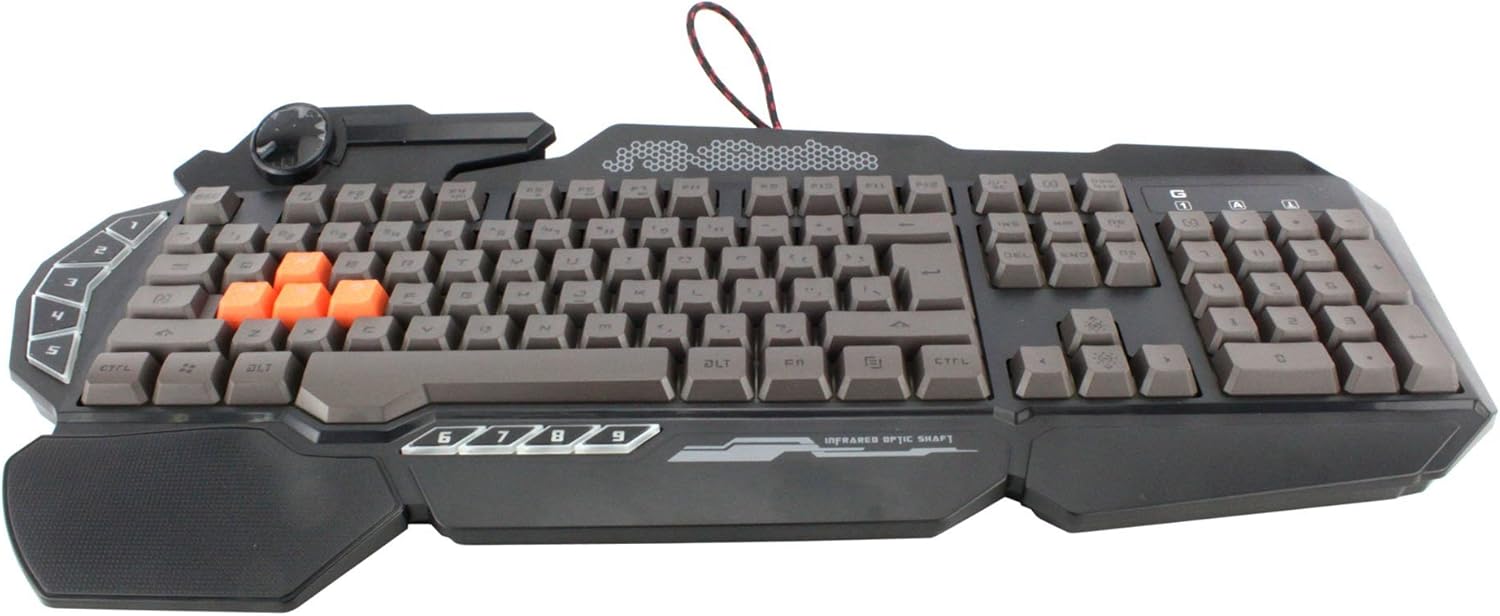
Hình ảnh: Từ trên xuống view of the Bloody Light Strike B314 Gaming Keyboard, showcasing the full QWERTY layout with orange WASD keys and dedicated macro keys on the left.
Hướng dẫn sử dụng
Cách sử dụng cơ bản
The Bloody B314 functions as a standard QWERTY keyboard for everyday typing and gaming. Its infrared mechanical switches provide a fast and responsive typing experience.
Phím có thể lập trình
The keyboard features 9 programmable keys, typically located on the left side. To customize these keys:
- Install the official Bloody software from the A4tech webđịa điểm.
- Launch the software and navigate to the key customization section.
- Select the desired programmable key (e.g., G1-G9 or similar).
- Assign macros, key functions, or multimedia controls as needed.
- Lưu chuyên nghiệp của bạnfile để áp dụng các thay đổi.
Điều khiển đèn nền LED
The Neon Glare System LED backlighting can be adjusted using function key combinations:
- Fn+F12: Cycle through different backlighting modes (e.g., static, breathing, off).
- Phím Fn + Mũi tên lên/xuống: Điều chỉnh độ sáng đèn nền.
- Fn + Mũi tên Trái/Phải: Adjust backlight speed or direction (if applicable to the mode).
Chế độ chơi
Activate Game Mode to disable the Windows key and prevent accidental interruptions during gameplay.
- Fn+F8: Bật / tắt Chế độ trò chơi.

Hình ảnh: Một góc cạnh view of the Bloody Light Strike B314 Gaming Keyboard, highlighting the ergonomic wrist rest and the distinct orange WASD keys.
BẢO TRÌ
Vệ sinh
- Ngắt kết nối bàn phím khỏi máy tính trước khi vệ sinh.
- Sử dụng một mềm, damp cloth to wipe the surface of the keyboard. Avoid harsh chemicals or abrasive materials.
- Để loại bỏ bụi và mảnh vụn giữa các phím, hãy sử dụng khí nén.
- The water-resistant design helps protect against spills, but it is still recommended to clean up liquids promptly.
Kho
Khi không sử dụng bàn phím trong thời gian dài, hãy bảo quản ở nơi khô ráo, thoáng mát, tránh ánh nắng trực tiếp và nhiệt độ quá cao hoặc quá thấp.
Xử lý sự cố
Bàn phím không phản hồi
- Đảm bảo cáp USB được cắm chắc chắn vào cả bàn phím và máy tính.
- Hãy thử cắm bàn phím vào một cổng USB khác.
- Khởi động lại máy tính của bạn.
- Check if the keyboard is recognized in your computer's Device Manager (Windows) or System Information (macOS).
Đèn nền không hoạt động
- Ensure the backlighting is not turned off using the Fn + F12 combination.
- Adjust brightness using Fn + Up Arrow.
- Nếu sử dụng pro tùy chỉnhfiles, ensure the backlighting settings are correctly configured in the Bloody software.
Các phím lập trình không hoạt động
- Verify that the Bloody software is installed and running.
- Ensure your custom profiles are loaded and active within the software.
- Check for any software updates for the Bloody keyboard utility.
Thông số kỹ thuật
| Tính năng | Chi tiết |
|---|---|
| Thương hiệu | A4tech |
| Số hiệu mẫu | A4TKLA45173 |
| Công nghệ kết nối | Hồng ngoại |
| Mô tả bàn phím | Cơ khí |
| Loại công tắc | Mechanical (Light Strike Optic) |
| Tính năng đặc biệt | Backlit, Programmable Keys, Water Resistant |
| Màu sắc | Đen |
| Hỗ trợ màu đèn nền bàn phím | RGB (Neon Glare System) |
| Số lượng chìa khóa | 104 |
| Nút có thể lập trình | 9 |
| Mức độ chống nước | Chống nước |
| Trọng lượng sản phẩm | 2.9 Bảng Anh |
Bảo hành và Hỗ trợ
Để biết thông tin về bảo hành và hỗ trợ kỹ thuật, vui lòng tham khảo trang web chính thức của A4tech. webhoặc liên hệ trực tiếp với bộ phận chăm sóc khách hàng của họ. Hãy giữ lại hóa đơn mua hàng để làm bằng chứng bảo hành.
Official A4tech Webđịa điểm: www.a4tech.com