
1. Giới thiệu
Cảm ơn bạn đã muaasing the ipega PG-9057 Wireless Game Controller. This manual provides detailed instructions for setting up, operating, and maintaining your device. Please read this manual carefully before use to ensure optimal performance and longevity of your controller.
2. Tính năng sản phẩm
- Kết nối không dây: Enjoy gaming freedom with wireless connection technology.
- Khả năng tương thích đa nền tảng: Supports Android devices (smartphones, tablets, TV boxes) and Windows PCs.
- High Durability Buttons: Equipped with high-quality, durable buttons for extended gaming sessions.
- Điều khiển chính xác: Features a D-pad with pressure sensitivity and a 360-degree joystick with no dead zone for accurate input.
- Thiết kế công thái học: Designed for comfortable grip and prolonged use.
- Giá đỡ điện thoại tích hợp: Conveniently mount your smartphone for mobile gaming.
3. Nội dung gói hàng
Vui lòng kiểm tra nội dung gói hàng khi mở hộp:
- Bộ điều khiển trò chơi không dây ipega PG-9057
- Cáp sạc USB
- User Manual (Japanese version included)
4. Thiết lập
4.1. Sạc bộ điều khiển
Before first use, fully charge the controller using the provided USB cable. Connect the small end of the USB cable to the controller's charging port and the other end to a USB power source (e.g., PC, USB wall adapter).
4.2. Device Compatibility Overview
The ipega PG-9057 controller supports various devices and connection methods as shown below:

This image displays the ipega PG-9057 Wireless Game Controller, highlighting its compatibility with various devices including smartphones, tablets, personal computers, and VR headsets.
4.3. Connection Methods and System Environment
The controller offers multiple connection options depending on your device and operating system. Refer to the table below for detailed compatibility.

This table outlines the system requirements and connection methods for the ipega PG-9057 controller, detailing compatibility with Android smartphones, tablets, and TV boxes via Bluetooth 4.0 or USB, and PCs via USB.
4.3.1. Bluetooth Connection (Android Devices)
- Đảm bảo bộ điều khiển đã được sạc.
- Nhấn và giữ TRANG CHỦ nút và A button simultaneously until the indicator light flashes rapidly. This puts the controller into pairing mode.
- On your Android device, go to Bluetooth settings and turn Bluetooth on.
- Tìm kiếm available devices and select "ipega PG-9057" (or similar name) from the list.
- Sau khi ghép nối, đèn báo trên bộ điều khiển sẽ sáng liên tục.
4.3.2. USB Wired Connection (Windows PC / Android Devices)
- Connect the controller to your Windows PC or Android device using the USB cable.
- The device should automatically recognize the controller. No special drivers are usually required for basic functionality.
5. Hướng dẫn vận hành
5.1. Điều khiển cơ bản
The ipega PG-9057 features standard gamepad controls for intuitive gaming.

Một chi tiết view of the ipega PG-9057 controller's D-pad, joystick, and A/B/X/Y buttons, illustrating their high sensitivity and precise input capabilities.
- D-Pad: For directional input, offering pressure sensitivity.
- Cần điều khiển trái/phải: 360-degree movement with no dead zone for precise control.
- Các nút A/B/X/Y: Standard action buttons with zero delay response.
- L1/R1, L2/R2 Triggers: Shoulder buttons and triggers for various in-game actions.
- Các nút CHỌN/BẮT ĐẦU: For in-game menu navigation and actions.
- Nút Home: To power on/off the controller or return to the main menu.
5.2. Using with a Smartphone
The controller includes an integrated holder for smartphones, allowing for a portable gaming experience.
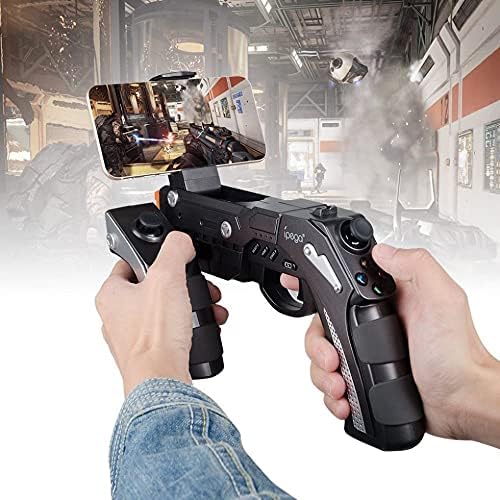
A user is shown holding the ipega PG-9057 Wireless Game Controller with a smartphone securely attached, actively engaged in mobile gaming.
- Extend the phone holder located on the top of the controller.
- Cẩn thận đặt điện thoại thông minh của bạn vào giá đỡ, đảm bảo nó được giữ chắc chắn.
- Connect the controller to your smartphone via Bluetooth as described in Section 4.3.1.
- Launch your desired game and configure controller settings if necessary.
6. Bảo trì
To ensure the longevity and optimal performance of your ipega PG-9057 controller, follow these maintenance guidelines:
- Vệ sinh: Use a soft, dry cloth to wipe the surface of the controller. Do not use harsh chemicals or abrasive cleaners.
- Kho: Bảo quản bộ điều khiển ở nơi khô ráo, thoáng mát, tránh ánh nắng trực tiếp và nhiệt độ cao.
- Tránh rơi: Hãy bảo vệ bộ điều khiển khỏi rơi vỡ và va đập, vì điều này có thể làm hỏng các bộ phận bên trong.
- Sạc: Không nên sạc quá mức pin. Ngắt kết nối cáp sạc khi bộ điều khiển đã được sạc đầy.

The ipega PG-9057 Wireless Game Controller is shown, emphasizing its construction from high-quality, durable ABS material.
KHAI THÁC. Xử lý sự cố
Nếu bạn gặp sự cố với bộ điều khiển của mình, vui lòng tham khảo các giải pháp phổ biến sau:
- Bộ điều khiển không kết nối:
- Đảm bảo bộ điều khiển được sạc đầy.
- Hãy kiểm tra xem Bluetooth đã được bật trên thiết bị của bạn chưa và bộ điều khiển đang ở chế độ ghép nối.
- Hãy thử khởi động lại cả bộ điều khiển và thiết bị của bạn.
- If using USB, ensure the cable is securely connected and try a different USB port.
- Các nút bấm hoặc cần điều khiển không phản hồi:
- Kiểm tra xem bộ điều khiển đã được kết nối đúng cách với thiết bị của bạn chưa.
- Khởi động lại bộ điều khiển và kết nối lại.
- Hãy đảm bảo trò chơi bạn đang chơi hỗ trợ tay cầm điều khiển ngoài.
- Độ trễ hoặc độ trễ đầu vào:
- Ensure there are no obstructions or excessive distance between the controller and your device.
- Giảm thiểu nhiễu từ các thiết bị không dây khác.
- For critical gaming, consider using a wired USB connection if supported by your device.
8. Thông số kỹ thuật
| Đặc điểm kỹ thuật | Giá trị |
|---|---|
| Thương hiệu | ipega |
| Người mẫu | PG-9057 |
| Thiết bị tương thích | Android, Windows |
| Loại bộ điều khiển | Bàn chơi game |
| Công nghệ kết nối | Không dây |
| Đặc trưng | Không dây |
| Các mặt hàng tương thích | Android, Windows |
| Phương pháp kết nối | Không dây |
| Tính năng đặc biệt | Không dây |
| Nền tảng phần cứng | Hộp giải mã tín hiệu |
| Nguồn điện | Pin chạy bằng |
| Number of Package Items | 1 |
| Mã số UPC | 602747571722 |
| ASIN | B018TSBFE4 |
| GTIN | 602747571722 |
9. Bảo hành và Hỗ trợ
For warranty information and customer support, please refer to the documentation provided with your purchase or visit the official ipega webtrang web. Giữ lại bằng chứng mua hàng để yêu cầu bảo hành.


