
Giới thiệu
Cảm ơn bạn đã muaasing the STOGA Ubox STV040 Dual Lens Car DVR Camera. This manual provides detailed instructions for the proper installation, operation, and maintenance of your device. Please read this manual thoroughly before using the product to ensure optimal performance and safety.
Nội dung gói
Vui lòng kiểm tra nội dung gói hàng khi mở. Nếu thiếu hoặc hư hỏng bất kỳ mặt hàng nào, hãy liên hệ với nhà bán lẻ.
- 1 x STOGA Ubox STV040 Car DVR Camera
- 1 x Bộ sạc ô tô
- 1 x Car Mount
- 1 x External GPS Module
- 1 x Hướng dẫn sử dụng
Sản phẩm trênview
Familiarize yourself with the components and features of your STOGA Ubox STV040 Car DVR Camera.

Hình 1: Đằng trước view of the DVR camera with the display screen active.

Hình 2: Đằng trước view detailing the dual wide-angle lenses and surrounding controls.
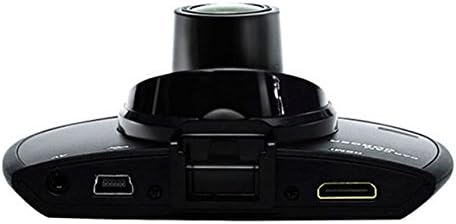
Hình 3: Đứng đầu view illustrating the connectivity ports (HDMI, USB, AV).
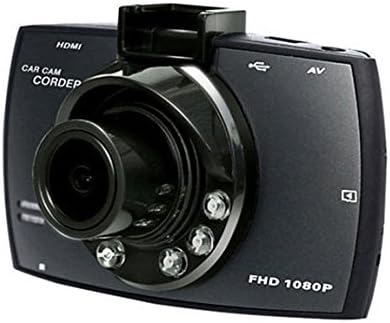
Hình 4: Angled perspective of the DVR camera, showing its compact design.
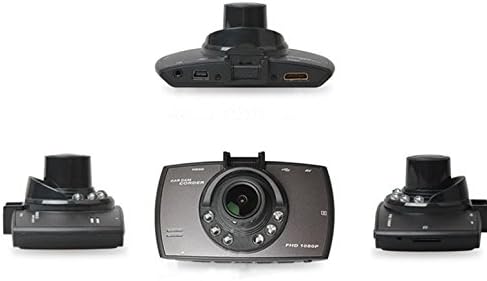
Hình 5: Toàn diện view of the DVR camera from various angles.
Cài đặt
1. Lắp đặt thẻ Micro SD
Insert a Micro SD card (Class 6 or higher, 4GB-32GB) into the designated slot on the DVR camera. Ensure the card is inserted correctly until it clicks into place. The device supports continuous loop recording and emergency event recording.
2. Gắn máy ảnh
- Attach the car mount to the windshield in a position that does not obstruct your view.
- Securely attach the DVR camera to the car mount.
- Adjust the camera angle to ensure both lenses capture the desired view (front and interior/side). The dual lenses are 180-degree rotatable.
3. Kết nối nguồn điện
Connect the car charger to the DVR camera's power input and plug the other end into your vehicle's 12V power outlet (cigarette lighter socket). The camera will typically power on automatically when the vehicle starts and power off when the vehicle is turned off.
4. GPS Module Connection (Optional)
Connect the external GPS module to the designated GPS port on the DVR camera. This enables GPS logging, recording location data along with video footage.
Hướng dẫn sử dụng
Bật/Tắt nguồn
- Tự động: The camera powers on and starts recording automatically when the car engine starts. It powers off automatically when the engine is turned off.
- Dẫn sử dụng: Press and hold the power button to manually turn the device on or off.
Chế độ ghi
- Ghi vòng lặp: The camera continuously records video in segments. When the memory card is full, it automatically overwrites the oldest unlocked footage.
- Ghi hình khẩn cấp (Cảm biến G): The built-in G-Sensor detects sudden impacts or collisions. In such an event, the current video segment is automatically locked and protected from being overwritten.
Điều hướng menu
Use the control buttons located on the device to navigate through the menu options on the 2.0" TFT LCD screen. Adjust settings such as video resolution, date/time stamp, language (English, Chinese, Japanese, Russian), and G-Sensor sensitivity.
Phát lại
- Dừng ghi hình nếu đang hoạt động.
- Enter playback mode via the menu.
- Chọn video mong muốn file for playback on the device screen.
- Alternatively, remove the Micro SD card and insert it into a computer to view files.
Bảo vệ mật khẩu
The device supports password protection to prevent unauthorized access to recordings. Refer to the on-screen menu for setting up and managing this feature.
BẢO TRÌ
- Vệ sinh: Use a soft, dry cloth to clean the camera lenses and screen. Avoid abrasive cleaners or solvents.
- Thẻ micro SD: Format the Micro SD card regularly (e.g., once a month) to ensure optimal performance and prevent data corruption. Back up important files trước khi định dạng.
- Nhiệt độ: Tránh để thiết bị ở nhiệt độ quá cao, ánh nắng trực tiếp trong thời gian dài hoặc độ ẩm cao.
- Cập nhật chương trình cơ sở: Kiểm tra của nhà sản xuất website periodically for any available firmware updates to improve performance and add features.
Xử lý sự cố
| Vấn đề | Nguyên nhân có thể / Giải pháp |
|---|---|
| Máy ảnh không bật được. |
|
| Quá trình ghi âm dừng đột ngột. |
|
| Chất lượng video kém. |
|
| GPS không hoạt động. |
|
| Pin không giữ được điện. |
|
Thông số kỹ thuật
| Tính năng | Chi tiết |
|---|---|
| Số hiệu mẫu | Ubox STV040 |
| Trưng bày | 2.0" TFT LCD (960 x 240 pixels) |
| Ống kính | Dual 140-degree A+ wide-angle, 180-degree rotatable |
| Cảm biến | CMOS |
| Độ phân giải video | 1280 x 480 @ 30 fps, 640 x 480 @ 30 fps |
| Định dạng video | AVI |
| Định dạng hình ảnh | M-JPG |
| Tầm nhìn ban đêm | Chức năng nhìn đêm hồng ngoại |
| Kho | Micro TF (SD HC) card, 4GB-32GB, Class 6 and above |
| GPS | Supports external GPS module |
| Cảm biến G | Integrated, supports emergency event recording lock |
| Micrô/Loa | Tích hợp |
| Đầu ra | CVBS (Video Output) |
| Ắc quy | 3.7V 700mA Lithium-Polymer battery |
| Khả năng tương thích của hệ điều hành | Windows 2000/XP/Vista/Windows 7 |
| Ngôn ngữ được hỗ trợ | English, Chinese, Japanese, Russian |
Bảo hành và Hỗ trợ
For warranty information and technical support, please refer to the documentation provided with your purchase or contact your retailer. Keep your purchase receipt as proof of purchase for warranty claims.
For further assistance, you may also visit the official STOGA webTrang web (nếu có) hoặc liên hệ với bộ phận chăm sóc khách hàng của họ.