
1. Thiết lập
1.1 Mở hộp và Nội dung
Cẩn thận lấy TV và tất cả phụ kiện ra khỏi bao bì. Đảm bảo tất cả các bộ phận đều có đủ:
- Sharp LC-40LE653U 40-Inch Smart LED TV
- Điều khiển từ xa
- 2 Pin AA
1.2 Lắp đặt chân đế
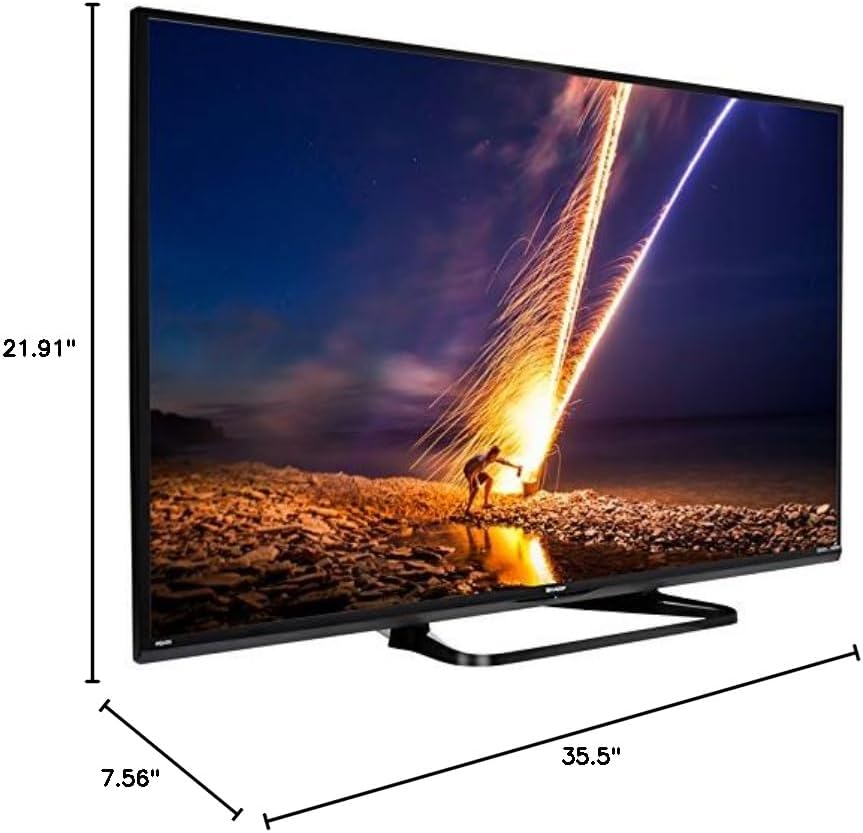
If placing the TV on a table, attach the included stand. Refer to the diagram below for proper assembly. Ensure all screws are securely fastened.
1.3 Kết nối các thiết bị bên ngoài
Connect your external devices such as cable boxes, Blu-ray players, or gaming consoles to the TV's input ports. The TV features multiple connectivity options.


Available ports include:
- HDMI: 2 ports for high-definition audio and video. One HDMI port supports MHL (Mobile High-Definition Link).
- USB: 1 port for media playback or connecting a USB device.
- Mạng Ethernet: Dành cho kết nối mạng có dây.
- Component/Video: For older video devices.
- DTV/TV (Antenna): Để kết nối ăng-ten hoặc nguồn cấp dữ liệu truyền hình cáp.
- Âm thanh ra: Optical for digital audio, and RCA for analog audio.
1.4 kết nối nguồn
After connecting all necessary devices, plug the TV's power cord into a wall outlet.
1.5 Thiết lập ban đầu
Upon first power-on, the TV will guide you through an initial setup process. This includes language selection, time zone, and network configuration. For Wi-Fi setup, select your network and enter the password.
2. Hướng dẫn vận hành
2.1 Chức năng điều khiển từ xa
Điều khiển từ xa cho phép bạn truy cập tất cả các chức năng của TV. Lắp hai pin AA vào điều khiển từ xa, đảm bảo đúng cực.

- Nguồn (Nút màu đỏ): Bật hoặc tắt TV.
- Đầu vào: Selects the input source (HDMI, TV, USB, etc.).
- VÒNG +/-: Điều chỉnh mức âm lượng.
- CH +/-: Thay đổi kênh truyền hình.
- Các nút điều hướng (Lên/Xuống/Trái/Phải/Enter): Được sử dụng để điều hướng menu và chọn tùy chọn.
- THÔNG MINH: Accesses the Smart Central Apps menu.
- THỰC ĐƠN: Opens the main TV menu for settings adjustments.
- NETFLIX: Direct access button for the Netflix application.
2.2 Smart TV Features (Smart Central Apps)
The Sharp LC-40LE653U features Smart Central Apps, providing access to various online services and a web browser. Ensure your TV is connected to the internet via Wi-Fi or Ethernet.

- Truy cập ứng dụng: Press the 'SMART' button on your remote to open the Smart Central Apps menu.
- Các dịch vụ được hỗ trợ: Includes Hulu Plus, Netflix, Pandora, Vudu, and YouTube.
- Web Trình duyệt: Sử dụng tích hợp sẵn web browser for general internet browsing. Navigation is done via the remote control.
2.3 Wallpaper Mode
When the TV is turned off, Wallpaper Mode can display virtually any image. To use this feature, connect a USB drive containing your desired images to the TV's USB port. Navigate to the Wallpaper Mode settings in the TV menu to select and configure your images.
3. Bảo trì
3.1 Vệ sinh TV
Để làm sạch màn hình, hãy lau nhẹ nhàng bằng khăn mềm, khô, không xơ. Đối với các vết bẩn cứng đầu, hãy dùng khăn mềm lau nhẹ.ampen the cloth with water or a specialized screen cleaner. Avoid using harsh chemicals, abrasive cleaners, or direct spraying of liquids onto the screen or cabinet.
Clean the TV cabinet with a soft, dry cloth. Ensure the TV is unplugged before cleaning.
3.2 Cập nhật phần mềm
Periodically check for software updates through the TV's settings menu to ensure optimal performance and access to the latest features. Updates can be performed via the internet connection.
KHAI THÁC. Xử lý sự cố
If you encounter issues with your Sharp LC-40LE653U TV, refer to the following common solutions:
- Không có điện: Ensure the power cord is securely plugged into both the TV and a working wall outlet. Check if the power indicator light on the TV is on.
- Không có hình ảnh/âm thanh: Verify the correct input source is selected using the 'Input' button on the remote. Check all cable connections (HDMI, component, etc.) are secure.
- Chất lượng hình ảnh kém: Điều chỉnh các thiết lập hình ảnh (độ sáng, độ tương phản, độ sắc nét) trong menu TV. Đảm bảo nguồn đầu vào cung cấp tín hiệu chất lượng cao.
- Không có kết nối Internet: Check your Wi-Fi router or Ethernet cable connection. Re-enter your Wi-Fi password in the TV's network settings. Restarting your router may resolve connectivity issues.
- Điều khiển từ xa không hoạt động: Thay pin cho điều khiển từ xa. Đảm bảo không có vật cản nào giữa điều khiển từ xa và cảm biến hồng ngoại của TV.
For more detailed troubleshooting steps, consult the full online manual or contact customer support.
5. Thông số kỹ thuật
Key technical specifications for the Sharp LC-40LE653U 40-Inch Smart LED TV:
| Tính năng | Đặc điểm kỹ thuật |
|---|---|
| Số hiệu mẫu | LC-40LE653U |
| Kích thước màn hình | 39.5 inch (Loại 40 inch) |
| Công nghệ hiển thị | Màn hình tinh thể lỏng |
| Nghị quyết | 1080p (Full HD) |
| Tốc độ làm mới | 60Hz |
| Tỷ lệ khung hình | 16:9 |
| Công nghệ kết nối | Wi-Fi |
| Giao diện phần cứng | Ethernet, HDMI, USB |
| Tổng số cổng HDMI | 2 (one with MHL support) |
| Tổng số cổng USB | 1 |
| Đầu vào âm thanh | HDMI, Optical, USB |
| Công suất đầu ra tối đa của loa | 20 Watt |
| Kích thước sản phẩm (D x R x C) | 7.56" x 35.5" x 21.91" |
| Trọng lượng sản phẩm | 16.3 Bảng Anh |
| Kiểu lắp đặt | Bảng gắn |
| Các dịch vụ Internet được hỗ trợ | Hulu Plus, Netflix, Pandora, Vudu, YouTube |
| Chứng nhận Energy Star | Đúng |
6. Bảo hành và Hỗ trợ
6.1 Bảo hành sản phẩm
This Sharp LC-40LE653U TV comes with a Bảo hành có giới hạn 1 nămVui lòng giữ lại hóa đơn mua hàng để yêu cầu bảo hành. Chế độ bảo hành bao gồm các lỗi sản xuất trong điều kiện sử dụng bình thường.
6.2 Hỗ trợ khách hàng
For technical assistance, troubleshooting beyond this manual, or warranty service, please contact Sharp customer support. Refer to the official Sharp webVui lòng truy cập trang web hoặc thẻ đăng ký sản phẩm của bạn để biết thông tin liên hệ cập nhật nhất.