
1. Giới thiệu
The Argox AS8520 is a high-performance cordless imager designed for efficient barcode scanning. It features advanced wireless communication technology, allowing for a data transmission range of up to 100 meters. Equipped with a long-lasting Li-ion battery and an IP42 sealing level, the AS8520 is built for durability and mobility across various environments, including offices, supermarkets, warehouses, and manufacturing facilities.
2. Sản phẩm hếtview
The AS8520 barcode scanner is designed for comfortable handling and robust performance. Key components include the scanning window, trigger button, and ergonomic grip.
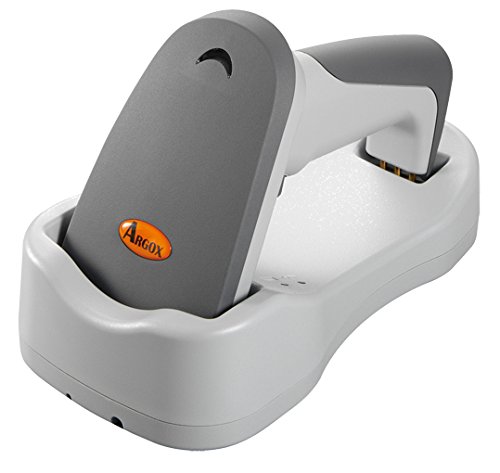
Hình 2.1: Bên view of the Argox AS8520 Barcode Scanner, showing the ergonomic handle and trigger button.
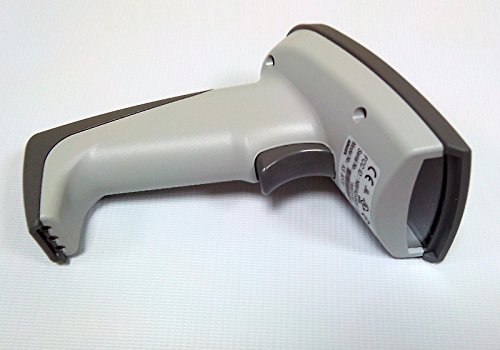
Hình 2.2: Đằng trước view of the Argox AS8520 Barcode Scanner, highlighting the scanning window and product labels.
3. Hướng dẫn cài đặt
3.1. Lắp đặt và sạc pin
- Ensure the scanner is powered off before installing or removing the battery.
- Locate the battery compartment on the scanner handle.
- Insert the Li-ion battery pack, ensuring correct polarity.
- Đóng chặt ngăn chứa pin.
- Connect the scanner to its charging base or power adapter using the provided cable. Allow the battery to fully charge before first use.
3.2. Kết nối với thiết bị chủ
The Argox AS8520 can connect wirelessly to various host devices, including desktops, laptops, and smartphones. Refer to the separate quick start guide for specific pairing instructions for your operating system or device type.
4. Hướng dẫn vận hành
4.1. Quét cơ bản
- Hãy đảm bảo máy quét đã được bật nguồn và ghép nối thành công với thiết bị chủ của bạn.
- Point the scanning window towards the barcode you wish to scan.
- Press and hold the trigger button. A red LED light source (630nm Visible Red LED) will illuminate the barcode.
- Position the scanner at an appropriate distance (the AS8520 offers superior depth of field up to 40 inches on 40-mil codes) until the barcode is successfully read. A successful scan is typically indicated by an audible beep and/or a visual indicator.
- Thả nút cò súng.
4.2. Các tính năng quét nâng cao
- Rapid Scan Rate: The AS8520 provides a rapid scan rate of 450 scans/sec for efficient data capture.
- Barcode Symbology Support: Supports GS1 Databar (RSS) and CS (Composite Symbology) barcodes.
- Sunlight Readability: Designed to be readable under direct sunlight conditions.
5. Bảo trì
5.1. Vệ sinh máy quét
- Hãy đảm bảo máy quét đã tắt nguồn trước khi vệ sinh.
- Dùng vải mềm, không có xơ vải nhẹ nhàng dampDùng nước hoặc dung dịch tẩy rửa nhẹ để lau sạch bề ngoài máy quét.
- Đối với cửa sổ quét, hãy sử dụng khăn lau ống kính để tránh làm trầy xước.
- Do not use abrasive cleaners, solvents, or immerse the scanner in liquid. The IP42 sealing level protects against dust and light water splashes, but not full immersion.
5.2. Chăm sóc pin
- To maximize battery life, avoid fully discharging the Li-ion battery frequently.
- Bảo quản máy quét ở nơi khô ráo, thoáng mát khi không sử dụng trong thời gian dài.
- If the battery performance degrades significantly, consider replacing it with an authorized Argox replacement battery.
KHAI THÁC. Xử lý sự cố
| Vấn đề | Nguyên nhân có thể | Giải pháp |
|---|---|---|
| Máy quét không bật được. | Pin đã hết điện hoặc chưa được lắp đặt đúng cách. | Sạc pin. Đảm bảo pin được đặt đúng vị trí trong ngăn chứa. |
| Máy quét không đọc được mã vạch. | Barcode is damaged, scanner is too far/close, or incorrect symbology settings. | Ensure the barcode is clear. Adjust scanning distance. Check scanner programming for supported barcode types. |
| No data transmitted to host device. | Scanner not paired or out of range. | Re-pair the scanner with the host device. Ensure the scanner is within the 100-meter transmission range. |
| Scanner is unresponsive. | Lỗi phần mềm tạm thời. | Perform a soft reset by powering off and then on the scanner. If issues persist, consult the manufacturer's support. |
7. Thông số kỹ thuật
| Tính năng | Đặc điểm kỹ thuật |
|---|---|
| Người mẫu | AS8520 |
| Tốc độ quét | 450 lần quét/giây |
| Nguồn sáng | 630nm Visible Red LED |
| Hiệu suất quét | Starting at 0.1mm (4 mil) |
| Độ sâu trường ảnh | Up to 40 inches on 40-mil codes |
| Phạm vi truyền dữ liệu | 100 mét (không dây) |
| Thiết bị tương thích | Máy tính để bàn, Máy tính xách tay, Điện thoại thông minh |
| Nguồn điện | Battery Powered (Li-ion battery pack) |
| Nhiệt độ hoạt động | 0°C đến 50°C (32°F đến 122°F) |
| Nhiệt độ lưu trữ | -20°C đến 70°C (-4°F đến 158°F) |
| Độ ẩm | Độ ẩm tương đối từ 10% đến 90%, không ngưng tụ |
| Mức độ ánh sáng | Lên đến 70,000 lux |
| Current - Operating | 225 mA @ 4.2 VDC |
| Current - Standby | 32 mA @ 4.2 VDC |
| Power - Operating | 900mW |
| Power - Standby | 150mW |
| Reliability (Trigger) | 1,000,000 lần |
| Reliability (Cable) | 320,000 times (90° bend) |
| Thông số kỹ thuật thả | 1.5 mét |
| Sealing Level | IP42 |
| Trọng lượng sản phẩm | 1.3kg |
| GTIN/UPC | 702563636336 |
8. Bảo hành và Hỗ trợ
For detailed warranty information, please refer to the warranty card included with your product or visit the official Argox website. For technical support, service, or replacement parts, please contact your authorized Argox reseller or Argox customer service directly.