
1. Giới thiệu
This manual provides essential instructions for the setup, operation, maintenance, and troubleshooting of your IBM Lenovo Preferred Pro USB Wired Keyboard and Mouse Set. Please read this manual thoroughly before using the product to ensure proper functionality and longevity.
2. Sản phẩm hếtview
The IBM Lenovo Preferred Pro USB Wired Keyboard and Mouse Set offers a reliable input solution for your computer. The keyboard features a standard layout with a numeric keypad, while the mouse is a 2-button optical mouse with a scroll wheel. Both devices connect via a standard USB interface, providing plug-and-play compatibility with most operating systems.

Hình 2.1: Trên cùng view of the IBM Lenovo Preferred Pro USB Wired Keyboard.
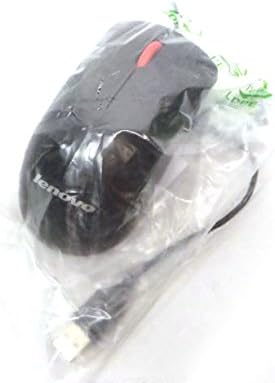
Hình 2.2: Trên cùng view of the Lenovo USB 2-Button Optical Mouse.
Các tính năng chính:
- USB Wired Connectivity: Ensures a stable and reliable connection.
- Plug-and-Play: No additional drivers typically required for basic functionality.
- Standard Keyboard Layout: Full-size keyboard with numeric keypad.
- Optical Mouse: Precise tracking with a scroll wheel for easy navigation.
3. Thiết lập
Follow these steps to connect your keyboard and mouse to your computer.
- Mở hộp các thiết bị: Cẩn thận lấy bàn phím và chuột ra khỏi bao bì.
- Identify USB Connectors: Locate the USB connectors at the end of the keyboard and mouse cables.
- Kết nối với máy tính: Insert the USB connector of the keyboard into an available USB port on your computer. Repeat this step for the mouse.
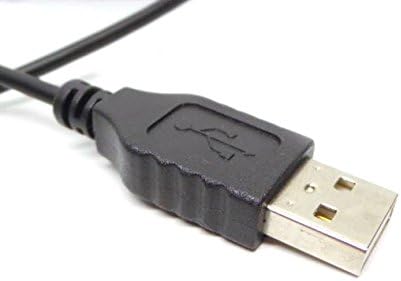
Figure 3.1: Close-up of a standard USB Type-A connector, used for connecting the keyboard and mouse.
Your computer should automatically detect and install the necessary drivers for the keyboard and mouse. No additional software installation is typically required for basic functionality.
4. Hướng dẫn vận hành
4.1 Sử dụng bàn phím
- Đánh máy: Sử dụng các phím chữ và số để nhập văn bản.
- Các phím chức năng (F1-F12): These keys perform various functions depending on the application or operating system.
- Bàn phím số: Use the dedicated numeric keypad for efficient data entry. Ensure the "Num Lock" indicator light is on.
- Phím đặc biệt: Utilize keys like "Print Screen", "Scroll Lock", "Pause/Break", "Insert", "Home", "Page Up", "Delete", "End", and "Page Down" for their respective functions.
4.2 Sử dụng chuột
- Sự chuyển động: Move the mouse across a flat surface to control the cursor on the screen.
- Ấn chuột trái: Nhấn nút bên trái để chọn mục, mở liên kết hoặc kích hoạt chức năng.
- Nhấp chuột phải: Nhấn nút bên phải để mở menu ngữ cảnh.
- Bánh xe cuộn: Cuộn bánh xe cuộn lên hoặc xuống để điều hướng qua các tài liệu hoặc web trang. Bánh xe cuộn cũng có thể hoạt động như một nút bấm giữa.
5. Bảo trì
Proper care and maintenance will extend the life of your keyboard and mouse.
- Vệ sinh:
- Disconnect devices from the computer before cleaning.
- Sử dụng một mềm, damp cloth with a mild cleaning solution (e.g., water or isopropyl alcohol) to wipe surfaces.
- Avoid excessive moisture, especially near keycaps and optical sensors.
- Sử dụng khí nén để loại bỏ bụi bẩn và mảnh vụn giữa các phím bàn phím.
- Kho: Store the devices in a clean, dry environment away from extreme temperatures and direct sunlight.
- Tránh đổ tràn: Tránh để chất lỏng tiếp xúc với bàn phím và chuột để tránh hư hỏng.
KHAI THÁC. Xử lý sự cố
If you encounter issues with your keyboard or mouse, refer to the following common problems and solutions:
| Vấn đề | Nguyên nhân có thể | Giải pháp |
|---|---|---|
| Bàn phím/Chuột không phản hồi | Kết nối USB lỏng lẻo, cổng USB bị lỗi, trình điều khiển có vấn đề. |
|
| Keys not working or typing incorrectly | Debris under keys, software conflict, keyboard settings. |
|
| Con trỏ chuột di chuyển thất thường hoặc không di chuyển | Dirty optical sensor, unsuitable surface, software issue. |
|
If the problem persists after trying these solutions, contact customer support or your reseller for further assistance.
7. Thông số kỹ thuật
| Tính năng | Chi tiết |
|---|---|
| Keyboard Model Numbers | 54Y9400, 41A5289, SK-8825, KB1021 |
| Mouse Model Numbers | 45J4888, 25011476, 45J4889, M-U0025-O |
| Thương hiệu | IBM/Lenovo |
| Màu sắc | Đen |
| Công nghệ kết nối | Có dây USB |
| Loại bàn phím | Preferred Pro USB Wired Keyboard |
| Loại chuột | 2-Button Black Red Scroll Wheel Optical Mouse |
| Kích thước gói hàng | 22 x 10.2 x 4.7 inch (xấp xỉ) |
| Trọng lượng sản phẩm | 1 pound (xấp xỉ) |
| Nhà sản xuất | Lenovo |
8. Bảo hành và Hỗ trợ
For warranty information, please refer to the documentation provided at the time of purchase or contact your reseller. IBM and Lenovo products typically come with a standard manufacturer's warranty.
For technical support or further inquiries, please contact the product's manufacturer or the authorized reseller from whom you purchased the item. Keep your purchase receipt and product model numbers handy for faster service.