
Giới thiệu
This manual provides instructions for the Goldmaster RCU 881 Universal Remote Control. This device is designed to control various television sets using infrared technology, offering a convenient replacement or alternative to multiple original remote controls.
Thông tin an toàn
- Để pin xa tầm tay trẻ em.
- Không trộn lẫn pin cũ và pin mới, hoặc các loại pin khác nhau.
- Do not expose the remote control to extreme temperatures, direct sunlight, or moisture.
- Vứt bỏ pin đã qua sử dụng theo đúng quy định về môi trường tại địa phương.
- Avoid disassembling the remote control; this may void any warranty.
Nội dung gói
- 1 x Goldmaster RCU 881 Universal Remote Control
- Note: Batteries are not included and must be purchased separately (2x AAA batteries required).
Sản phẩm trênview
The Goldmaster RCU 881 is a universal infrared remote control featuring a sleek silver design and a comprehensive button layout for intuitive control of compatible devices, primarily televisions.
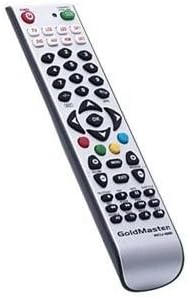
Hình ảnh: Mặt trước view of the Goldmaster RCU 881 Universal Remote Control, showing its silver finish and button layout.

Image: The official Goldmaster brand logo.
Cài đặt
1. Lắp đặt pin
- Xác định vị trí nắp ngăn chứa pin ở mặt sau của điều khiển từ xa.
- Slide the cover off in the direction indicated by an arrow (if present).
- Insert two AAA batteries, ensuring correct polarity (+ and - symbols match the markings inside the compartment).
- Đậy nắp ngăn chứa pin lại cho đến khi nó khớp vào đúng vị trí.
2. Lập trình điều khiển từ xa
The Goldmaster RCU 881 is a universal remote. Programming typically involves entering a code specific to your TV brand or using an automatic search function. Refer to the included code list (if available with your purchase) or follow these general steps:
- Turn on the device you wish to control (e.g., your television).
- Nhấn và giữ BỘ button (or a similar button, if present) on the remote until the indicator light turns on and remains lit.
- Enter the 3 or 4-digit code for your TV brand using the number buttons. If the indicator light turns off, the code has been accepted.
- Kiểm tra điều khiển từ xa bằng cách nhấn nút. QUYỀN LỰC button or other function buttons. If the device responds, the programming is successful.
- If the code does not work, or if the indicator light flashes and turns off without controlling the device, repeat steps 2-4, trying other codes listed for your brand.
- If no code works, or if a code list is not provided, use the automatic search function:
- Nhấn và giữ BỘ nút cho đến khi đèn báo bật sáng.
- Nhấn nút QUYỀN LỰC button once. The indicator light will begin to flash slowly.
- Point the remote at your TV and repeatedly press the QUYỀN LỰC nút (hoặc CH+ button) slowly, allowing a few seconds between presses, until the TV turns off.
- Once the TV turns off, immediately press the BỘ Nhấn nút để lưu mã. Đèn báo sẽ tắt.
- Test the remote. If it controls your TV, programming is complete. If not, repeat the automatic search process.
Note: Specific programming steps and available codes may vary. Consult the original packaging or manufacturer's website for a comprehensive code list or detailed instructions for your specific device model.
Hướng dẫn sử dụng
Once programmed, the Goldmaster RCU 881 functions like your original remote control for the assigned device. Below are common button functions:
- Nút nguồn: Bật hoặc tắt thiết bị.
- Channel Buttons (CH+/CH-): Thay đổi kênh lên hoặc xuống.
- Volume Buttons (VOL+/VOL-): Điều chỉnh âm lượng.
- Nút tắt tiếng: Tắt tiếng hoặc bật tiếng âm thanh.
- Các nút số (0-9): Được sử dụng cho đầu vào kênh trực tiếp.
- Menu/Settings Buttons: Accesses device menus and settings.
- Các nút điều hướng (Lên/Xuống/Trái/Phải/OK): Điều hướng qua các menu và xác nhận lựa chọn.
- Nút Đầu vào/Nguồn: Changes the input source (e.g., HDMI 1, AV, Component).
Button layout and specific functionality may vary based on the programmed device and the universal code used.
BẢO TRÌ
- Clean the remote control with a soft, dry cloth. Do not use liquid cleaners, abrasive materials, or chemical solvents.
- If the remote control will not be used for an extended period (e.g., one month or more), remove the batteries to prevent potential leakage and damage.
- Avoid dropping the remote control or exposing it to strong impacts, which can damage internal components.
- Store the remote in a cool, dry place away from direct sunlight.
Xử lý sự cố
Điều khiển từ xa không hoạt động sau khi lập trình:
- Ensure batteries are inserted correctly with the correct polarity and are not depleted. Replace if necessary.
- Re-attempt the programming process, trying different codes for your device brand.
- Hãy đảm bảo không có vật cản nào giữa điều khiển từ xa và bộ thu hồng ngoại của thiết bị.
- The remote control may not be compatible with all functions of your specific device model.
Một số nút không hoạt động:
- This can occur if the programmed code does not fully support all functions of your device. Try a different code.
- Hãy đảm bảo các nút bấm sạch sẽ và không bị bám bụi bẩn.
Indicator light not turning on:
- Kiểm tra việc lắp đặt pin và đảm bảo pin có đủ điện. Thay pin nếu cần.
Thông số kỹ thuật
| Tính năng | Chi tiết |
|---|---|
| Thương hiệu | VàngMaster |
| Người mẫu | RCU-881 |
| Công nghệ kết nối | Hồng ngoại |
| Thiết bị tương thích | Tivi |
| Màu sắc | Bạc |
| Phương pháp nhập liệu | Cái nút |
| Bao gồm pin | KHÔNG |
| Năm mẫu | 2014 |
| ASIN | B00PUIXRRA |
Bảo hành và Hỗ trợ
Specific warranty information for the Goldmaster RCU 881 Universal Remote Control is not provided in the product details. For warranty claims, technical support, or further assistance, please contact GoldMaster customer service directly or refer to the documentation included with your original purchase.
You can often find up-to-date support information and contact details on the official GoldMaster webđịa điểm.