
1. Giới thiệu
This manual provides detailed instructions for the proper use, setup, and maintenance of your Genius HS-920BT Bluetooth Headset. Please read this manual thoroughly before using the device to ensure optimal performance and longevity.
The Genius HS-920BT is a versatile Bluetooth headset designed for wireless audio streaming and hands-free communication with compatible devices such as smartphones, tablets, and PCs.
2. Nội dung gói hàng
Xác minh rằng tất cả các mục đều có trong gói hàng của bạn:
- Genius HS-920BT Bluetooth Headset
- Cáp sạc USB
- Multi-language User Manual (this document)
3. Sản phẩm hếtview
The HS-920BT headset features an adjustable headband and comfortable earcups, integrating controls for audio playback and call management.
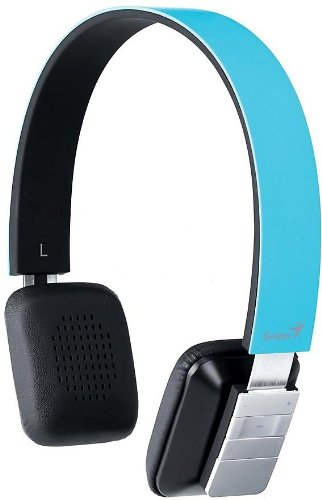
Figure 1: Genius HS-920BT Bluetooth Headset (Blue)
This image displays the Genius HS-920BT Bluetooth Headset in blue, viewed from an angle, highlighting its adjustable headband and earcup design.
Các tính năng chính:
- Wireless Bluetooth connectivity for audio and calls (A2DP support)
- Integrated rechargeable Lithium-Ion battery
- Micrô tích hợp để liên lạc rảnh tay
- On-ear controls for volume adjustment, track skipping (AVRCP support)
- Băng đô có thể điều chỉnh để vừa vặn thoải mái
- 40 mm driver units for clear sound
4. Thiết lập
4.1 Sạc tai nghe
Before initial use, fully charge the headset. Use the provided USB charging cable.
- Kết nối đầu nhỏ của cáp sạc USB với cổng sạc trên tai nghe.
- Kết nối đầu lớn hơn của cáp USB với cổng USB có nguồn điện (ví dụ: máy tính, bộ chuyển đổi nguồn USB).
- The LED indicator on the headset will illuminate during charging and change color or turn off when fully charged. Refer to the headset's LED behavior for specific indications.
Sạc đầy thường mất khoảng 2-3 giờ.
4.2 Ghép nối với thiết bị Bluetooth
To use the HS-920BT wirelessly, you must pair it with your Bluetooth-enabled device.
- Bật nguồn: Press and hold the Power button on the headset until the LED indicator flashes, usually alternating blue and red, indicating pairing mode.
- Kích hoạt Bluetooth: On your smartphone, tablet, or PC, enable Bluetooth functionality.
- Tìm kiếm Thiết bị: In your device's Bluetooth settings, search for available devices. The headset should appear as "HS-920BT".
- Chọn và ghép cặp: Select "HS-920BT" from the list. If prompted for a passcode, enter "0000" (four zeros).
- Xác nhận: Once paired, the headset's LED indicator will typically flash blue slowly, and your device will confirm the connection.
The headset will automatically attempt to reconnect to the last paired device when powered on, if that device's Bluetooth is active and within range.
5. Hướng dẫn vận hành
The HS-920BT features intuitive controls located on the earcup.

Figure 2: Earcup Controls of HS-920BT
This image shows a close-up of the right earcup of the Genius HS-920BT Bluetooth Headset, detailing the control buttons for power, volume, and track navigation.
5.1 Bật/Tắt nguồn
- Bật nguồn: Press and hold the Power button for approximately 3 seconds until the LED indicator flashes blue.
- Tắt nguồn: Nhấn và giữ nút Nguồn trong khoảng 3 giây cho đến khi đèn LED tắt.
5.2 Phát lại nhạc
- Phát/Tạm dừng: Nhấn nút Phát/Tạm dừng một lần.
- Bài hát tiếp theo: Press the "Next Track" button (usually marked with a forward arrow).
- Bản nhạc trước: Press the "Previous Track" button (usually marked with a backward arrow).
5.3 Quản lý cuộc gọi
- Trả lời/Kết thúc cuộc gọi: Press the Multi-function button (often the same as Play/Pause) once during an incoming call to answer, or once during a call to end it.
- Từ chối cuộc gọi: Nhấn và giữ nút Đa chức năng trong khoảng 2 giây khi có cuộc gọi đến.
- Gọi lại số cuối cùng: Nhấn đúp nút Đa chức năng khi không đang thực hiện cuộc gọi.
5.4 Điều khiển âm lượng
- Tăng khối lượng: Nhấn nút Tăng âm lượng (+).
- Giảm âm lượng: Nhấn nút Giảm âm lượng (-).
6. Bảo trì
Proper care ensures the longevity of your headset.
- Vệ sinh: Hãy dùng khăn mềm, khô để lau tai nghe. Không sử dụng chất tẩy rửa có tính ăn mòn hoặc dung môi.
- Kho: Bảo quản tai nghe ở nơi khô ráo, thoáng mát, tránh ánh nắng trực tiếp và nhiệt độ cao.
- Chăm sóc pin: Để kéo dài tuổi thọ pin, tránh xả pin thường xuyên. Hãy sạc tai nghe thường xuyên, ngay cả khi không sử dụng trong thời gian dài.
- Tiếp xúc với nước: Tai nghe không chống nước. Tránh tiếp xúc với nước hoặc độ ẩm quá mức.
KHAI THÁC. Xử lý sự cố
If you encounter issues with your HS-920BT headset, refer to the following common solutions:
| Vấn đề | Giải pháp khả thi |
|---|---|
| Tai nghe không bật được. | Ensure the battery is charged. Connect the headset to a power source using the USB cable. |
| Không thể ghép nối tai nghe với thiết bị. |
|
| Không có âm thanh hoặc âm lượng thấp. |
|
| Chất lượng cuộc gọi kém. |
|
8. Thông số kỹ thuật
| Tên mẫu: | HS-920BT |
| Công nghệ không dây: | Bluetooth |
| Đơn vị điều khiển: | 40mm |
| Ắc quy: | Pin Lithium-Ion sạc tích hợp |
| Loại điều khiển: | Volume Control, Track Navigation, Call Management |
| Micrô: | Tích hợp sẵn |
| Pro được hỗ trợfiles: | A2DP, AVRCP |
| Thiết bị phần cứng: | Máy tính cá nhân, điện thoại thông minh, máy tính bảng |
| Trọng lượng sản phẩm: | 110 gam |
| Kích thước (DxRxC): | 13.6 x 17.3 x 2.9cm |
9. Bảo hành và Hỗ trợ
For warranty information and technical support, please refer to the warranty card included with your product or visit the official Genius webtrang web. Giữ lại biên lai mua hàng làm bằng chứng mua hàng.
For further assistance, you may contact Genius customer service through their official channels.