
Công cụ hiệu suất W2977
Performance Tool W2977 CAN OBD II Scanner Tool User Manual
Mã sản phẩm: W2977 | Thương hiệu: Performance Tool
Sản phẩm trênview
The Performance Tool W2977 CAN OBD II Scanner Tool is an essential diagnostic device for vehicle owners and professionals. It provides a straightforward way to interact with your vehicle's On-Board Diagnostics (OBD-II) system, allowing you to quickly identify and resolve issues indicated by the Check Engine Light.
Các tính năng chính:
- Bảo hiểm xe mở rộng: Compatible with most 1996 and newer American, European, and Asian vehicles.
- Powerful Scan Tool: Reads and erases Diagnostic Trouble Codes (DTCs) to pinpoint engine and emissions system problems.
- Giao diện thân thiện với người dùng: Simple operation with clear display and intuitive buttons.
- Emissions Readiness Check: Verifies your vehicle's emissions system status for compliance.
- Full OBD2 Protocol Support: Includes support for the Controller Area Network (CAN) protocol.
- Note: Does not work with 2007 Chevy Silverado models.
Hướng dẫn thiết lập
Follow these steps to set up and begin using your W2977 CAN OBD II Scanner Tool:
- Xác định vị trí cổng OBD-II: The OBD-II port is typically located under the dashboard on the driver's side of the vehicle. Refer to your vehicle's owner's manual if you cannot find it.
- Kết nối máy quét: Plug the scanner's cable connector firmly into the vehicle's OBD-II port. Ensure a secure connection.

Image: Connecting the scanner to the vehicle's OBD-II port.

Image: The W2977 scanner held in hand, connected and ready for use.
Once connected, the scanner will power on automatically. Ensure your vehicle's ignition is in the 'ON' position or the engine is running, as required for proper communication.
Hướng dẫn sử dụng
Reading Diagnostic Trouble Codes (DTCs)
- With the scanner connected and powered on, the display will show 'C.A.N. OBD2'.
- Nhấn nút ĐI VÀO button to initiate the scan. The display will show 'SCAN...' as it communicates with the vehicle.
- Once the scan is complete, the scanner will display 'Menu: 1. DTC'. Press ĐI VÀO ĐẾN view the Diagnostic Trouble Codes.
- If codes are present, they will be displayed. Use the CUỘN button to navigate through multiple codes if applicable.
- If 'NO CODES' is displayed, it means no active Diagnostic Trouble Codes are currently stored in the vehicle's computer.

Image: Initial display screen of the scanner.

Image: Menu option to view DTC.

Image: Display indicating no trouble codes found.
Erasing Mã lỗi chẩn đoán (DTC)
Note: Erasing DTCs will turn off the Check Engine Light, but it will not fix the underlying problem. Ensure the issue has been resolved before clearing codes.
- From the main menu, use the CUỘN button to navigate to 'Menu: 2. ERASE'.
- Nhấn nút ĐI VÀO button. The scanner will ask 'ERASE? YES NO'.
- Nhấn ĐI VÀO again to confirm 'YES'. The display will show 'ERASE DONE!' indicating the codes have been cleared.
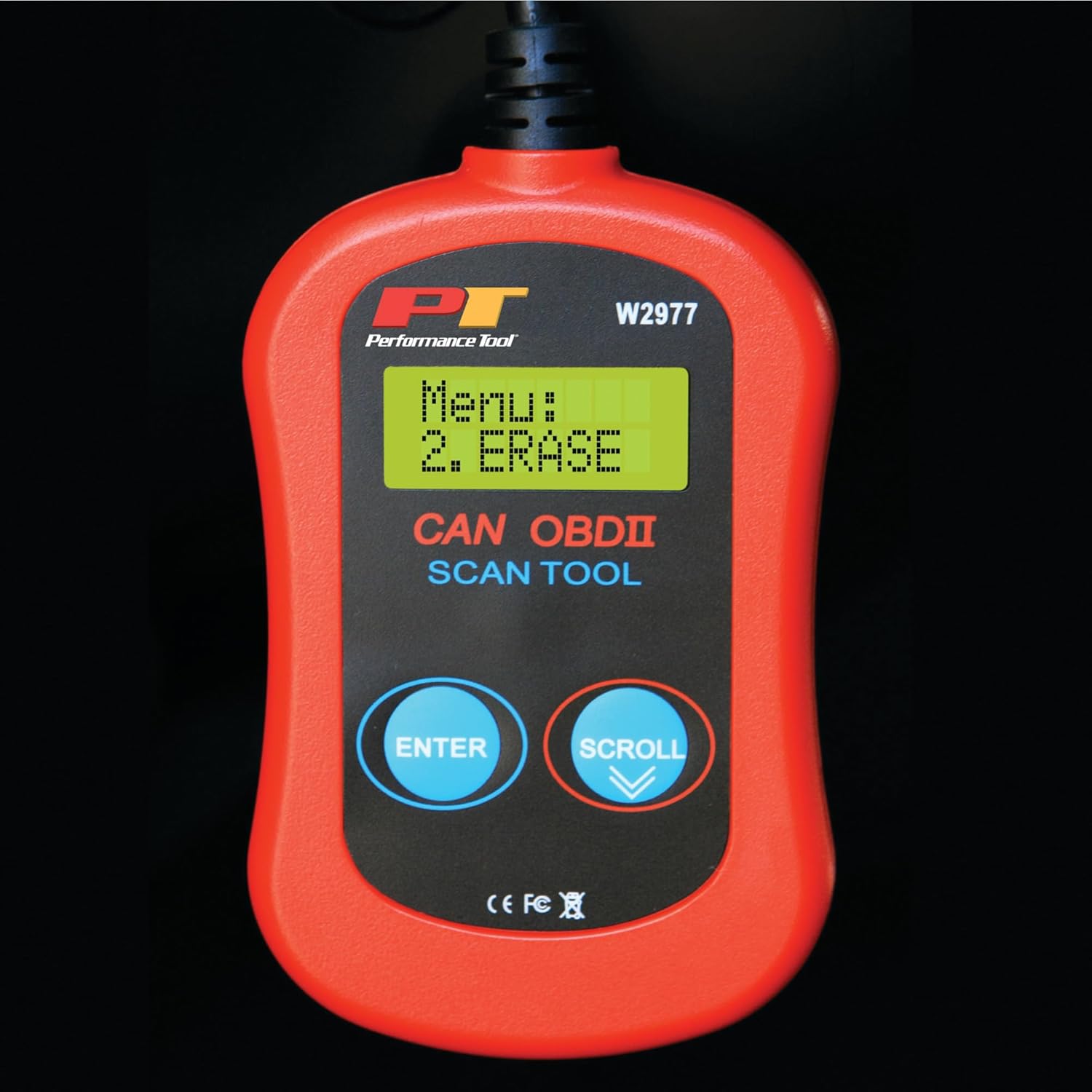
Image: Menu option to erase DTCs.
BẢO TRÌ
To ensure the longevity and proper functioning of your Performance Tool W2977 scanner, follow these maintenance guidelines:
- Vệ sinh: Lau thiết bị bằng vải mềm, khô. Không sử dụng chất tẩy rửa có tính mài mòn hoặc dung môi.
- Kho: Bảo quản máy quét ở nơi sạch sẽ, khô ráo, tránh nhiệt độ quá cao hoặc quá thấp và ánh nắng trực tiếp.
- Chăm sóc cáp: Avoid kinking or sharply bending the cable. Store it neatly coiled to prevent damage.
Xử lý sự cố
Các vấn đề thường gặp:
- 'LINK ERROR!' Displayed:
This indicates a communication issue between the scanner and the vehicle. - Ensure the scanner cable is securely connected to the OBD-II port.
- Kiểm tra xem hệ thống đánh lửa của xe có đang ở vị trí "ON" hay động cơ đang hoạt động hay không.
- Check if your vehicle is compatible with OBD-II (most vehicles 1996 and newer).
- Try connecting the scanner to a different compatible vehicle to rule out a scanner issue.
- Máy quét không bật nguồn:
- The scanner draws power from the vehicle's OBD-II port. Ensure the connection is secure.
- Check the vehicle's fuse for the OBD-II port (often labeled 'CIGAR' or 'AUX POWER').
- No Codes Found, But Check Engine Light is On:
- Some intermittent issues may not store a permanent code immediately. Drive the vehicle for a short period and re-scan.
- Ensure the vehicle's ignition is on or engine is running during the scan.

Image: Display indicating a communication error.
Thông số kỹ thuật
| Đặc điểm kỹ thuật | Chi tiết |
|---|---|
| Thương hiệu | Công cụ hiệu suất |
| Người mẫu | W2977 |
| Trọng lượng sản phẩm | 5.6 ounce |
| Kích thước sản phẩm | 1.75 x 6.09 x 9.5 inch |
| Kiểu lắp ô tô | Universal Fit (1996 and later OBD-II compliant vehicles) |
| Mã số UPC | 039564106811 |
| Nhà sản xuất | Công cụ hiệu suất |
Bảo hành và Hỗ trợ
The Performance Tool W2977 CAN OBD II Scanner Tool comes with a 1-year limited warranty. For detailed warranty information and terms, please refer to the official documentation.
For further assistance, troubleshooting, or to access the complete user manual, please refer to the official PDF document:
Tải xuống Hướng dẫn sử dụng (PDF)
Bạn cũng có thể ghé thăm Cửa hàng dụng cụ hiệu năng trên Amazon để biết thêm thông tin về sản phẩm và tài nguyên hỗ trợ.
Ask a question about this manual
Ask about setup, troubleshooting, compatibility, parts, safety, or missing instructions. Manuals+ will review the question and use this page’s manual context to help answer it.