
1. Sản phẩm hếtview
The RioRand 0.56" Blue LED Digital Voltmeter is a compact device designed for measuring DC voltage in a range of 0 to 99.9V. It features a bright blue LED display for clear readings and is suitable for various applications, including automotive and DIY electronics projects. This manual provides essential information for the proper installation, operation, and maintenance of your voltmeter.

Image 1: The RioRand 0.56" Blue LED Digital Voltmeter displaying a voltagĐiện áp đo được là 19.8V.
2. Thông số kỹ thuật
| Tính năng | Đặc điểm kỹ thuật |
|---|---|
| Phạm vi đo lường | Điện áp một chiều 0 - 99.9V |
| Nguồn cung cấp Voltage | DC 5 - 28V (required for meter operation) |
| Cutting Size (Panel Mount) | 45.5 x 26.5mm (approx. 1.79 x 1.04 inches) |
| Kích thước tổng thể | 48 x 29 x 21 mm (xấp xỉ 1.89 x 1.14 x 0.83 inch) |
| Kiểu hiển thị | Three 0.56" LED digital tubes |
| Hiển thị màu sắc | Màu xanh da trời |
| Tốc độ làm mới | Khoảng 500ms |
| Đo lường độ chính xác | 1% (+/- 1 digit) |
| Trọng lượng sản phẩm | Khoảng 0.353 ounce (10g) |
| Số hiệu mẫu | RRQWEUAAQAQAO |
3. Thiết lập và Cài đặt
Before installation, ensure all power sources are disconnected to prevent electrical shock or damage to the device. The voltmeter requires a DC power supply between 5V and 28V to operate. It has three wires for connection:
- Dây đỏ: Positive terminal for the meter's power supply (DC 5-28V).
- Dây đen: Common ground for both the meter's power supply and the voltagđang được đo lường.
- Yellow/White Wire: Positive terminal for the voltage input to be measured (DC 0-99.9V).
Cấu hình dây:
- Self-Powered (Shared Source, 5V-28V Measurement):
Nếu voltage you wish to measure is between 5V and 28V, and you want to use this voltage to power the meter itself:- Kết nối Dây điện màu đỏ to the positive (+) of the voltagnguồn e.
- Kết nối Yellow/White Wire to the positive (+) of the voltagnguồn e.
- Kết nối Dây đen to the negative (-) of the voltagnguồn e.
- Separately Powered (Any 0V-99.9V Measurement):
Nếu voltage you wish to measure is outside the 5V-28V range (e.g., below 5V or above 28V up to 99.9V), or if you prefer to isolate the meter's power:- Kết nối Dây điện màu đỏ to the positive (+) of a separate DC 5-28V power supply.
- Kết nối Dây đen to the negative (-) of the separate DC 5-28V power supply.
- Kết nối Yellow/White Wire to the positive (+) of the voltagnguồn e muốn đo.
- Ensure the negative (-) of the voltage source you want to measure is also connected to the Dây đen (common ground).
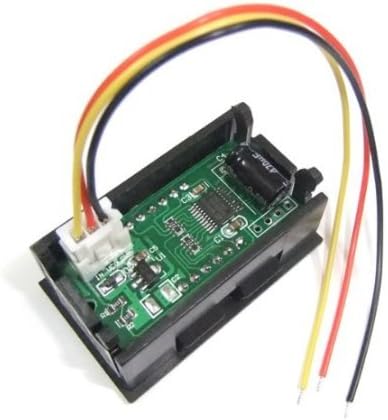
Hình ảnh 2: Phía sau view of the voltmeter showing the wiring connections. The red, black, and yellow/white wires are visible, connected to the circuit board.
Lắp đặt bảng điều khiển: The voltmeter is designed for panel mounting. Cut an opening of approximately 45.5 x 26.5mm (1.79 x 1.04 inches) in your panel. Insert the voltmeter into the opening and secure it if necessary (mounting clips or screws are not typically included and may need to be sourced separately).
Cảnh báo: Always observe correct polarity when connecting the wires. Incorrect wiring can damage the voltmeter or the power source. Do not exceed the maximum input voltage of 99.9V for measurement or 28V for the meter's power supply.
4. Hướng dẫn vận hành
Once properly wired and powered, the voltmeter will automatically display the measured DC voltage on its blue LED screen. The display updates approximately every 500 milliseconds, providing near real-time readings. No additional configuration or calibration is typically required for basic operation.
- Đảm bảo voltage being measured is within the 0-99.9V range.
- Readings are displayed with one decimal place (e.g., 12.5V).
5. Bảo trì
The RioRand Digital Voltmeter is a low-maintenance device. Follow these guidelines to ensure its longevity:
- Vệ sinh: Sử dụng một miếng vải mềm, khô để lau màn hình và casing. Tránh sử dụng chất tẩy rửa hoặc dung môi có tính mài mòn.
- Môi trường: Keep the device away from excessive moisture, dust, and extreme temperatures.
- Kết nối: Thường xuyên kiểm tra các mối nối dây điện để đảm bảo chúng chắc chắn và không bị ăn mòn.
- Kho: If storing the voltmeter for an extended period, disconnect it from all power sources and store it in a dry, cool place.
KHAI THÁC. Xử lý sự cố
If you encounter issues with your voltmeter, refer to the following troubleshooting steps:
- No Display / Voltmeter Not Turning On:
- Check the power supply to the red and black wires. Ensure it is within the DC 5-28V range and correctly connected with proper polarity.
- Verify that the power source itself is functional.
- Inspect the wires for any breaks or loose connections.
- Incorrect or Erratic Readings:
- Ensure the yellow/white wire is securely connected to the positive terminal of the voltage you wish to measure, and the black wire is connected to its negative/ground.
- Xác nhận rằng voltage being measured is within the 0-99.9V range. Voltages outside this range will not be displayed accurately.
- Check for any interference from nearby electrical components.
- Verify the accuracy of your reference voltage source if comparing readings.
- Display Shows '0.0' or '---':
- If '0.0' is displayed, it indicates either no voltage is being measured or the voltage is extremely low. Verify the connection of the yellow/white wire to the voltagnguồn e.
- If '---' or a similar error is shown, it might indicate an out-of-range measurement or a connection issue. Recheck all wiring.
7. Bảo hành và Hỗ trợ
Specific warranty information for this product may vary depending on the retailer and region of purchase. Please refer to your purchase documentation or contact the seller directly for details regarding warranty coverage and return policies.
For technical support or further assistance, please contact RioRand customer service or the authorized distributor from whom you purchased the product. When contacting support, please have your product model number (RRQWEUAAQAQAO) and a detailed description of the issue ready.