
1. Giới thiệu
This manual provides instructions for the OEM RMT-B119A remote control, designed as a replacement or secondary remote for various Sony Blu-ray player models. This remote offers full functionality for controlling your Blu-ray player's features.
Compatible Sony Blu-ray Player Models:
- BDP-BX59
- BDP-S390
- BDP-S590
- BDP-BX110
- BDP-S1100
- BDP-S3100
- BDP-BX310
2. Thiết lập
2.1 Lắp đặt pin
Điều khiển từ xa cần hai (2) pin AAA (không bao gồm). Hãy làm theo các bước sau để lắp pin:
- Xác định vị trí nắp ngăn chứa pin ở mặt sau của điều khiển từ xa.
- Nhấn vào lẫy và trượt nắp xuống để mở ngăn chứa.
- Lắp hai pin AAA, đảm bảo cực dương (+) và cực âm (-) thẳng hàng với các vạch đánh dấu bên trong ngăn chứa.
- Trượt nắp ngăn chứa pin trở lại vị trí cũ cho đến khi nghe thấy tiếng kêu tách.
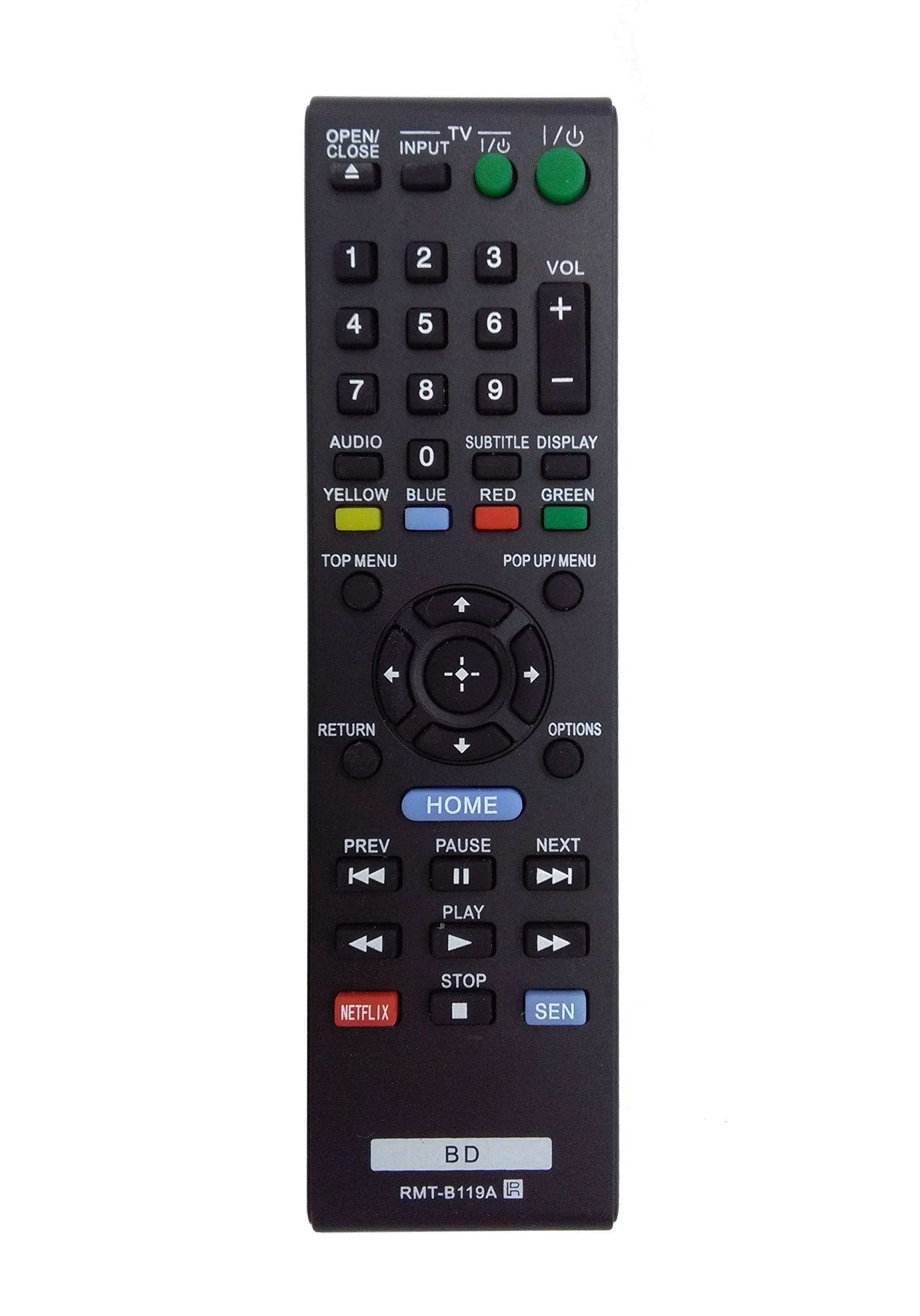
Image: The OEM RMT-B119A remote control, showing the full button layout on the front and a partial view of the open battery compartment on the back, revealing the battery terminals.
3. Hướng dẫn vận hành
3.1 Remote Control Layout and Button Functions
Familiarize yourself with the buttons on your RMT-B119A remote control. Below is a description of each button's primary function.
Image: The OEM RMT-B119A remote control, displaying all buttons and their labels.
- Nguồn (I/O): Bật hoặc tắt đầu phát Blu-ray.
- OPEN/CLOSE (▲): Mở hoặc đóng khay đĩa.
- ĐẦU VÀO: Switches the input source on the connected TV (if programmed).
- TV: Switches the remote to TV control mode (if programmed).
- Bàn phím số (0-9): Used for direct track selection, chapter selection, or entering numerical data.
- VÒNG (+/-): Adjusts the volume level (typically for the connected TV, if programmed).
- ÂM THANH: Changes the audio track or language during playback.
- SUBTITLE DISPLAY: Toggles subtitle display on or off, or cycles through available subtitle languages.
- YELLOW, BLUE, RED, GREEN: Color-coded function buttons, typically used for specific features within menus or interactive content. Their function varies depending on the disc or menu.
- THỰC ĐƠN HÀNG ĐẦU: Accesses the main menu of the Blu-ray disc.
- MENU/CỬA SỔ POP-UP: Hiển thị menu bật lên trong khi phát đĩa.
- Directional Pad (↑↓←→): Điều hướng thông qua các menu và tùy chọn.
- Center Button (Enter/Select): Xác nhận lựa chọn hoặc nhập một mục trong thực đơn.
- TRỞ LẠI: Trở lại màn hình hoặc menu trước đó.
- TÙY CHỌN: Displays context-sensitive options or settings.
- TRANG CHỦ: Accesses the Blu-ray player's home menu.
- TRƯỚC (◀◀): Skips to the beginning of the current track/chapter or the previous track/chapter.
- PAUSE (▌▌): Tạm dừng phát lại.
- TIẾP THEO (▶▶): Chuyển sang bài hát hoặc chương tiếp theo.
- CHƠI): Bắt đầu hoặc tiếp tục phát lại.
- DỪNG LẠI (■): Dừng phát lại.
- NETFLIX: Nút truy cập trực tiếp vào dịch vụ phát trực tuyến Netflix.
- SEN: Direct access button for the Sony Entertainment Network (now PlayStation Video/Music).
- BD: Likely a dedicated button for Blu-ray Disc functions or to switch to Blu-ray mode.
4. Bảo trì
Để đảm bảo điều khiển từ xa của bạn hoạt động bền lâu và đúng cách, hãy làm theo các hướng dẫn bảo trì sau:
- Vệ sinh: Lau điều khiển từ xa bằng vải mềm, khô. Đối với vết bẩn cứng đầu, hãy chà nhẹ.ampLau vải bằng nước hoặc chất tẩy rửa nhẹ, không gây mài mòn. Tránh sử dụng hóa chất hoặc dung môi mạnh.
- Thay thế pin: Replace batteries when the remote's response becomes sluggish or it stops functioning. Always replace both batteries at the same time with new ones of the same type.
- Kho: Bảo quản điều khiển từ xa ở nơi khô ráo, thoáng mát, tránh ánh nắng trực tiếp, nhiệt độ quá cao hoặc quá thấp và độ ẩm cao. Nếu không sử dụng điều khiển từ xa trong thời gian dài, hãy tháo pin ra để tránh rò rỉ.
- Tránh rơi: Bảo vệ điều khiển khỏi tác động vật lý, vì rơi rớt có thể làm hỏng các linh kiện bên trong.
KHAI THÁC. Xử lý sự cố
If you experience issues with your remote control, refer to the following table for common problems and solutions:
| Vấn đề | Nguyên nhân có thể | Giải pháp |
|---|---|---|
| Điều khiển từ xa không hoạt động. | Pin chết hoặc lắp không đúng cách. | Thay pin mới, đảm bảo đúng cực (+/-). |
| Làm việc từ xa không liên tục. | Pin yếu hoặc bị vật cản. | Replace batteries. Ensure no objects are blocking the remote's signal path to the Blu-ray player. |
| Điều khiển từ xa không điều khiển được TV. | Remote not programmed for TV or TV mode not selected. | This remote is primarily for Blu-ray players. TV control functionality may require specific programming not covered by this manual, or may not be supported by this OEM model. |
| Các nút bấm không phản hồi hoặc bị kẹt. | Bụi bẩn hoặc mảnh vụn dưới nút. | Lau sạch bề mặt điều khiển từ xa. Tránh làm đổ chất lỏng lên điều khiển. |
6. Thông số kỹ thuật
- Thương hiệu: OEM
- Số hiệu mẫu: RMT-B119A
- Công nghệ kết nối: Hồng ngoại (IR)
- Thiết bị tương thích: Sony Blu-ray Players (specific models listed in Introduction)
- Nguồn điện: 2 x Pin AAA (không bao gồm)
- Tầm xa tối đa: Khoảng 10 mét (33 feet)
- Tính năng đặc biệt: Thiết kế công thái học
7. Bảo hành và Hỗ trợ
This OEM RMT-B119A remote control comes with a Bảo hành 30 ngày kể từ ngày mua, bao gồm cả lỗi sản xuất. Vui lòng giữ lại hóa đơn mua hàng để yêu cầu bảo hành.
For technical support or warranty inquiries, please contact the retailer or manufacturer directly. Refer to your purchase documentation for specific contact information.