
1. Giới thiệu
The D-Link GO-SW-5G is a 5-Port Unmanaged Gigabit Desktop Switch designed for home and small office environments. This device provides a simple and cost-effective solution to expand your network connectivity, offering high-speed Gigabit Ethernet ports for reliable data transfer. It incorporates D-Link's Green Technology for energy efficiency, reduced heat generation, and extended product lifespan.
This switch is a plug-and-play device, requiring no complex configuration or software installation, making it easy to integrate into an existing network.
2. Nội dung gói hàng
Vui lòng xác minh rằng tất cả các mục được liệt kê dưới đây đều có trong gói hàng của bạn:
- D-Link GO-SW-5G 5-Port Gigabit Desktop Switch
- Bộ đổi nguồn
- Hướng dẫn cài đặt nhanh
Nếu có bất kỳ mặt hàng nào bị thiếu hoặc hư hỏng, vui lòng liên hệ với nhà bán lẻ để được hỗ trợ.
3. Hướng dẫn thiết lập
The D-Link GO-SW-5G switch is designed for easy plug-and-play installation. Follow these steps to set up your device:
3.1. Kết nối Bộ đổi nguồn
- Locate the power input port on the side of the D-Link GO-SW-5G switch.
- Kết nối bộ chuyển đổi nguồn được cung cấp vào cổng này.
- Cắm đầu còn lại của bộ chuyển đổi nguồn vào ổ cắm điện thông thường.
- The power LED on the front of the switch will illuminate, indicating that the device is receiving power.

Hình 1: Bên view of the D-Link GO-SW-5G switch with the power input port.
3.2. Kết nối với mạng của bạn
- Using a standard Ethernet cable (RJ45), connect one end to an available LAN port on your router (not your modem).
- Connect the other end of this Ethernet cable to any of the five available ports on the back of the D-Link GO-SW-5G switch.
- The corresponding LED on the front of the switch will light up, indicating an active connection.
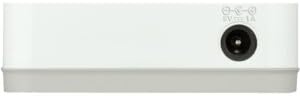
Hình 2: Ở phía sau view of the D-Link GO-SW-5G switch with five Ethernet ports.
3.3. Connect Network Devices
- Connect your network devices (e.g., computers, gaming consoles, network printers, smart TVs) to the remaining available Ethernet ports on the D-Link GO-SW-5G switch using Ethernet cables.
- Each connected device will have its corresponding LED on the front of the switch illuminate, confirming a successful connection.

Hình 3: Đằng trước view of the D-Link GO-SW-5G switch showing active port LEDs.
4. Hướng dẫn vận hành
The D-Link GO-SW-5G is an unmanaged switch, meaning it operates automatically without requiring user configuration. Once connected as described in the Setup section, it will begin forwarding network traffic between connected devices.
- Đàm phán tự động: The switch automatically detects the network speed (10/100/1000 Mbps) and duplex mode (half/full) of connected devices and adjusts accordingly.
- Tự động MDI/MDIX: All ports support automatic MDI/MDIX crossover, eliminating the need for crossover cables when connecting to other switches or hubs.
- Đèn báo LED: Each port has an LED indicator on the front panel. A lit LED indicates an active link, and blinking indicates network activity.
5. Bảo trì
To ensure optimal performance and longevity of your D-Link GO-SW-5G switch, consider the following maintenance guidelines:
- Vị trí: Place the switch in a cool, dry location away from direct sunlight, heat sources, and excessive moisture. Ensure adequate ventilation around the device.
- Vệ sinh: Use a soft, dry cloth to clean the exterior of the switch. Avoid using liquid or aerosol cleaners, as they may damage the device.
- Quản lý cáp: Keep Ethernet cables neatly organized to prevent tangles and accidental disconnections.
- Chu kỳ nguồn điện: If you experience network issues, a simple power cycle (unplugging the power adapter for 10 seconds and then plugging it back in) can often resolve minor problems.
KHAI THÁC. Xử lý sự cố
If you encounter issues with your D-Link GO-SW-5G switch, refer to the following common troubleshooting steps:
- Không có đèn LED nguồn:
- Hãy đảm bảo bộ chuyển đổi nguồn được kết nối chắc chắn với cả công tắc và ổ cắm điện đang hoạt động.
- Kiểm tra ổ cắm điện có hoạt động không bằng cách cắm thiết bị khác.
- No Link/Activity LED for a Connected Device:
- Hãy kiểm tra xem cáp Ethernet đã được cắm chắc chắn vào cả cổng chuyển mạch và thiết bị mạng chưa.
- Hãy thử sử dụng một cáp Ethernet khác để loại trừ khả năng cáp bị lỗi.
- Đảm bảo thiết bị được kết nối đã được bật nguồn và bộ điều hợp mạng đang hoạt động bình thường.
- Hãy thử kết nối thiết bị với một cổng khác trên switch.
- Tốc độ mạng chậm:
- Verify that all connected devices and cables support Gigabit Ethernet (1000 Mbps) for optimal performance. The switch will operate at the lowest common speed.
- Ensure your router and internet service provider (ISP) plan support the desired speeds.
- Perform a power cycle on the switch and your router.
- Kết nối không liên tục:
- Kiểm tra các kết nối cáp lỏng lẻo.
- Ensure the switch is not overheating; provide adequate ventilation.
- Test with different Ethernet cables.
7. Thông số kỹ thuật
| Thương hiệu | Liên kết D |
| Số hiệu mẫu | GO-SW-5G/B |
| Số lượng cổng | 5 |
| Loại công tắc | Không được quản lý |
| Tốc độ truyền dữ liệu | 1 Gigabits Per Second (10/100/1000 Mbps) |
| Giao diện | RJ45 |
| Màu sắc | Trắng |
| Trọng lượng sản phẩm | 0.22 Bảng Anh |
| Tậptage | 100-240 vôn |
| Thiết bị tương thích | PC, Mac, and other Ethernet-enabled devices |
| Chuyển đổi vải | 10Gbps |
| Mã số UPC | 790069365669 |
8. Bảo hành và Hỗ trợ
Bảo hành có giới hạn: The D-Link GO-SW-5G switch comes with a 3-year limited warranty. For detailed terms and conditions, please refer to the warranty information included in your package or visit the official D-Link webđịa điểm.
Hỗ trợ kỹ thuật: For technical assistance, product registration, or to download the latest firmware and documentation, please visit the Hỗ trợ D-Link Webđịa điểm or contact D-Link customer service.