
Giới thiệu
Cảm ơn bạn đã muaasing the GPX Weatherx WR282B Weather and Alert Radio. This portable radio is designed to provide you with AM/FM radio reception and access to all 7 NOAA weatherband channels, ensuring you stay informed during various conditions. It offers flexible power options, operating on either AC power or D-size batteries, making it suitable for both indoor and outdoor use.
Vui lòng đọc kỹ hướng dẫn sử dụng này trước khi vận hành thiết bị để đảm bảo sử dụng đúng cách và tối đa hóa hiệu suất cũng như tuổi thọ của thiết bị.
Thông tin an toàn quan trọng
- Đọc hướng dẫn: Tất cả các hướng dẫn vận hành và an toàn nên được đọc trước khi sản phẩm được vận hành.
- Giữ lại hướng dẫn: Nên lưu lại hướng dẫn an toàn và vận hành để tham khảo sau này.
- Lưu ý cảnh báo: Cần tuân thủ mọi cảnh báo trên sản phẩm và trong hướng dẫn sử dụng.
- Thực hiện theo hướng dẫn: Cần phải tuân theo mọi hướng dẫn vận hành và sử dụng.
- Nước và độ ẩm: Không sử dụng sản phẩm này gần nước (ví dụ: gần bồn tắm, chậu rửa mặt, bồn rửa chén, bồn giặt, trong tầng hầm ẩm ướt hoặc gần hồ bơi).
- Vệ sinh: Chỉ lau sạch bằng vải khô.
- Thông gió: Không chặn bất kỳ lỗ thông gió nào. Lắp đặt theo hướng dẫn của nhà sản xuất.
- Nhiệt: Không lắp đặt gần bất kỳ nguồn nhiệt nào như bộ tản nhiệt, thanh nhiệt, bếp lò hoặc các thiết bị khác (bao gồm amplò phản ứng) tạo ra nhiệt.
- Bảo vệ dây nguồn: Bảo vệ dây nguồn khỏi bị dẫm lên hoặc kẹp, đặc biệt là ở phích cắm, ổ cắm tiện lợi và điểm chúng thoát ra khỏi thiết bị.
- Tia chớp: Rút phích cắm của thiết bị này khi có sấm sét hoặc khi không sử dụng trong thời gian dài.
- Bảo dưỡng: Tham khảo mọi dịch vụ bảo dưỡng cho nhân viên bảo dưỡng có trình độ. Cần bảo dưỡng khi thiết bị bị hư hỏng theo bất kỳ cách nào, chẳng hạn như dây nguồn hoặc phích cắm bị hỏng, chất lỏng bị đổ hoặc có vật rơi vào thiết bị, thiết bị bị mưa hoặc ẩm ướt, không hoạt động bình thường hoặc bị rơi.
Đặc trưng
- Bộ dò đài AM/FM
- Weatherband - All 7 NOAA Channels
- Swivel Telescopic Antenna
- Kiểm soát âm lượng
- Audio Line Input (Auxiliary Input)
- Tay cầm tích hợp
- Dual Power Options: AC/DC Adapter or 3 x 'D' Batteries
Nội dung gói
- GPX Weatherx WR282B Weather and Alert Radio
- Bộ đổi nguồn AC/DC
- Hướng dẫn sử dụng (tài liệu này)
Kiểm soát và chỉ số
Familiarize yourself with the various controls and indicators on your WR282B radio.
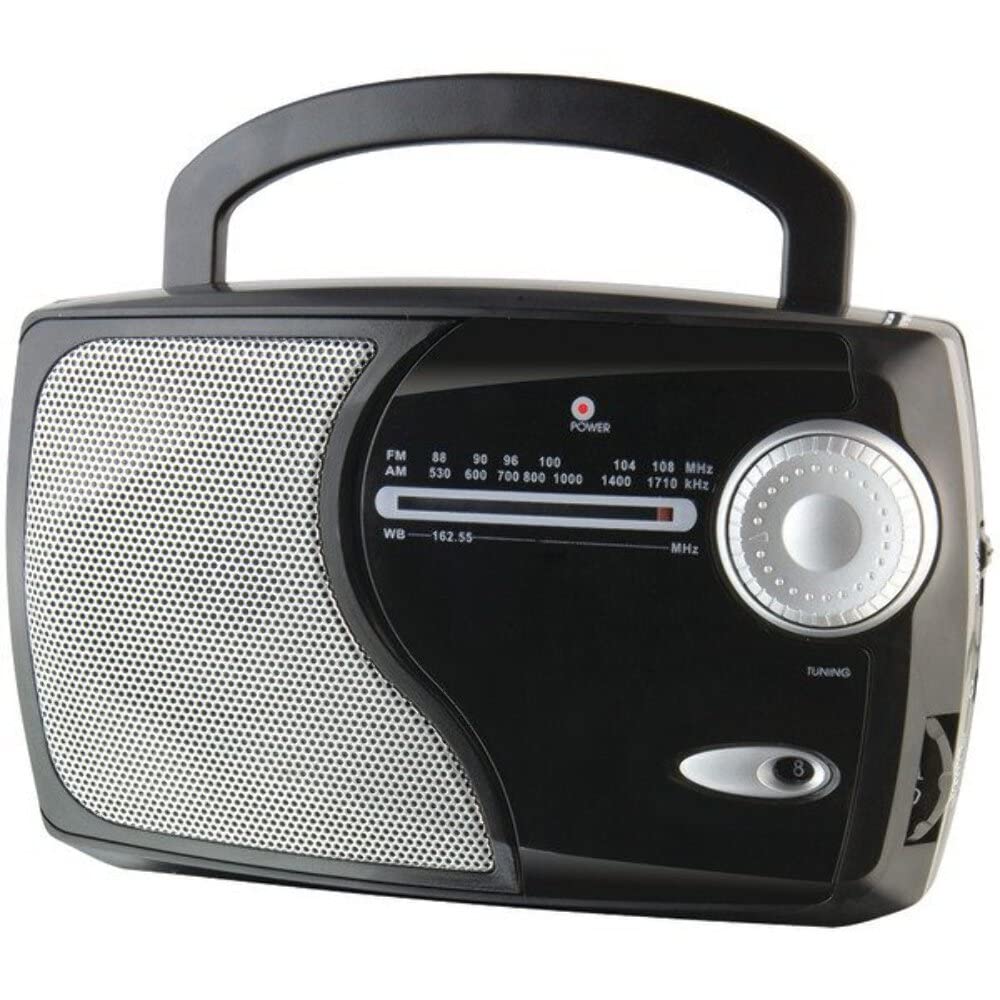
Hình ảnh: Mặt trước view of the GPX Weatherx WR282B radio, showing the speaker, tuning dial, and control knobs.
- Núm nguồn / âm lượng: Turns the radio on/off and adjusts the audio output level.
- Công tắc chọn băng tần: Selects between AM, FM, and Weatherband (WB) modes.
- Núm điều chỉnh: Adjusts the frequency to tune into desired radio stations or weather channels.
- Chỉ báo điều chỉnh: Illuminates when a strong signal is received.
- Quay số tần số: Hiển thị tần số radio hiện tại.
- Ăng-ten kính thiên văn: Extendable antenna for improved FM and Weatherband reception.
- Ngõ vào phụ (AUX IN): Giắc cắm 3.5 mm để kết nối các thiết bị âm thanh bên ngoài.
- Đầu vào nguồn AC: Jack for connecting the included AC/DC power adapter.
- Ngăn chứa pin: Located on the back, holds 3 'D' size batteries.
- Quai xách: Để dễ dàng di chuyển.
Cài đặt
Cấp nguồn cho Radio
The WR282B radio can be powered using either the included AC/DC power adapter or three 'D' size batteries.
1. AC Power Operation
- Ensure the radio is turned off by rotating the Power/Volume knob counter-clockwise until it clicks.
- Insert the small plug of the AC/DC power adapter into the AC Power Input jack on the radio.
- Plug the other end of the AC/DC power adapter into a standard wall outlet (AC 120V~60Hz).
- The radio is now ready for use with AC power.
Ghi chú: When the AC adapter is connected, battery power is automatically disconnected.
2. Battery Power Operation
- Đảm bảo đài đã được tắt.
- Xác định vị trí ngăn chứa pin ở mặt sau của radio.
- Mở nắp ngăn chứa pin.
- Insert three (3) 'D' size batteries (not included) into the compartment, observing the correct polarity (+/-) as indicated inside the compartment.
- Đóng chặt nắp ngăn chứa pin.
- The radio is now ready for use with battery power.
Quan trọng: Remove batteries if the radio will not be used for an extended period to prevent leakage and damage.
Hướng dẫn sử dụng
1. Turning On and Adjusting Volume
- Xoay Núm nguồn/âm lượng clockwise to turn on the radio. Continue rotating to increase the volume to a comfortable listening level.
- Để tắt radio, hãy xoay Núm nguồn/âm lượng Xoay ngược chiều kim đồng hồ cho đến khi nghe tiếng tách.
2. Selecting a Radio Band (AM/FM/Weatherband)
- Sử dụng Công tắc bộ chọn băng tần to choose your desired listening mode:
- LÀ: Vì Amplitude Modulation radio stations.
- Đài phát thanh: For Frequency Modulation radio stations.
- Ngân hàng thế giới: For NOAA Weatherband channels.
3. Tuning to a Station or Channel
- Mở rộng Kính Antenna fully for optimal FM and Weatherband reception. For AM reception, the radio has a built-in antenna, and adjusting the radio's position may improve reception.
- Xoay Núm điều chỉnh to scan through frequencies on the Quay số tần số.
- When a strong signal is received, the Chỉ báo điều chỉnh ánh sáng sẽ chiếu sáng.
- For Weatherband (WB) mode, tune to one of the 7 NOAA weather channels (162.400 MHz to 162.550 MHz).
4. Using the Auxiliary Input (AUX IN)
- Connect a 3.5mm audio cable (not included) from your external audio device (e.g., MP3 player, smartphone) to the Đầu vào phụ (AUX IN) jack on the radio.
- Ensure the radio is turned on and the volume is adjusted.
- The audio from your external device will now play through the radio's speaker. Control playback and track selection from your external device.
BẢO TRÌ
- Vệ sinh: Lau sạch bề ngoài của radio bằng vải mềm, khô. Không sử dụng chất tẩy rửa có tính mài mòn, sáp hoặc dung môi.
- Thay thế pin: Replace all three 'D' batteries when the radio's performance diminishes or if the unit will not be used for an extended period. Always replace with new batteries of the same type.
- Kho: When storing the radio for a long time, remove the batteries to prevent leakage. Store in a cool, dry place away from direct sunlight and extreme temperatures.
- Chăm sóc ăng-ten: Cầm ăng-ten dạng ống lồng nhẹ nhàng để tránh bị cong hoặc gãy.
Xử lý sự cố
| Vấn đề | Nguyên nhân có thể | Giải pháp |
|---|---|---|
| Không có điện |
|
|
| Thu sóng radio kém |
|
|
| Không có âm thanh từ cổng AUX IN |
|
|
Thông số kỹ thuật
- Người mẫu: WR282B
- Ban nhạc vô tuyến: AM, FM, Weatherband (7 NOAA channels)
- Nguồn điện: AC 120V~60Hz (via included adapter) or 3 x 'D' Batteries (not included)
- Kết nối: Đầu vào phụ trợ 3.5 mm
- Ăng-ten: Telescopic (FM/WB), Built-in Ferrite Bar (AM)
- Kích thước sản phẩm: 8.86" L x 2.76" W x 5.51" H (approximately)
- Trọng lượng sản phẩm: 1.06 pound (không bao gồm pin)
Bảo hành và Hỗ trợ
For detailed warranty information and customer support, please refer to the warranty card included with your product or visit the official GPX webtrang web. Giữ lại biên lai mua hàng làm bằng chứng mua hàng cho bất kỳ khiếu nại bảo hành nào.
If you experience issues not covered in the troubleshooting section, please contact GPX customer service for assistance.


