
1. Giới thiệu
The Altronix CP1 Conversion Plate is designed to facilitate the mounting of two (2) Altronix PD4/PD8 Power Distribution Boards or two (2) MOM5 Multi-Output Modules within Altronix BC400 or BC400R series enclosures. This plate ensures secure and organized installation of these components, optimizing space and maintaining system integrity.
2. Thông tin an toàn
- Đọc bài hướng dẫn: Before installation, carefully read and understand all instructions.
- Nhân viên có trình độ: Việc lắp đặt chỉ nên được thực hiện bởi nhân viên dịch vụ có trình độ.
- Ngắt kết nối nguồn: Ensure all power to the enclosure is disconnected before installing or servicing the conversion plate or any associated components.
- Công cụ phù hợp: Use appropriate tools for installation to prevent damage to the product or injury.
- Điều kiện môi trường: Install in a dry, indoor location, away from extreme temperatures or humidity.
3. Nội dung gói hàng
Xác minh rằng tất cả các thành phần đều có sẵn khi mở hộp:
- One (1) Altronix CP1 Conversion Plate
- Mounting hardware (screws, standoffs) - (Typically included with Altronix products, verify upon receipt)
4. Thiết lập và Cài đặt
This section details the steps for installing the CP1 Conversion Plate and mounting compatible Altronix boards within a BC400/BC400R enclosure.
4.1 Công cụ cần thiết
- Tuốc nơ vít đầu Phillips
- Small flathead screwdriver (for terminal blocks, if applicable to boards)
4.2 Các bước cài đặt
- Chuẩn bị vỏ bọc: Ensure the Altronix BC400 or BC400R enclosure is securely mounted and all power is disconnected. Open the enclosure door.
- Position the Conversion Plate: Align the CP1 Conversion Plate with the designated mounting holes inside the BC400/BC400R enclosure. The plate is designed to fit specific standoffs or mounting points.
- Secure the Conversion Plate: Using the provided mounting hardware (screws), securely fasten the CP1 Conversion Plate to the enclosure. Do not overtighten.
- Mount PD4/PD8 or MOM5 Boards:
- Take one PD4/PD8 or MOM5 board.
- Align the board's mounting holes with the corresponding standoffs or screw holes on the CP1 Conversion Plate.
- Secure the board using appropriate screws. Repeat for the second board.
- Xác minh cài đặt: Ensure both the conversion plate and the mounted boards are firmly in place and do not wobble.
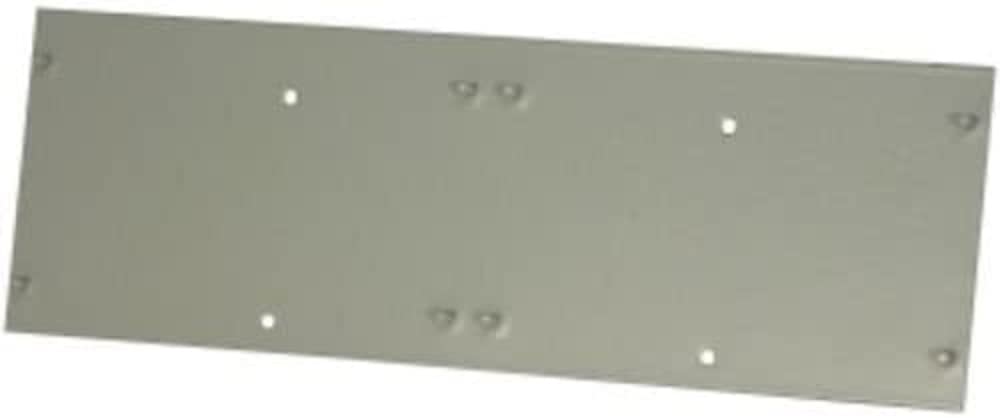
Figure 1: The Altronix CP1 Conversion Plate. This image shows the plate itself, designed to accommodate two smaller Altronix boards.
5. Hướng dẫn vận hành
The Altronix CP1 Conversion Plate is a passive mounting accessory. Once installed, its "operation" is to securely hold the PD4/PD8 or MOM5 boards within the enclosure. There are no active operational steps for the plate itself. Refer to the individual instruction manuals for the PD4/PD8 Power Distribution Boards or MOM5 Multi-Output Modules for their specific operational guidelines.
6. Bảo trì
The CP1 Conversion Plate requires minimal maintenance. Regular inspection is recommended to ensure continued secure mounting.
- Vệ sinh: If necessary, gently wipe the plate with a dry, soft cloth to remove dust. Do not use abrasive cleaners or solvents.
- Điều tra: Periodically check all mounting screws to ensure they remain tight. Verify that the mounted boards are still securely attached to the conversion plate.
- Kiểm tra môi trường: Ensure the enclosure environment remains within specified operating conditions (temperature, humidity) to prevent corrosion or material degradation.
KHAI THÁC. Xử lý sự cố
Nếu gặp sự cố trong quá trình cài đặt hoặc sử dụng, hãy xem xét những điều sau:
- Plate does not fit in enclosure:
- Ensure you are using an Altronix BC400 or BC400R series enclosure. The CP1 is specifically designed for these models.
- Verify the orientation of the plate.
- Boards do not fit on plate:
- Confirm that you are attempting to mount Altronix PD4/PD8 or MOM5 boards. The CP1 is designed for these specific board types.
- Check the orientation of the boards on the plate.
- Lắp đặt lỏng lẻo:
- Ensure all screws are tightened appropriately. Do not overtighten.
- Verify that the correct mounting hardware is being used.
If issues persist, contact Altronix Technical Support for assistance.
8. Thông số kỹ thuật
| Tính năng | Chi tiết |
|---|---|
| Số hiệu mẫu | CP1 |
| Khả năng tương thích | Altronix PD4/PD8 Power Distribution Boards, MOM5 Multi-Output Modules |
| Enclosure Compatibility | Altronix BC400, BC400R series enclosures |
| Kích thước sản phẩm | 5.12 x 5.12 x 0.98 inch |
| Trọng lượng sản phẩm | 2.2 pound |
| Nhà sản xuất | ALTROnix |
9. Thông tin bảo hành
Altronix products are backed by a comprehensive warranty. For specific warranty terms and conditions applicable to the CP1 Conversion Plate, please refer to the official Altronix website or contact Altronix customer service. Keep your proof of purchase for warranty claims.
10. Hỗ trợ khách hàng
For technical assistance, product information, or troubleshooting, please contact Altronix Technical Support:
- Webđịa điểm: www.altronix.com
- Điện thoại: Refer to the Altronix webtrang web để biết số điện thoại liên lạc hiện tại.
- E-mail: Refer to the Altronix website for current contact email addresses.
When contacting support, please have your product model number (CP1) and a detailed description of your issue ready.