
Smith Corona 900
Smith Corona Dictionary Display Electronic Typewriter Model 900
Hướng dẫn sử dụng
Giới thiệu
This manual provides comprehensive instructions for the setup, operation, maintenance, and troubleshooting of your Smith Corona Dictionary Display Electronic Typewriter Model 900. Please read this manual thoroughly before using the device to ensure proper function and longevity.
1. Thiết lập
Follow these steps to prepare your typewriter for first use.
1.1 Tháo dỡ
Carefully remove the typewriter from its packaging. Retain all packaging materials for future transport or storage. Inspect the unit for any signs of damage. If damage is observed, contact your retailer immediately.
1.2 kết nối nguồn
Locate the power cord. Insert the small end of the power cord into the power input port at the rear of the typewriter. Plug the other end into a standard electrical outlet (120V AC, 60Hz). Ensure the power switch is in the OFF position before connecting to power.
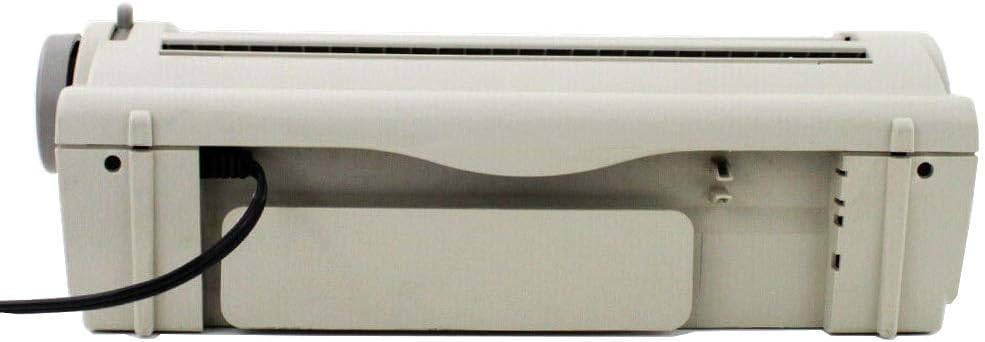
Hình ảnh: Ở phía sau view of the Smith Corona Model 900 typewriter, illustrating the power cord connection point on the left side.
1.3 Nạp giấy
- Ensure the paper bail is lifted.
- Insert a sheet of paper into the paper entry slot at the back of the platen.
- Align the paper using the paper guide.
- Lower the paper bail to secure the paper against the platen.
- Use the platen knob on the right side to advance the paper to the desired starting position.

Hình ảnh: Đằng trước view of the Smith Corona Model 900 typewriter, demonstrating a sheet of paper correctly loaded into the machine.
1.4 Lắp đặt ruy băng
The typewriter uses a specific ribbon cartridge. Open the ribbon cover (refer to the diagram in the quick start guide if available). Carefully insert the new ribbon cartridge, ensuring it clicks into place. Follow the arrows on the cartridge for correct threading. Close the ribbon cover.
2. Hướng dẫn vận hành
This section details the basic functions and advanced features of your typewriter.
2.1 Kỹ năng đánh máy cơ bản
- Bật công tắc nguồn.
- The display will show a ready message.
- Begin typing on the keyboard. Characters will appear on the display before being printed on paper.
- Nhấn nút Trở lại key to advance to the next line.

Hình ảnh: Một chi tiết view of the Smith Corona Model 900's keyboard and the integrated display, which shows the word "Hello" as it is being typed.
2.2 Dictionary Display Function
The Model 900 features a built-in dictionary. As you type, the display may offer suggestions or corrections. To utilize this feature:
- If a word is misspelled, the typewriter may highlight it or offer alternatives on the display.
- Use the arrow keys (Up, Down, Left, Right) to navigate through suggestions.
- Nhấn Chính xác to accept a suggested correction.
2.3 Correction Features
The typewriter includes a correction system to rectify errors:
- WordEraser: Nhấn nút WordEraser key to erase the last typed word.
- Chính xác: Nhấn nút Chính xác key to erase the last character typed. Repeated presses will erase additional characters.
- Lift-Off Correction: For more precise corrections, position the print head over the error and press the appropriate correction key.
2.4 Tùy chọn định dạng
The Model 900 offers basic formatting capabilities:
- Bold Print: To highlight text for emphasis, activate the bold function before typing the desired text.
- Gạch chân: Use the underline function to stress certain points in your document.
- Visible Typing Line: This feature helps to clearly see what is being typed, improving accuracy.
- Tự động căn giữa: The typewriter can automatically center text on a line.
- Phrase Abbreviation: Insert a phrase for a two-character abbreviation to save typing time.
3. Bảo trì
Regular maintenance ensures optimal performance and extends the life of your typewriter.
3.1 Vệ sinh bên ngoài
Wipe the exterior of the typewriter with a soft, damp cloth. Avoid using abrasive cleaners or solvents, as these can damage the plastic surfaces. Ensure the typewriter is unplugged before cleaning.
3.2 Cleaning the Platen and Print Head
Periodically clean the platen (the rubber roller) with a lint-free cloth dampened with rubbing alcohol to remove ink residue and paper dust. Gently clean the print head area with a soft brush or compressed air to prevent blockages and maintain print quality.
3.3 Thay thế ruy băng
Replace the ribbon cartridge when the print becomes faint or inconsistent. Refer to section 1.4 for ribbon installation instructions. Always use genuine Smith Corona replacement ribbons for best results.
KHAI THÁC. Xử lý sự cố
This section addresses common issues you might encounter with your typewriter.
| Vấn đề | Nguyên nhân có thể | Giải pháp |
|---|---|---|
| Typewriter does not turn on. | Power cord not connected, power outlet not working, power switch off. | Ensure power cord is securely plugged in. Test the outlet with another device. Verify the power switch is in the ON position. |
| Faint or inconsistent print. | Ribbon is old or depleted, ribbon not installed correctly. | Replace the ribbon cartridge. Check ribbon installation as per section 1.4. |
| Paper does not feed correctly. | Paper not aligned, paper bail not lowered, platen dirty. | Re-align paper and ensure paper bail is down. Clean the platen as described in section 3.2. |
| Keys are sticking. | Bụi hoặc mảnh vụn dưới các phím. | Use compressed air to clear debris around the keys. Avoid liquid cleaners. |
5. Thông số kỹ thuật
Key technical specifications for the Smith Corona Dictionary Display Electronic Typewriter Model 900.
- Số hiệu mẫu: 900
- Nhà sản xuất: Smith Corona
- ASIN: B003TZ5LKC
- Trọng lượng sản phẩm: 11.28 pound (5.12 kg)
- Kích thước gói hàng: 19 x 18.6 x 8.5 inch (48.26 x 47.24 x 21.59 cm)
- Yêu cầu về nguồn điện:
- Quyển: 120V
- Hz: 60Hz
- Amptrước: 0.7A
- Ngày đầu tiên có sẵn: Ngày 26 tháng 2010 năm XNUMX

Hình ảnh: cận cảnh view of the product label located on the underside of the typewriter, detailing electrical specifications such as voltage, frequency, and current draw, along with the model number.
6. Bảo hành và Hỗ trợ
For detailed information regarding warranty coverage, technical support, or service inquiries, please refer to the official documentation provided with your Smith Corona Dictionary Display Electronic Typewriter Model 900 or visit the official Smith Corona website. This manual does not contain specific warranty terms or support contact information.
Ask a question about this manual
Ask about setup, troubleshooting, compatibility, parts, safety, or missing instructions. Manuals+ will review the question and use this page’s manual context to help answer it.