
Giới thiệu
This manual provides detailed instructions for the safe and effective use of your Sony Alpha NEX-3 interchangeable lens digital camera. The NEX-3 combines the performance of a DSLR with a compact, lightweight design, featuring a 14.2-megapixel APS-C sensor and an 18-55mm zoom lens. Please read this manual thoroughly before operating the camera and retain it for future reference.
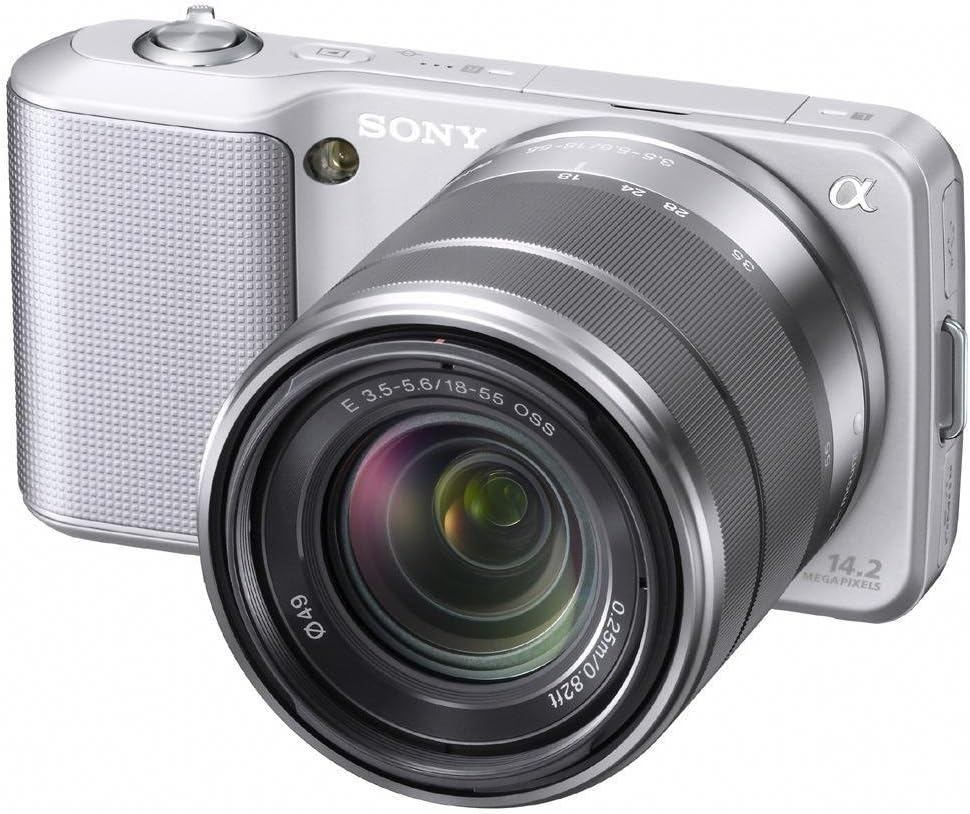
Hình 1: Sony Alpha NEX-3 Digital Camera with the included 18-55mm zoom lens. The camera body is silver with a textured grip, and the lens is also silver and black.
Cài đặt
Before using your camera, perform the following setup steps:
- Sạc pin: Insert the supplied NP-FW50 Lithium-Ion battery into the charger and connect the charger to a power outlet. The charging indicator will illuminate and turn off when charging is complete.
- Lắp pin: Open the battery cover on the bottom of the camera and insert the charged battery, ensuring correct orientation. Close the cover securely.
- Chèn thẻ nhớ: Open the memory card slot cover. Insert a compatible SD/SDHC/SDXC or Memory Stick Pro Duo/Pro-HG Duo card with the contacts facing the correct direction until it clicks into place. Close the cover.
- Gắn ống kính: Align the white index mark on the lens with the white index mark on the camera body. Mount the lens by rotating it clockwise until it locks into position.
- Cài đặt ban đầu: Turn on the camera using the power switch. Follow the on-screen prompts to set the language, date, time, and time zone.
Vận hành máy ảnh
The Sony Alpha NEX-3 offers various modes and features for capturing images and videos.
Nhiếp ảnh cơ bản
- Chế độ iAuto: For automatic scene recognition and optimal settings, rotate the control wheel to select the 'iAuto' mode. The camera will automatically adjust exposure, white balance, and other parameters.
- Chụp ảnh: Frame your subject using the 3-inch tilting LCD. Press the shutter button halfway down to focus, then press it fully to capture the image.
Chế độ chụp nâng cao
For more creative control, the NEX-3 provides Program Auto (P), Shutter Priority (S), Aperture Priority (A), and Manual (M) modes. Access these via the menu system using the control wheel and soft keys.
- Quét toàn cảnh: This mode allows you to capture wide panoramic images by sweeping the camera horizontally or vertically. The camera automatically stitches multiple images together.
- Chế độ chụp ảnh hoàng hôn cầm tay: Captures six images at high speed and combines them to reduce noise in low-light conditions without a tripod.
- Chế độ chống nhòe chuyển động: Similar to Hand-held Twilight, this mode combines six shots to reduce blur caused by camera shake or subject movement in low light.
Quay Video
The NEX-3 can record high-definition video in MP4 format (720p/30p or 480p/30p).
- Bắt đầu/Dừng ghi: Press the dedicated MOVIE button to begin or end video recording.
- Tiêu điểm và độ phơi sáng: The camera automatically adjusts focus and exposure during video recording with E-mount lenses. Exposure compensation can be adjusted using the control wheel.
BẢO TRÌ
Bảo trì đúng cách sẽ đảm bảo độ bền và hiệu suất tối ưu cho máy ảnh của bạn.
- Vệ sinh thân máy ảnh: Dùng vải mềm, khô để lau thân máy ảnh. Đối với vết bẩn cứng đầu, lau nhẹampLau vải bằng nước. Tránh sử dụng dung môi hữu cơ.
- Vệ sinh ống kính: Use a lens blower to remove dust. For smudges, use a lens cleaning solution and a soft lens cloth, wiping gently in a circular motion from the center outwards.
- Làm sạch cảm biến: If dust spots appear on images, the image sensor may need cleaning. This is a delicate procedure; it is recommended to have this performed by a qualified service technician.
- Chăm sóc pin: Bảo quản pin ở nơi khô ráo, thoáng mát. Tránh để pin tiếp xúc với nhiệt độ quá cao hoặc quá thấp. Nếu không sử dụng máy ảnh trong thời gian dài, hãy tháo pin ra.
- Kho: Store the camera in a dry, well-ventilated area, away from direct sunlight and extreme temperatures. Use a desiccant if storing in humid environments.
Xử lý sự cố
Phần này giải quyết những vấn đề phổ biến mà bạn có thể gặp phải.
| Vấn đề | Nguyên nhân có thể / Giải pháp |
|---|---|
| Máy ảnh không bật được. | Battery may be depleted. Ensure the battery is charged and inserted correctly. |
| Hình ảnh bị mờ. |
|
| Images appear noisy, especially in low light. | High ISO settings can introduce noise. Use Hand-held Twilight mode or ensure adequate lighting. |
| Lỗi thẻ nhớ. | Hãy đảm bảo thẻ nhớ được lắp đúng cách và không bị hư hỏng. Thử định dạng thẻ (thao tác này sẽ xóa toàn bộ dữ liệu). |
| Đèn flash không nháy. | Check flash settings. Ensure the external flash unit (if used) is properly attached and powered. |
If problems persist, consult the Sony support webtrang web hoặc liên hệ với dịch vụ khách hàng.
Thông số kỹ thuật
| Tính năng | Chi tiết |
|---|---|
| Tên mẫu | ALPHA NEX-3 |
| Độ phân giải cảm biến ảnh | 14.2MP |
| Kích thước cảm biến ảnh | APS-C (23.4 x 15.6 mm) |
| Loại cảm biến | CMOS |
| Loại ống kính | Zoom (18-55mm) |
| Gắn kết tương thích | Sony E (NEX), Sony FE |
| Ổn định hình ảnh | Điện tử |
| Độ phân giải video | 720p |
| Kiểu hiển thị | Màn hình LCD nghiêng 3 inch |
| Chụp liên tục | Lên đến 7 FPS |
| ISO Sensitivity (Expanded) | 200 - 12800 |
| Tốc độ màn trập | Từ 30 giây đến 1/4000 giây |
| Loại pin | Lithium-Ion NP-FW50 |
| Kết nối | HDMI, USB, EyeFi (Wireless Technology) |
| Kích thước (Xấp xỉ) | Chiều cao sản phẩm: 2.44 inch |
| Trọng lượng (Xấp xỉ) | 0.65 Bảng Anh |
Bảo hành và Hỗ trợ
Your Sony Alpha NEX-3 camera comes with a Bảo hành có giới hạn 1 năm kể từ ngày mua. Bảo hành này bao gồm các lỗi sản xuất trong điều kiện sử dụng bình thường. Vui lòng giữ lại hóa đơn mua hàng để yêu cầu bảo hành.
For technical support, service, or detailed warranty information, please visit the official Sony support webhoặc liên hệ bộ phận chăm sóc khách hàng của Sony.