
Giới thiệu
This manual provides essential instructions for the installation, operation, maintenance, and troubleshooting of the IBM 49P1599 FRU System Board. This system board is designed for personal computers, featuring a 400/533 Front Side Bus, integrated 10/100 Ethernet, and support for DDR2 memory.
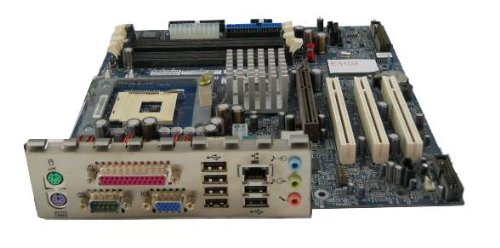
Image: The IBM 49P1599 FRU System Board. This image displays the main components and layout of the motherboard, including CPU socket, memory slots, and various connectors.
Thiết lập và cài đặt
Careful installation is crucial for the proper functioning of your system board. Always handle the board by its edges to avoid static discharge.
1. Chuẩn bị cài đặt
- Ensure your computer case is compatible with the system board's form factor.
- Chuẩn bị các dụng cụ cần thiết: Tua vít đầu Phillips, vòng đeo tay chống tĩnh điện.
- Unplug the power supply from the wall outlet before beginning.
2. Installing the System Board
- Lắp tấm chắn I/O vào lỗ mở phía sau của vỏ máy tính.
- Carefully align the system board with the standoffs in the case.
- Secure the system board with screws, ensuring it is firmly seated.
3. Cài đặt các thành phần
Bộ xử lý (CPU)
This system board is supplied without a processor. Refer to your CPU's manual for specific installation instructions. Ensure the CPU is correctly oriented in the socket before securing the retention lever.
Bộ nhớ (RAM)
The board supports DDR2 RAM and has 2 memory slots.
- Mở các chốt ở cả hai đầu của khe cắm thẻ nhớ.
- Căn chỉnh mô-đun bộ nhớ với khe cắm, đảm bảo rằng rãnh trên mô-đun khớp với rãnh trong khe cắm.
- Ấn mạnh vào cả hai đầu của mô-đun cho đến khi các kẹp khớp vào đúng vị trí.
Card đồ họa
The system board features an Integrated Graphics Card Interface and a PCI-Express x16 slot for dedicated graphics cards.
- Tìm khe cắm PCI-Express x16.
- Tháo nắp khe cắm mở rộng tương ứng khỏi thùng máy của bạn.
- Insert the graphics card firmly into the slot until it clicks. Secure it with a screw to the case.
4. Cáp kết nối
- Đầu nối nguồn: Connect the main 24-pin ATX power connector and the 4-pin CPU power connector from your power supply to the system board.
- Thiết bị SATA: Connect SATA 3 data cables from your storage devices (hard drives, SSDs) to the SATA ports on the system board.
- Kết nối bảng điều khiển phía trước: Connect the power button, reset button, HDD LED, power LED, and USB ports from your case to the corresponding headers on the system board. Refer to the board's silkscreen labels for correct orientation.
- Mạng Ethernet: The board has integrated 10/100 Ethernet. Connect your network cable to the RJ-45 port on the I/O panel.
Hướng dẫn sử dụng
After completing the physical installation, you can proceed with the initial boot and operating system setup.
1. Khởi động ban đầu
- Đảm bảo tất cả các thành phần được kết nối an toàn.
- Kết nối màn hình, bàn phím và chuột.
- Plug in the power supply and turn on the system.
- Hệ thống sẽ khởi động và bạn sẽ thấy hình ảnh hiển thị trên màn hình.
2. Thiết lập BIOS/UEFI
During the initial boot sequence, press the designated key (commonly DEL, F2, F10, or F12) to enter the BIOS/UEFI setup utility. Here you can configure boot order, system time, and other hardware settings. Save changes before exiting.
3. Cài đặt hệ điều hành
This system board is compatible with platforms such as Windows 10. Insert your operating system installation media (USB drive or DVD) and follow the on-screen prompts to install the operating system. Ensure all necessary drivers for the system board components are installed after the OS installation.
BẢO TRÌ
Regular maintenance helps ensure the longevity and stable performance of your system board.
- Vệ sinh: Periodically clean dust from the system board and components using compressed air. Ensure the system is powered off and unplugged before cleaning.
- Cập nhật BIOS: Check the official IBM support website for BIOS updates. BIOS updates can improve compatibility, stability, and performance. Follow the provided instructions carefully when updating the BIOS.
- Kiểm tra thành phần: Ensure all cables and components remain securely connected.
Xử lý sự cố
Nếu bạn gặp sự cố, hãy tham khảo các bước khắc phục sự cố phổ biến sau:
Không có điện
- Verify the power supply is connected to the wall outlet and turned on.
- Check that the 24-pin and 4-pin power connectors are securely attached to the system board.
- Ensure the front panel power button cable is correctly connected to the system board header.
Không hiển thị
- Confirm the monitor is powered on and connected to the correct video output (either integrated or dedicated graphics card).
- Reseat the graphics card (if applicable) and memory modules.
- Nếu có thể, hãy thử với màn hình hoặc cáp video khác.
System Fails to Boot
- Check for any loose cables or components.
- Ensure the CPU is properly seated and its cooler is installed correctly.
- Try booting with only one memory module installed, rotating through the modules and slots to identify a faulty one.
- Reset the BIOS to default settings (refer to your system board's specific instructions for clearing CMOS).
Thông số kỹ thuật
Bảo hành và Hỗ trợ
For warranty information and technical support, please refer to the official IBM website or contact your point of purchase. Keep your proof of purchase for warranty claims. IBM provides resources and support for its products to ensure customer satisfaction.
Để được hỗ trợ thêm, hãy truy cập Hỗ trợ của IBM webđịa điểm.
Ask a question about this manual
Ask about setup, troubleshooting, compatibility, parts, safety, or missing instructions. Manuals+ will review the question and use this page’s manual context to help answer it.
Posting as .
| Tính năng | Đặc điểm kỹ thuật |
|---|---|
| Số hiệu mẫu | 49P1599 FRU |
| Xe buýt phía trước (FSB) | 400/533MHz |
| Công nghệ bộ nhớ RAM | DDR2 |
| Tốc độ đồng hồ bộ nhớ | 2133MHz |
| Có sẵn khe cắm bộ nhớ | 2 |
| Giao diện card đồ họa | Integrated, PCI-Express x16 |
| Hỗ trợ tiêu chuẩn Bus hệ thống. | SATA3 |
| Integrated Ethernet | 10/100Mbps |
| Thiết bị tương thích | Máy tính cá nhân |
| Khả năng tương thích nền tảng | Windows 10 |
| Trọng lượng sản phẩm | 8 pound |