
Giới thiệu
This manual provides essential instructions for the safe and efficient use of your Olympus Note Corder 100 digital voice recorder. Please read this manual thoroughly before operating the device and retain it for future reference.
Sản phẩm trênview
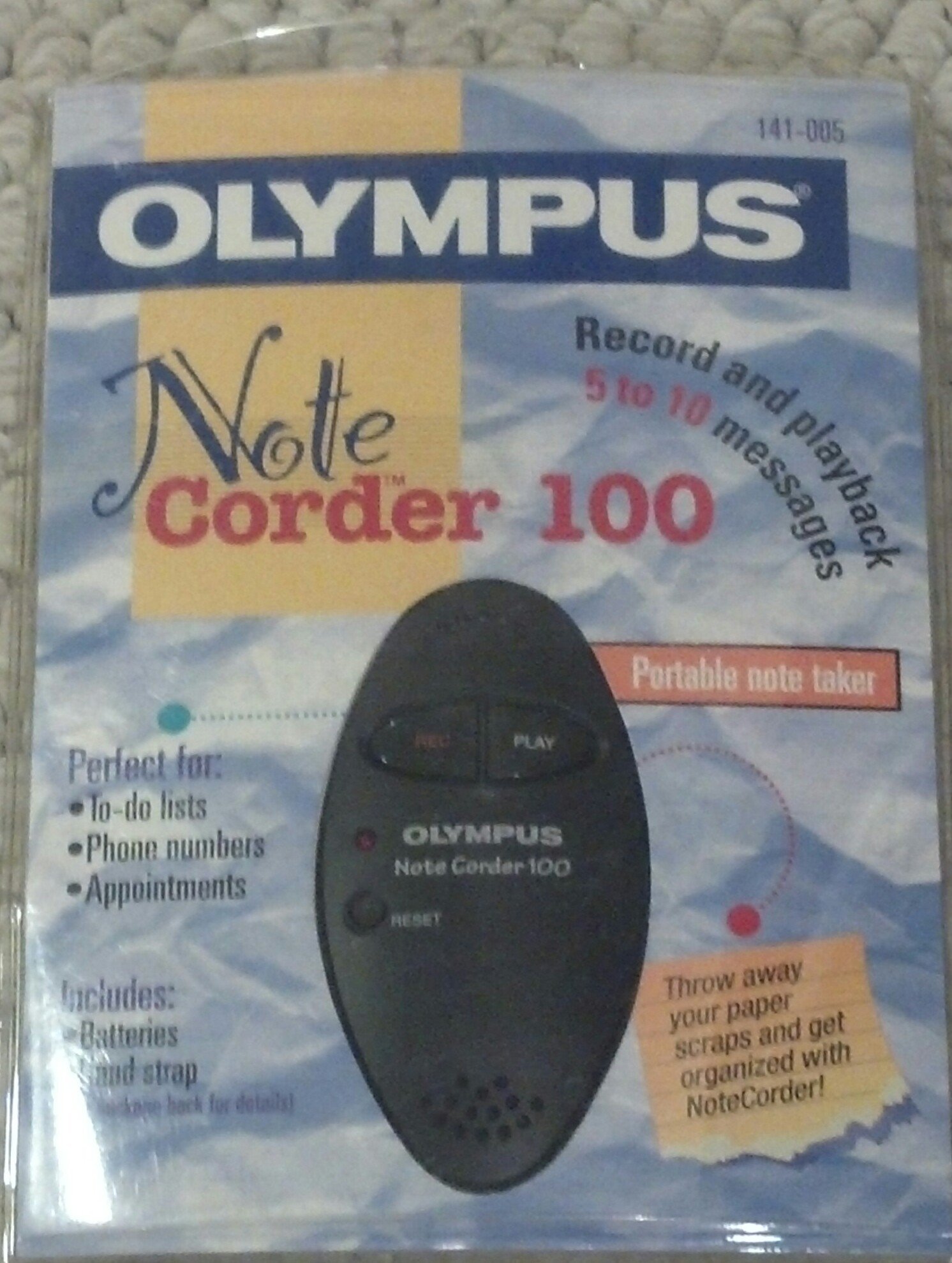
Image: The Olympus Note Corder 100 digital voice recorder, packaged. This image illustrates the product's compact design and highlights its primary features such as ergonomic design, 20-second recording time, and an LED indicator.
The Olympus Note Corder 100 is a compact, portable digital voice recorder designed for quick and convenient voice memos. Its ergonomic design ensures comfortable handling, making it ideal for recording short notes on the go.
Các tính năng chính:
- Thiết kế công thái học: Fits comfortably in the palm of your hand.
- 20-Second Recording Time: Ideal for short, concise messages.
- Đèn báo LED: Provides visual feedback on device status.
- Bộ nhớ trong: Stores recordings internally.
- Portable Format: Dễ dàng mang theo và sử dụng mọi lúc mọi nơi.
Cài đặt
1. Lắp đặt pin
The Note Corder 100 requires two (2) CR2032 1.5V batteries for operation. Ensure correct polarity when inserting the batteries.
- Xác định vị trí nắp ngăn chứa pin trên thiết bị.
- Open the cover by sliding or lifting it according to the markings.
- Insert two CR2032 batteries, observing the positive (+) and negative (-) terminals.
- Đóng chặt nắp ngăn chứa pin.
2. Lắp dây đeo tay
Attach the included hand strap to prevent accidental drops and for convenient carrying.
- Locate the strap attachment point on the device.
- Thread the thin loop of the hand strap through the attachment point.
- Pass the main strap through the loop and pull firmly to secure it.
Hướng dẫn sử dụng
1. Recording Messages
The Note Corder 100 allows for quick voice recordings up to 20 seconds in length.
- Nhấn và giữ Ghi button. The LED indicator will illuminate.
- Hãy nói rõ ràng vào micro tích hợp.
- Phát hành Ghi button to stop recording. The LED indicator will turn off.
- If the recording exceeds 20 seconds, the device will automatically stop recording.
2. Playing Back Messages
To listen to your recorded messages:
- Nhấn nút Chơi button. The device will play back the last recorded message.
- Để dừng phát lại, hãy nhấn Chơi nút một lần nữa.
3. Đèn báo LED
The LED indicator provides visual cues for the device's status:
- Illuminated during Record: Cho biết thiết bị đang ghi âm.
- Tắt: Indicates standby or stopped recording/playback.
BẢO TRÌ
1. Thay thế pin
Replace batteries when the device's performance degrades or the LED indicator suggests low power.
- Hãy làm theo các bước lắp đặt pin được nêu trong phần Thiết lập.
- Always use two new CR2032 1.5V batteries.
- Vứt bỏ pin cũ một cách có trách nhiệm theo quy định của địa phương.
2. Vệ sinh
Keep your Note Corder 100 clean to ensure optimal performance.
- Lau sạch bề ngoài thiết bị bằng một miếng vải mềm, khô.
- Do not use liquid cleaners, solvents, or abrasive materials.
- Tránh để hơi ẩm lọt vào bất kỳ lỗ hở nào.
Xử lý sự cố
| Vấn đề | Nguyên nhân có thể | Giải pháp |
|---|---|---|
| Thiết bị không bật nguồn. | Pin đã hết hoặc lắp không đúng cách. | Thay thế pin bằng pin CR2032 mới, đảm bảo đúng cực. |
| Cannot record messages. | Record button not held down, or batteries are low. | Ensure the Record button is pressed and held during recording. Check and replace batteries if necessary. |
| Không có âm thanh trong khi phát lại. | No message recorded, or low battery. | Verify a message has been recorded. Replace batteries. |
Thông số kỹ thuật
- Người mẫu: Olympus Note Corder 100 (Model No. 141-005)
- Thời gian ghi âm: Up to 20 seconds per message
- Nguồn điện: 2 pin lithium CR2032 1.5V
- Ký ức: Built-in (non-expandable)
- Micrô: Tích hợp
- Kết nối PC: Không được hỗ trợ
- Kích hoạt bằng giọng nói: Không được hỗ trợ
- Year of Introduction: 1996
Bảo hành và Hỗ trợ
The Olympus Note Corder 100 comes with a Bảo hành có giới hạn 90 ngày kể từ ngày mua. Bảo hành này bao gồm các lỗi sản xuất trong điều kiện sử dụng bình thường.
For warranty claims or technical support, please contact Olympus America Inc. at the address below. Please have your proof of purchase and product model number ready.
Olympus America Inc.Two Corporate Center Drive
Melville, NY 11747-3157 USA
Ghi chú: This product was manufactured in China.